18
disposed of in compliance with current regulations in the
country of use.
All metal parts are in stainless steel (AISI 304) and removable.
Plastic parts are marked with the letters of the material.
The symbol on the product indicates that this product
should not be treated as domestic waste, but must be correctly
disposed of in order to prevent possible negative consequen-
ces for the environment and the human health.
Regarding the recycling of this product, please contact the
sales agent or dealer of your product, your Customer Care
service or the appropriate waste disposal service.
I STEAMAIR OPTION
I.1 Introduction
The Steamair option allows, particularly when making cappuc-
cino, to foam the milk very easily and automatically: the supply
of air mixed with steam brings milk to a programmed temper-
ature (60° to 70°) and foams it.
The stop is done automatically when the temperature is
reached which saves milk from boiling. By this way the milk
qualities are preserved.
Once the air/steam adjustment is defined, the operation
is as follows:
• Insert the Steamair outlet into the milk container.
• Push on the Steamair touch.
• Wait for it to stop automatically.
The Steamair box also controls a timed steam and hot water
outlet.
I.2 Components
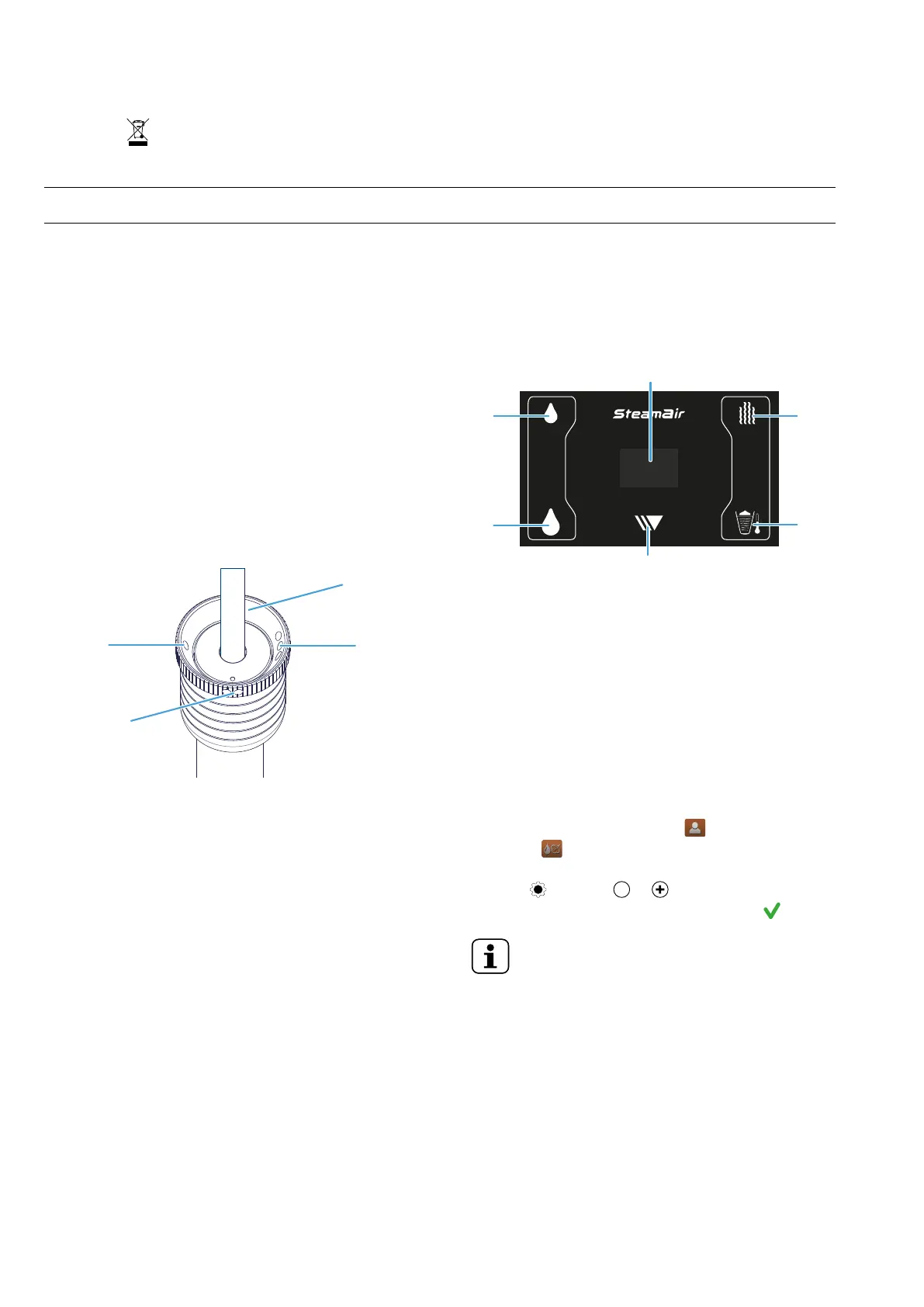
Setting foam
1. Level 1 Very fine foam
2. Level 2 Fine foam
3. Level 3 Medium foam
4. Steam only
I.3 Use
I.3.1 Automatic mode (To reach the programmed T℃)
One impulse on the touch makes the Steamair flow until the
liquid reaches the preset temperature. You can stop it
manually by pushing again on the touch.
I.3.2 Manual mode (Over the programmed T℃)
If after the stop in automatic mode (temperature reached) you
wish to continue the heating, you have to press again the touch.
Then you go into manual mode and the outlet is again
activated. To stop you will have to push again on the same
touch. If you don’t do it, it will be stopped automatically by one
of the two safeties: after 180 seconds or when the liquid
temperature reaches 96℃.
I.4 Programming
1. Hot water icon (small dose)
2. Display
3. Steam icon
4. Steamair icon
5. Continu/stop icon
6. Hot water icon (large dose)
The programming mode allows adjusting the steam and hot
water time together with the Steamair level temperature
adjustment.
To adjust the settings of the Steamair and the hot water control
box, need the access to the setting of the machine by the BTA
screen (for more information about level codes see “service
manual”)
By the BTA, press “Utilization” menu , then “Hot water and
steam” menu
When you are in the menu, select a line to make a adjustment
by the icon , then use or icons to adjust the desired
value, confirm the adjustment to save the settings
NOTE!
The temperature adjustment can be done in a
range of 50℃ to 90℃. The default is 62℃.
Steam time: 0 second to 99 seconds
Small volume of water: 0 to 1,000 ml
Large volume of water: 0 to 1,000 ml


 To Next Page