Part C. Operation Introduction
14
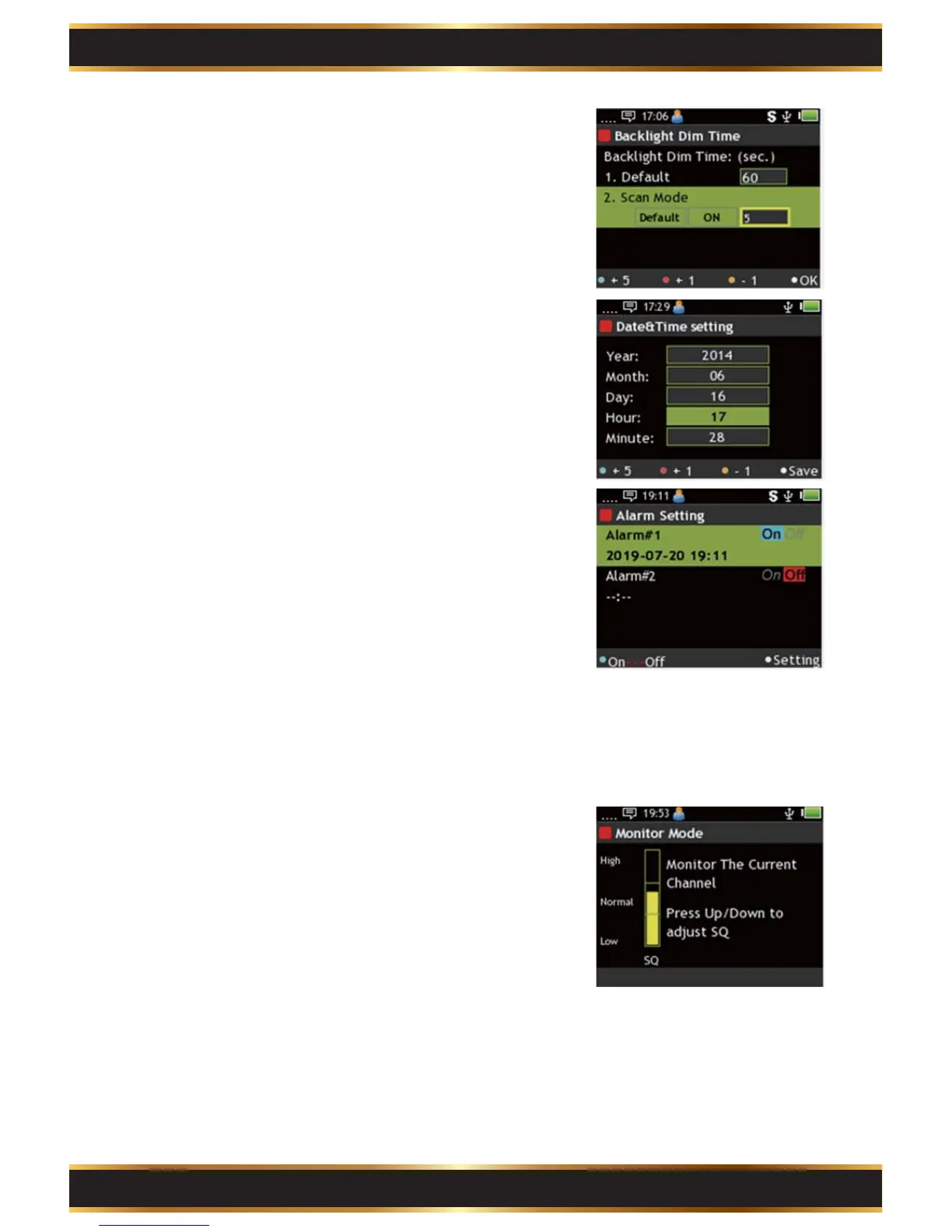
Backlight Dim Time:
Adjust screen backlight dim time.
A. Use the Navigation Key to move.
B. Press the “K1” Key to make highlighted value +5.
C. Press the “K2” Key to make highlighted value +1.
D. Press the “K3” Key to make highlighted value -1.
E. Press the “K4” Key to save.
4.
Date & Time:
Adjust Time of pager.
A. Use the Navigation Key to move.
B. Press the “K1” Key to make highlighted value +5.
C. Press the “K2” Key to make highlighted value +1.
D. Press the “K3” Key to make highlighted value -1.
E. Press the “K4” Key to save.
5.
Monitor Mode:
Please refer to C2-4 for more detailed
information.
7.
Alarm Setting:
Set up to 2 sets of Alarm.
A. Use the Navigation Key to move.
B. Press the “K1” Key to activate the Alarm.
C. Press the “K4” Key to set.
Alarm setting:
A. Use the Navigation Key to move.
B. Press the “K1” Key to make highlighted value +5.
C. Press the “K2” Key to make highlighted value +1.
D. Press the “K3” Key to make highlighted value -1.
E. Press the “K4” Key to save.
6.



 To Next Page