9
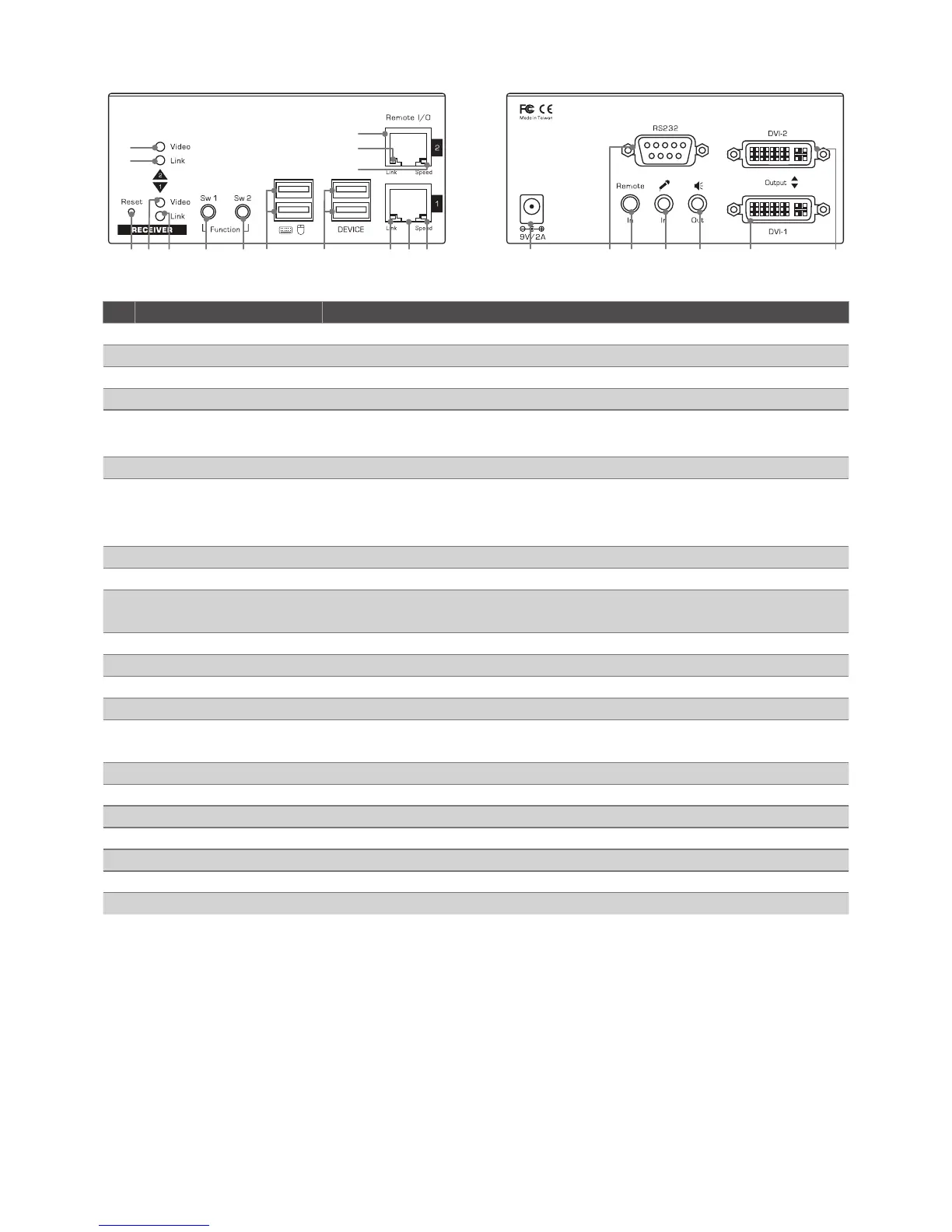
Receiver
1 2 3 4 5 6 7 8 9 10
11
12
13
14
15
16 17 18 19 20 21 22
No. Item Description
1 Reset button Reset the unit.
2 Video LED 1 Lights up when the power is on.
3 Link LED 1 Lights up when the link is active.
4 Momentary switch (Sw1) Short press to switch on or off the remote console.
5 Momentary switch (Sw2) • Short press to select Graphic mode / Video mode.
• Long press to select Anti-Dither 1/2/OFF.
6 USB port (Type A) Connect to keyboard and mouse.
7 USB port (Type A) Connect to other USB devices.
* Not all USB devices are compatible, some devices may not be
recognized.
8 LAN port 1 Link LED Blinks green when the connection is active.
9 LAN port 1 Connect to the LAN port of Transmitter or a Gigabit Ethernet Switch.
10 LAN port 1 Speed LED Lights solid yellow when the connection speed is good, or blinks when
the connection speed may be slower.
11 Video LED 2 Lights up when the power is on.
12 Link LED 2 Lights up when the link is active.
13 LAN port 2 Connect to the LAN port of Transmitter or a Gigabit Ethernet Switch.
14 LAN port 2 Link LED Blinks green when the connection is active.
15 LAN port 2 Speed LED Lights solid yellow when the connection speed is good, or blinks when
the connection speed may be slower.
16 Power jack Connect to a power adapter.
17 RS-232 (Female) Connect to a RS-232 device.
18 IR remote connector Connect to the IR receiver.
19 Mic. connector Connect to a microphone.
20 Audio connector Connect to a speaker.
21 DVI port 1 Connect to a DVI monitor 1.
22 DVI port 2 Connect to a DVI monitor 2.


 To Next Page