5
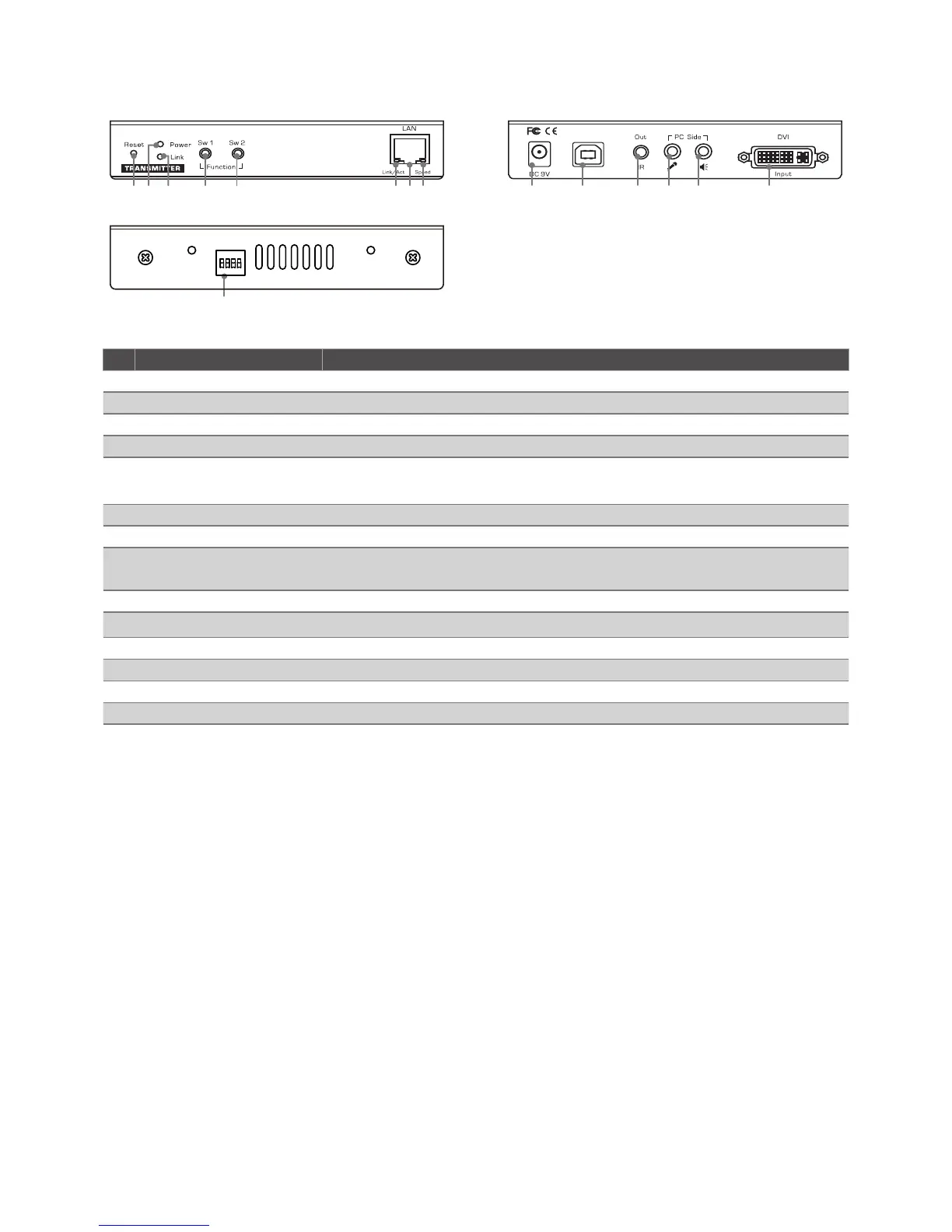
Parts overivew
Transmitter
15
ON DIP
1 2 3 4
1 2 3 4 5 6 7 8
9 10 11 12 13 14
No. Item Description
1 Reset button Reset the unit.
2 Power LED Lights up when the power is on.
3 Link LED Lights up when the link is active.
4 Momentary switch (Sw1) Short press to switch on or off the remote console.
5 Momentary switch (Sw2) • Short press to select Graphic mode / Video mode.
• Long press to select Anti-Dither 1/2/OFF.
6 LAN port Link LED Blinks green when the connection is active.
7 LAN port Connect to the LAN port of Receiver or a Gigabit Ethernet Switch.
8 LAN port Speed LED Lights solid yellow when the connection speed is good, or blinks when
the connection speed may be slower.
9 Power jack Connect to a power adapter.
10 UBS port (Type B) Connect to USB port of PC.
11 IR remote connector Connect to the IR emitter.
12 Mic. connector Connect to the Mic. input of PC.
13 Audio connector Connect to the audio output of PC.
14 DVI port Connect to the DVI output of PC.
15 Four position dip switch Change the channel of Transmitter.


 To Next Page