
 To Next Page
J
Jeremy GallagherSep 14, 2025
What to do if UNIS Arcade Game Machines is out of tickets?
- MMichael CookSep 14, 2025
If your UNIS Arcade Game Machine is out of tickets, refill the ticket supply.

What to do if UNIS Arcade Game Machines is out of tickets?
If your UNIS Arcade Game Machine is out of tickets, refill the ticket supply.
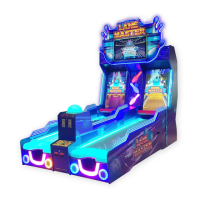
What to do if UNIS Lane Master are not dispensing tickets?
If your UNIS Arcade Game Machines are not dispensing tickets, here's what you can do: 1. Check if the machine is out of tickets. If so, add more tickets and press the reset button. 2. See if there are any jammed tickets. If so, remove them and press the reset button. 3. Make sure the connector is securely plugged in. If it's loose, plug it in tightly.
How to troubleshoot black screen on UNIS Arcade Game Machines?
If your UNIS Arcade Game Machines display a black screen, try the following: * Ensure all connectors are properly plugged in tightly. * Test the display with another source, like a PC, to see if the display is working. * Remove and reinsert the RAM to ensure it's properly seated.
How to fix blue screen on UNIS Lane Master Arcade Game Machines?
If your UNIS Arcade Game Machines display a blue screen, here are some steps to take: * Check the PC power cord to ensure it is securely connected. * Verify that the VGA signal cable is not loose. * Reseat the PC video card to ensure it is properly connected.
How to fix loose connection of the ticket dispenser’s cables in UNIS Lane Master?
If the ticket dispenser cables are loosely connected in your UNIS Arcade Game Machine, check and reconnect the loose cables to the ticket dispenser.
How to fix bad connection of the network port or cable in UNIS Lane Master?
If there is a bad connection of the network port or cable in your UNIS Arcade Game Machine, check if the network port is lighting or replace the network cable.
Why is my UNIS Arcade Game Machines display showing a black screen?
A black screen on your UNIS Arcade Game Machines display can be due to several reasons: * Begin by checking all connectors to ensure they are properly plugged in. * Remove and reinsert the RAM. * Test the display with another source, like a PC, to see if the display itself is working.
What to do if UNIS Lane Master Arcade Game Machines power off?
If your UNIS Arcade Game Machine is powering off, it could be due to the circuit protector. Try turning the power switch back on. If the issue persists, it indicates a more significant problem, and you should contact UNIS Service.
How to troubleshoot switch or network problem in UNIS Arcade Game Machines?
To troubleshoot a switch or network problem in your UNIS Arcade Game Machine, check the power of the switch or replace it. Make sure the internet connection is available.
How to fix loose connection of the send ball assembly in UNIS Arcade Game Machines?
Check and reconnect the loose cables of send ball assembly on your UNIS Arcade Game Machines.
Warns about electrical shock, high temperatures, and hot components.
Details power supply, consumption, dimensions, weight, and identification.
Lists all accessories, components, and hardware for installation.
Identifies major parts of the game machine with visual labels.
Guidance on moving, leveling, and required space for the machine.
Steps for assembling the main unit, marquee, lanes, and display.
Step-by-step guide on playing and examples of game scenes.
Explains adjustment buttons and the main configuration menu.
Covers settings, advertisement operation, linking, and diagnostics.
Guide on how to upload and display video advertisements.
Instructions for connecting machines for multiplayer gameplay.
Addresses typical issues, causes, and solutions for error messages.
Step-by-step guide for recovering the game system using a recovery stick.
Guidelines for safe operation, daily checks, and handling precautions.
Procedures for cleaning and disassembling lanes, sensors, and displays.
Detailed parts lists for main assemblies like display, lane, and marquee.
Lists and identifies electrical parts, cables, labels, and internal components.
A comprehensive schematic of all electrical connections within the machine.
 General
| Brand | UNIS |
|---|---|
| Model | Lane Master |
| Category | Arcade Game Machines |
| Language | English |