@
sales@utplindia.in
+91 7046223333 , 9427301436
www.utplindia.in
www
UT-102
UNIVERSAL PROCESS INDICATOR & CONTROLLER
5
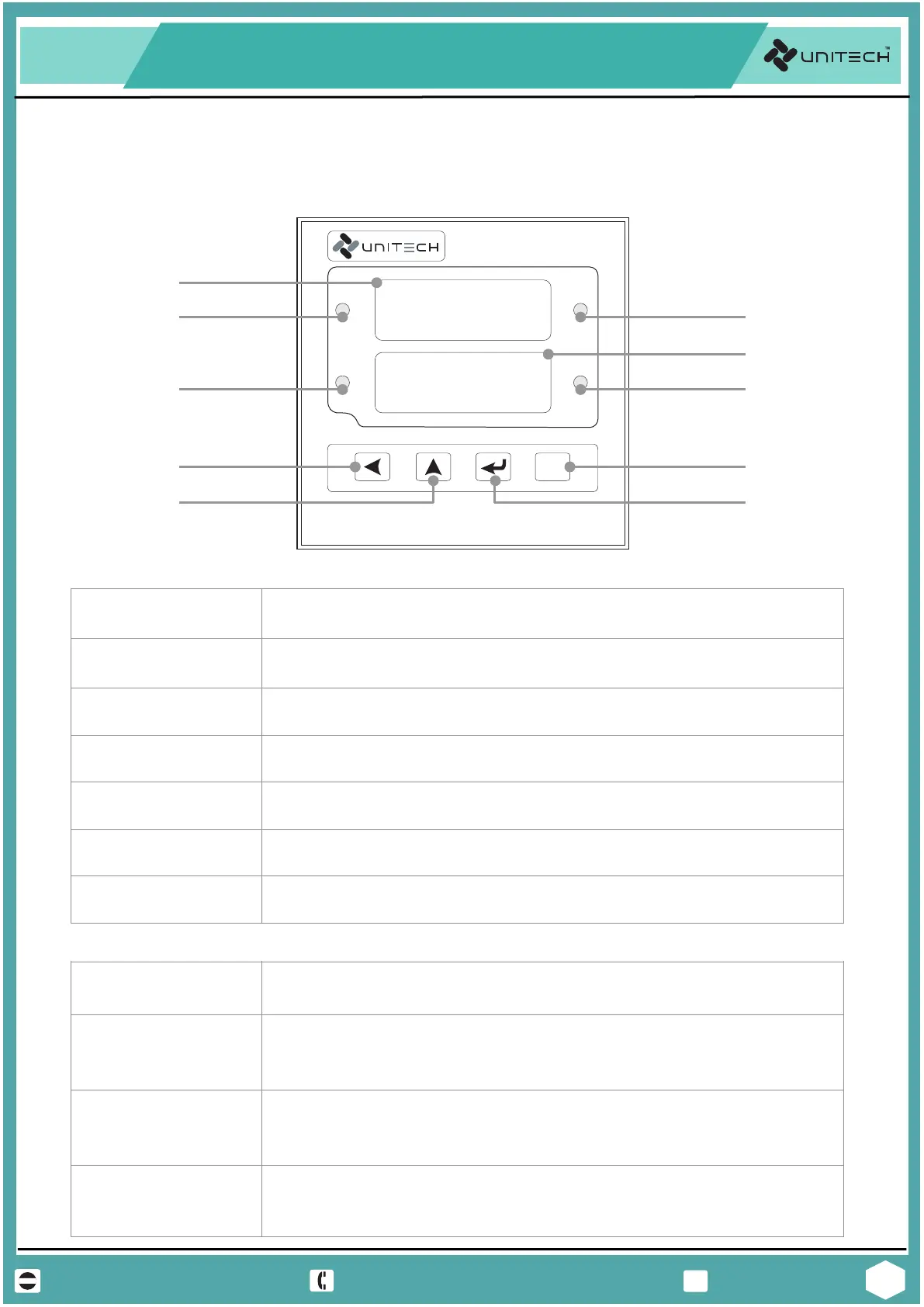
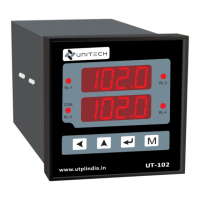
4 Digit 7 segment dedicated to display the present value. In Programing
mode it shows Parameter.
RL-1 LED It indicates the status of Relay-1, When LED is On, Relay is Off and When
LED if Off, Relay is On.
RL-2 LED It indicates the status of Relay-2, When LED is On, Relay is Off and When
LED if Off, Relay is On.
COM LED It indicates the active Communication between devices. When LED is Blink,
the communication is active.
KEYS
MODE KEY
Press MODE or Function key with Pass key allows to access the program-
-ming group or parameters. press this key to return to the normal view.
NORMAL VIEWS
ENTER KEY
ENTER Key allows enter into the Parameter, moving from one parameter
to another or saving a new value of parameter or a status of parameter.
Press to change set points in normal view.
UP KEY UP Key allows increasing the value of a digit selected or changing the
status of parameter in programming mode. Press to change set points in
normal view
PASS KEY PASS Key allows pass the digit of a value from right to left of a selected
parameter in programming mode. In some Parameter it also change or
decrease the value.
3. PROGRAMMING
3.1 Operation Interface
FRONT VIEW
RL-3 LED
It indicates the status of Relay-3, When LED is On, Relay is Off and When
LED if Off, Relay is On.
RL-4 LED It indicates the status of Relay-4, When LED is On, Relay is Off and When
LED if Off, Relay is On.
8.8.8.8.
1
0
0.0
UT-102
M
COM
www.utplindia.in
RL-2
RL-1
RL-4
RL-3
8.8.8.8.
1
0
0.0
PASS Key
Present Value
Display
UP Key
MODE Key
ENTER Key
Relay-1 LED
Relay-3 LED
COM LED
Relay-2 LED
Relay-4 LED
Set Value
Display
Present Value [PV]
Display
4 Digit 7 segment dedicated to display the selected Set value. In the
Programing mode it shows Value of Parameter.
Set Value [SV] Display


 To Next Page