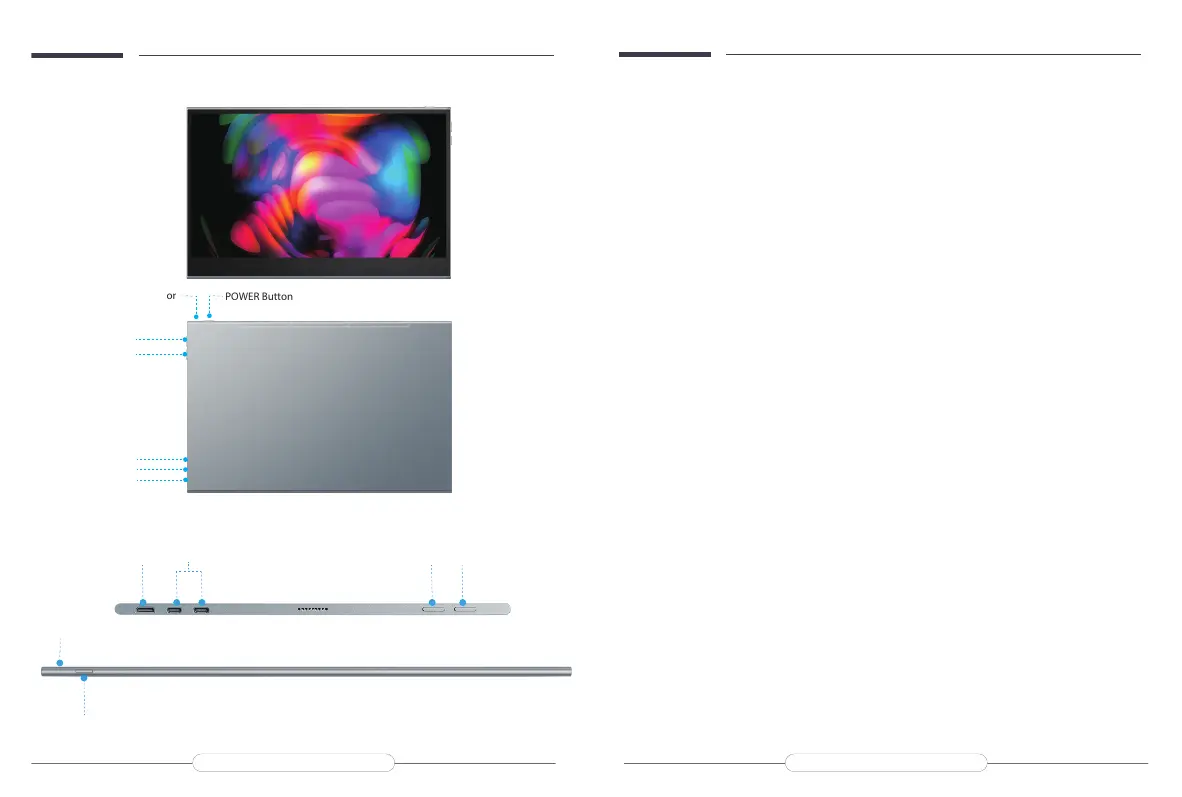
UP Button
UP Button
LED Indicator
LED Indicator
POWER Button
POWER Button
DOWN Button
DOWN Button
Type C Port
Mini HDMI Port
Mini HDMI Port
Type C Port
Type C Port*2
Monitor Introduction
A:Mirco USB Port
OTG interface. Support extended connection of mouse and keyboard. (It can be used when connecting to
Type-C devices, not available when connecting to HDMI devices).
B:Type C Port 1
Only for the power supply (if your device is low on power, please connect it to an external power supply)
C: Type C Port 2
For both power supply and signal transmission (if your device is low on power, please connect it to an
external power supply)
D: Standard HDMI Connector
For signal transmission only
E: 3.5mm Audio Port
F: Menu Button
Press/scroll up /down the button to open the On-Screen Display (OSD) menu.
Use the scroll button up and down the menu to control the cursor and press the scroll button to conrm.
G: POWER / BACK Button
① Press and hold for 1 second to turn on
②Press for 3 seconds to turn o
③ Short press to enter the signal input option / return to the previous menu page.
H: Speakers
Product Appearance & Interface Function Introduction
Email: help@uperfectmonitor.com Email: help@uperfectmonitor.com


 To Next Page