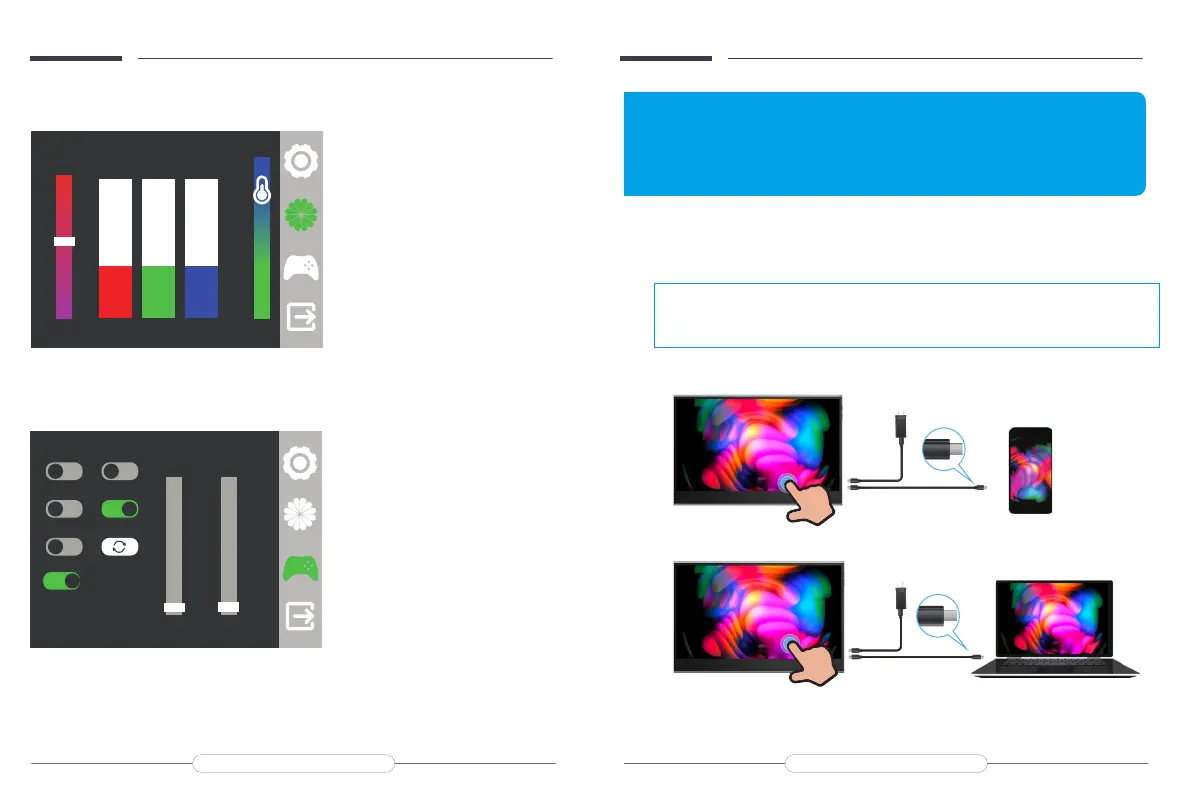
TYPE-C signal transfer
Note:
For a more stable power supply, it is recommended to use our
original power adapter to power.
Chapter 04
Connecting
HDMI 3840x2160@30.0Hz
Sharpness
o
GameMode
o
3DSound
o
Reset
Rotate
Crosshair
o
English UItraHDR
On
Auto
O
+
ON
ON
BatInfo.
HDMI 3840x2160@30.0Hz
41 41 41
+
Saturation
User
sRGB
5800
6500
7500
9300
60
In the Second setting, Adjust the
Saturation, Color Temperature, and R G B
to suit the display screen. You can switch to
the appropriate color.
In the Third setting, you can choose
Language, Ultra HDR, 3D Sound,
Game Mode, Sharpness, Crosshair, Batlnfo,
Reset.
Email: help@uperfectmonitor.com Email: help@uperfectmonitor.com


 To Next Page