Chapter 02
Specications
Model
M156E13
IPS Screen
15.6 inches
16 : 9
3840 * 2160
178°
100000:1
400 cd/m²
Panel Type
Size
Response Time
Mini HDMI*1, Type-C*2,
1ms
Input Interface
Color Gamut
60 Hz
100% DCI-P3
Touch Screen Yes (10-point touchscreen)
Built-in Speaker Yes (2 speakers 8Ω 1W)
Refresh Rate
Resolution
Aspect Ratio
Viewing Angle
Contrast Ratio
Brightness
Built-in Speakers
Yes (2 speakers 8Ω 1W)
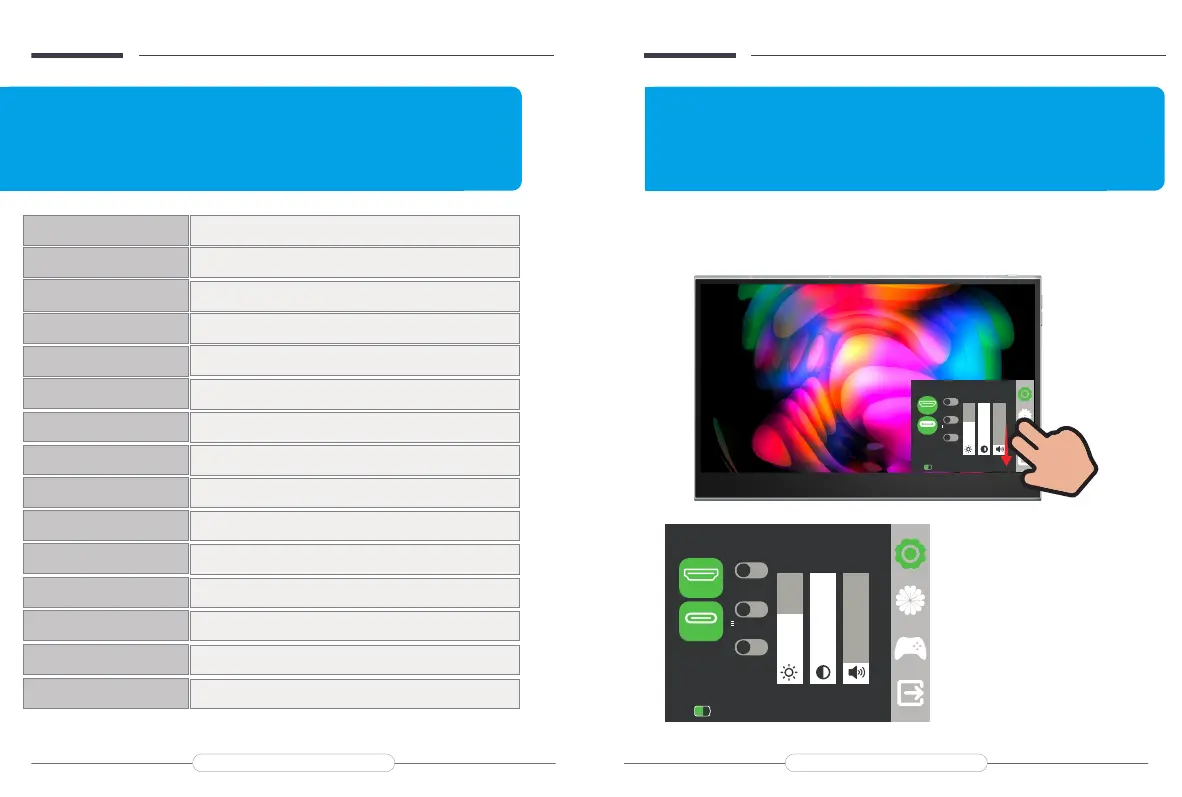
OSD Menu Introduction:
How to active On-Screen Display Menu?
Press the button to open the On-Screen Display (OSD) menu.
Chapter 03
OSD Menu Introduction
HDMI
Source
HDMI
50%
3840x2160@30.0Hz
Type-c
Mute
DelaySleep
o
yeProtectio
o
o
64 100 16
+
In the First setting, you can choose 'Source',
'Mute','Eye Protection', 'Delay Sleep',
'Brightness', 'Contrast', 'Volume'.
Email: help@uperfectmonitor.com Email: help@uperfectmonitor.com
HDMI
Source
HDMI
50%
HOxl
Type-c
Mute
DelaySleep
o
yeProtectio
o
o
64 100 16
+


 To Next Page