EasyManua.ls Logo

UROVO SR5600 - User Manual

UROVO SR5600
59 pages
Print Icon
To Next Page IconTo Next Page
Loading...
SR5600
[USER GUIDE]
[F.2021.07.12].2
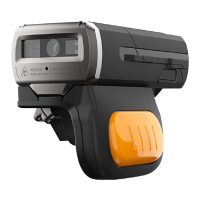
Bluetooth Ring Scanner

Table of Contents

Other manuals for UROVO SR5600

Question and Answer IconNeed help?

Do you have a question about the UROVO SR5600 and is the answer not in the manual?

Summary

Getting Started

Introduction

Brief overview of the SR5600 Ring Scanner's features and functionality.

Unpacking

Instructions for carefully removing the SR5600 Ring Scanner and its accessories from the shipping container.

Configuration Features

Details on the physical components and configuration options of the SR5600 Ring Scanner.

LED Status Indications

Buzzer and Vibration Status

Battery Installation

Trigger Assembly

Installation Instructions

Steps for fitting the trigger assembly onto the SR5600 Ring Scanner.

Finger Strap Adjustment

Guidance on adjusting the finger strap for a secure and comfortable fit.

Direct Charger Installation

Powering ON;OFF

How to power the SR5600 Ring Scanner on and off using the power button.

Bluetooth Communications

Introduction

Overview of Bluetooth communication capabilities for the SR5600 Ring Scanner.

Bluetooth Connection Modes

Details on available Bluetooth connection modes like HID, SPP, and BLE.

Pairing Mode

Bluetooth Name Modification

Command Control in SPP Mode

Indicator Control

Trigger Control

Trigger Button Control

Turn Off All Indications

AIM and Character ID Output

Setup

HID Bluetooth Connection to iOS;iPad;iPhone

Step-by-step guide for connecting the scanner to Apple devices via HID Bluetooth.

HID Bluetooth Connection to Android

Procedure for connecting the scanner to Android devices using HID Bluetooth.

HID Bluetooth Connection to Windows

Power Save Settings

Delay Settings

Inquiry Functions

Inquiry Firmware Version

How to scan a barcode to retrieve the SR5600's firmware version.

Inquiry Bluetooth Information

Restore Factory Settings

Indicators & Beeper Settings

Power On Alarming

Enabling or disabling the alarming sound upon powering on the device.

LED Indicator Settings

Configuring the behavior of LED indicators during decoding.

Beeper Settings

Duration Settings

Volume Level Settings

Scanner Settings

Scanning Type

Selecting the scanning mode, such as continuous read or pulsed.

Illumination & Aiming

Adjusting illumination and aiming settings for optimal scanning.

Illumination Level

Suffix & Prefix

Symbologies

Code 128 Settings

Configuration options for the Code 128 barcode symbology.

Code 39

Settings for enabling, disabling, and configuring the Code 39 barcode.

Code 39 Full ASCII

PDF417

Data Matrix

Interleaved 2 of 5

MaxiCode

UPC;EAN

EAN Supplemental Settings

Code 93

Code 11

Check Digit and Transmit Options

Matrix 2 of 5

NEC 2 of 5

Hanxincode

GridMatrix

Aztec Code

MicroPDF417

MSI;PLESSEY

Dotcode

Standard 2 of 5

IATA 2 of 5

CodaBlock_F

CodaBlock_A

GS1 DataBar-14

Codabar

Code 2 of 5

Trioptic

Postnet

Postal Symbologies: Australian Post

Postal Symbologies: Royal Mail

Postal Symbologies: US Planet

Postal Symbologies: US Postnet

Postal Symbologies: US4 State FICS

Postal Symbologies: USPS 4 CB

Postal Symbologies: Canadian Post

Postal Symbologies: Planet, UPU

Postal Symbologies: Planet, Postnet, USPS 4 CB

Postal Symbologies: Postnet, UPU, UPS 4 CB

Postal Symbologies: Planet, Postnet, UPU, USPS 4 CB

Postal Symbologies: Planet, UPU

Postal Symbologies: Postnet, UPU

Postal Symbologies: Planet, USPS 4 CB

Postal Symbologies: Postnet, USPS 4 CB

China Post

OCR Decoding

OCR Pattern Settings

OCR Font Settings

OCR Character Settings

OCR Character Length

Programming Reference

Linear Symbologies

List of linear barcode symbologies and their corresponding programming IDs.

2 D Symbologies

List of 2D barcode symbologies and their corresponding programming IDs.

Postal Symbologies

List of postal barcode symbologies and their corresponding programming IDs.

UROVO SR5600 Specifications

General IconGeneral
ModelSR5600
TypeHandheld Scanner
Scanning TechnologyLaser
Battery Capacity4000 mAh
Operating SystemAndroid
Camera Resolution13 MP
Humidity5% to 95% (non-condensing)
Resolution640 x 480 pixels
Battery Life10 hours
ConnectivityBluetooth
Operating Temperature-20°C to 50°C
Storage Temperature-40°C to 70°C
Drop Specification1.5m to concrete
Bluetooth Version4.2
Scanning Speed100 scans/sec
Supported BarcodesQR, UPC, EAN, Code 39, Code 128
Operating System CompatibilityAndroid
Symbologies Supported1D/2D barcodes