English
2
Hardware Installation
NAS Manager
The SyncQuick™ NAS Manager is a NAS device search and backup software that has been specifically developed for
NAS Client users to provide simple, fast and reliable backups for personal information including photos, MP3 files, and
other documents.
Search for your uShare™ Mini NAS Adapter with SyncQuick™ NAS Manager
1. Insert the USRobotics Installation CD-ROM. Click Install SyncQuick™ NAS Manager.
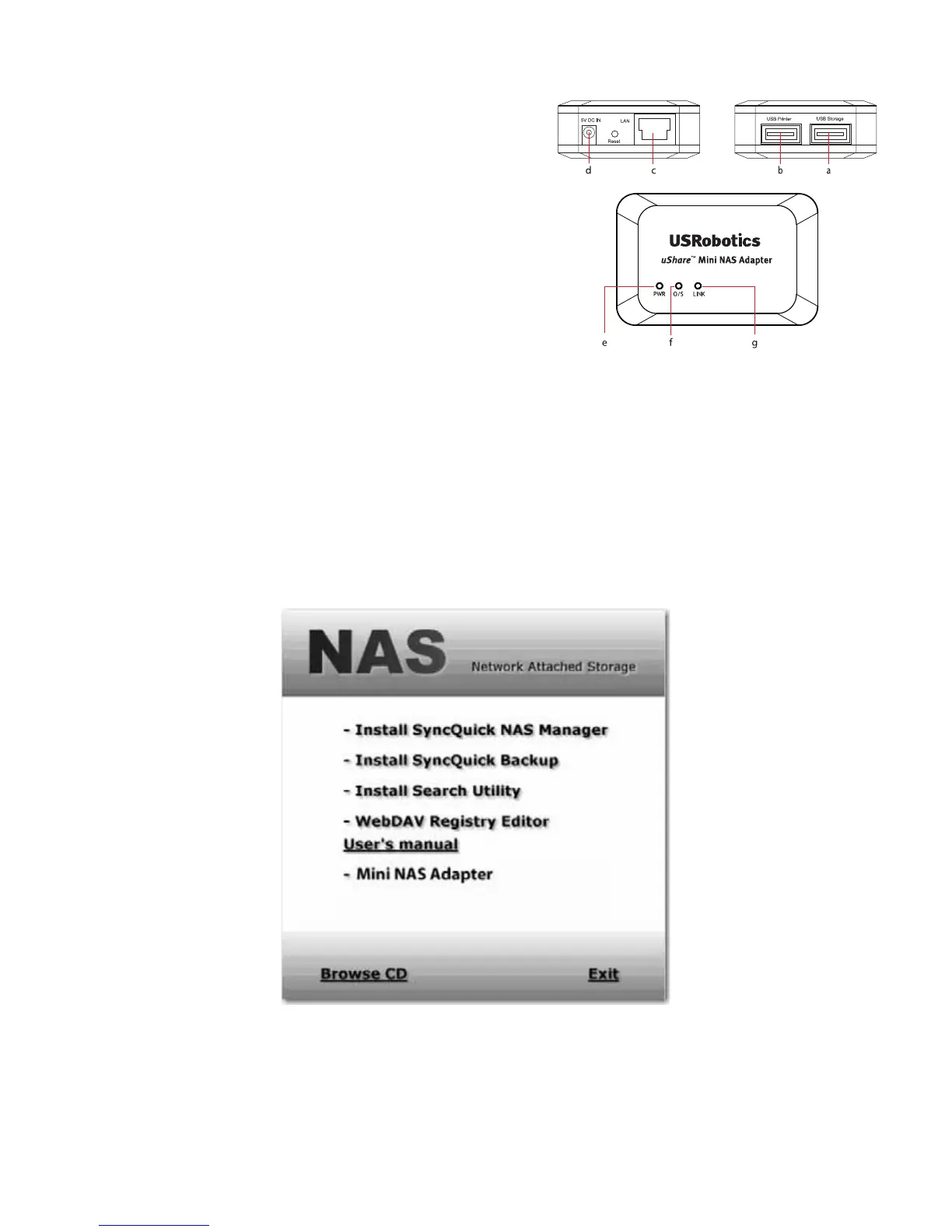
1. Connect your USB storage drive to the adapter (a).
*
And/Or
Connect your USB printer to the adapter (b).
2. Connect an Ethernet cable to the adapter (c) and to your
router or gateway.
3. Connect the power adapter (d) and plug it in.
•(e) Power LED
• (f) Operating System LED
• (g) LAN LED
*. The uShare™ Mini NAS Adapter supports FAT32/NTFS/FAT64
file systems. Make sure your USB storage drive has been pre-for-
matted to one of these system files. Then simply plug your USB
storage into the USB storage port and the system will automati-
cally recognize and initialize the drive.



 To Next Page