18
OPTIONAL FEATURES
TRANSBRAKE (QUICK 6 PRO ONLY)
In order to use the Transbrake feature, you will first need to connect a switch to
pin 5 (purple) of the vehicle connector. Our Shiftware tuning software provides
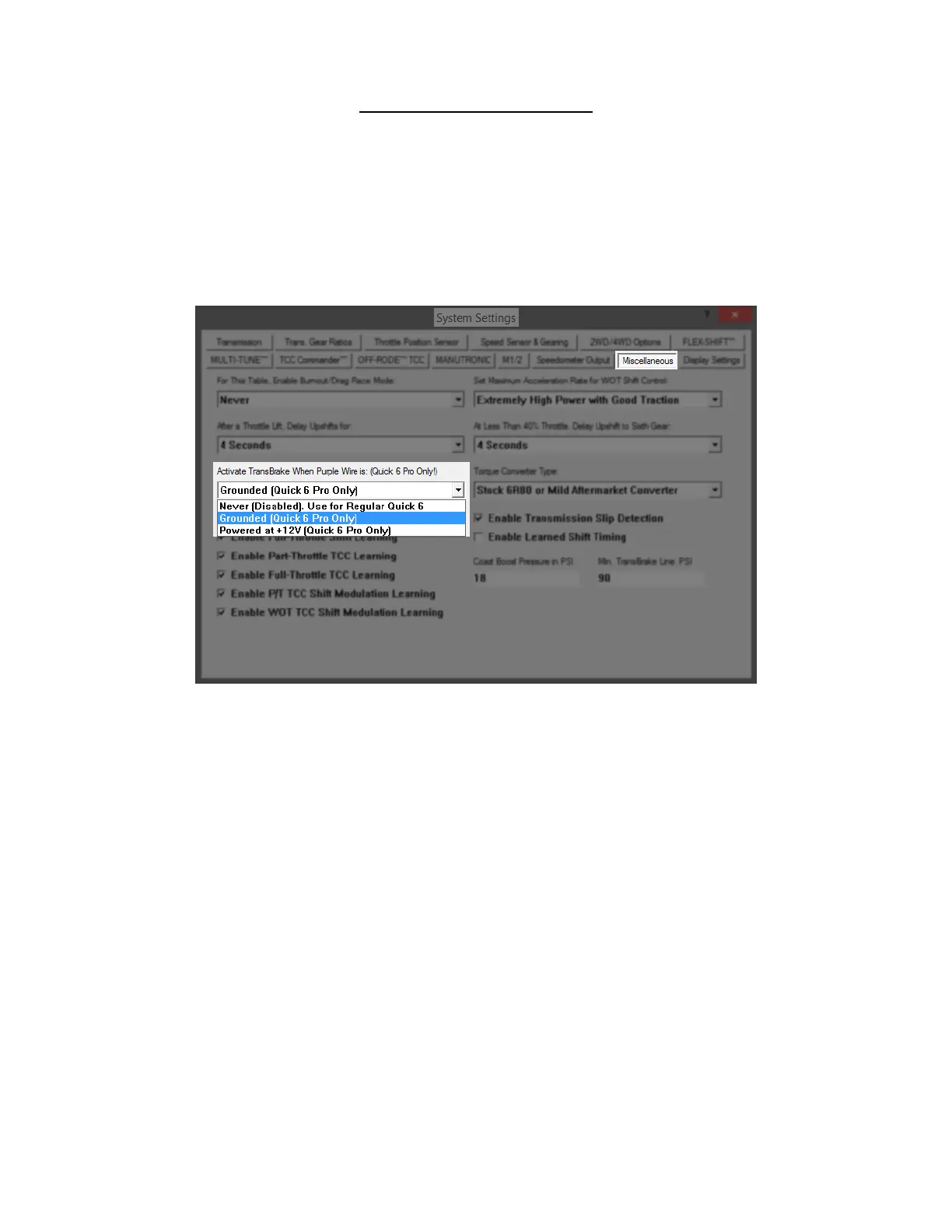
options for transbrake activation by grounding or supplying 12v when the switch
is pressed. By default, supplying ground activates the switch. It can be reversed
so that supplying 12v to the switch wire will activate it. This can be changed in
the settings/miscellaneous page of Shiftware.
The TransBrake setting under the miscellaneous tab
To insure safety, the transbrake will not engage while the vehicle is moving or if
there is an active fault. When the transbrake feature is disabled within the tuning
software, the switch can operate as table select, as described in the MULTI-
TUNE section below. When the transbrake feature is enabled, alternate
methods for table select should be used if switching between tables is desired.
When the transbrake is engaged, the transbrake icon will appear on the display.


 To Next Page