24
MANUAL SHIFT CONNECTIONS
Manutronic Overview
If connected and enabled the ManuTronic feature will allow manual selection of
all forward gears using paddles, buttons, or another type of switch. With
ManuTronic engaged, a brief press of the UPSHIFT button will change to the
next higher gear, while DOWNSHIFT will change to the next lower gear.
ManuTronic also has a safety feature which inhibits downshifting if the engine
RPM is too high, which prevents over-revving of the engine due to a driver's
error.
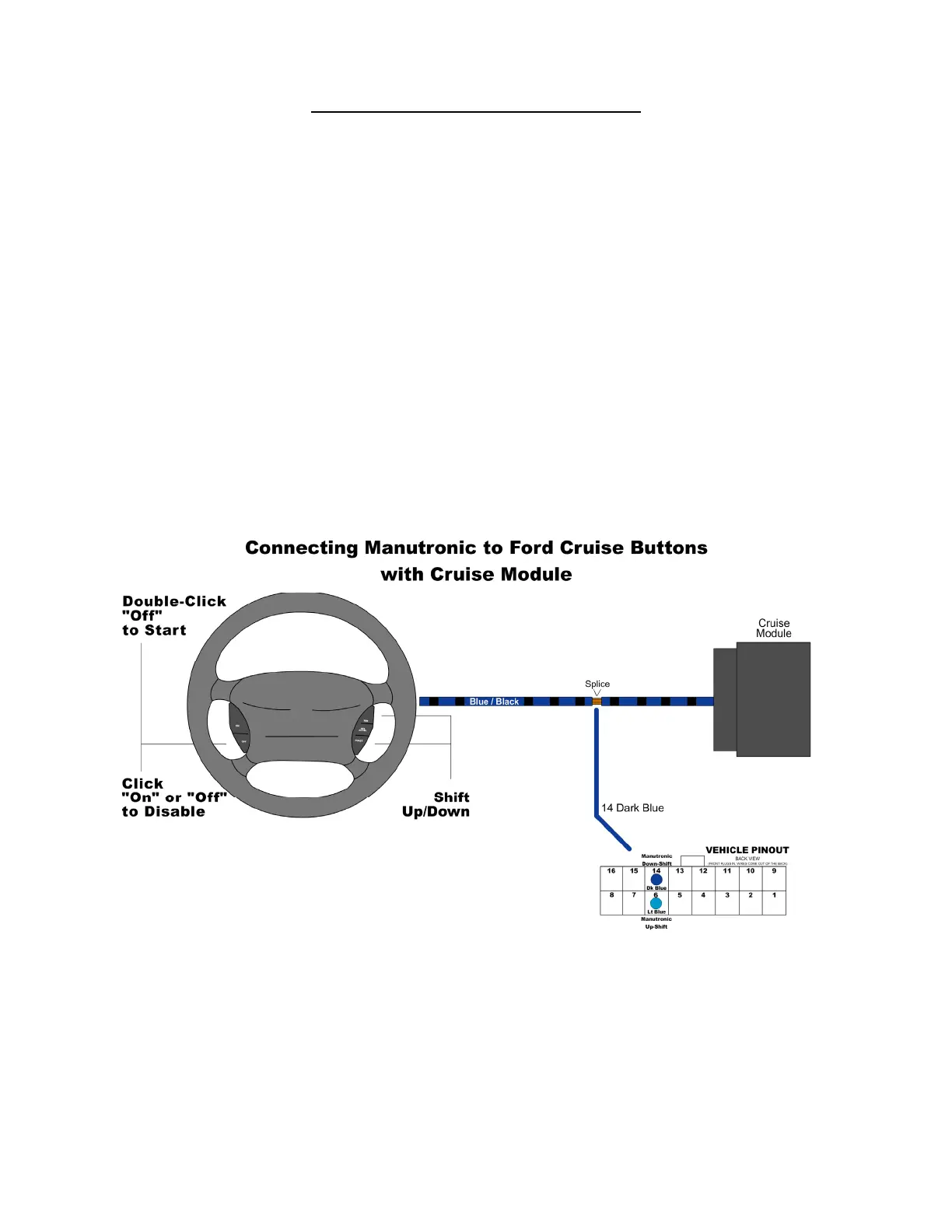
Ford Cruise Buttons with Cruise Module
For this configuration, you will need to solder the Dark Blue wire (Pin 14 on the
Vehicle Connector) to the Blue / Black striped wire that connects the steering
wheel buttons to the cruise module. (Follow the guidelines for soldering found in
the “General Installation” section.) The Light Blue wire is not needed for this
configuration. Be sure to use the correct settings in Shiftware. To enable
Manutronic, double-click the CRUISE OFF button. Press ON or OFF once to
disable it.


 To Next Page