SEL
ESC
14
EN
6. Device programming
Device is equipped with KEMAN LCD head.
Head allows usual water use during regeneration. The head is operated by soware, short message menu is displayed
on the LCD screen. The main screen shows alternately: current time, current flow, amount of water for treatment before
regeneration, planned time of regeneration start.
6.1. Button definition
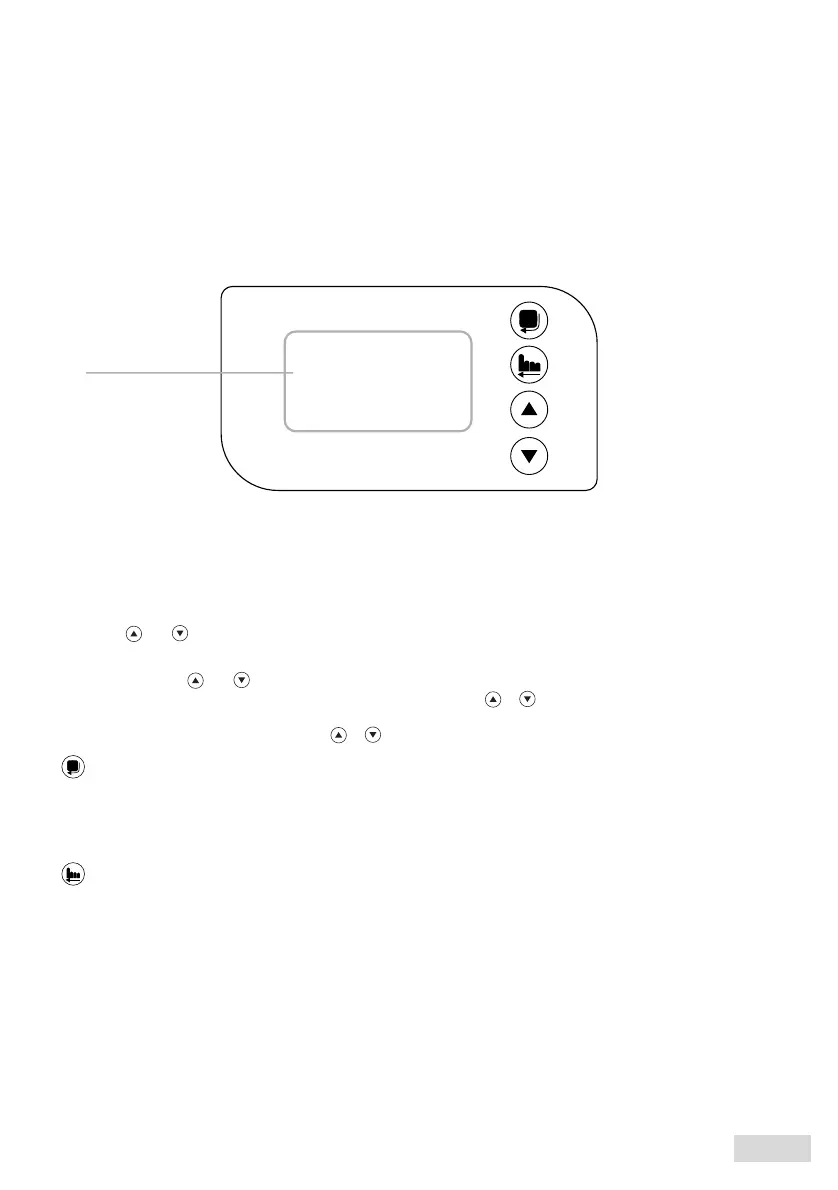
fig.2. Control valve
digital display
Menu / selection button
Allows to enter the soener PARAMETER settings menu
Enables access to individual parameters.
Confirms parameter change
SEL
Exit Button
ESC
Immediate regeneration - starting the entire process of device "cleaning". Backwash, brining, fast rinse, filling up
the salt tank with water.
With the head unlocked, pressing the ESC button will start immediate regeneration. ESC button exits the
function. The changes will not be saved.
During any operating cycle during regeneration, pressing the ESC button will switch to the next cycle.
For example, in the "rinse" cycle, pressing the ESC button will terminate rinsing and will start the next cycle -
"brining".
and
and
Buttons
Unlocking the keyboard
Press and hold for 5 seconds to unlock the keyboard.
In the head settings menu at SOFTENER PARAMETERS, press or
or
to scroll through the displayed
functions.
To change the parameter value, press



 To Next Page