Need help?
Do you have a question about the UTILITY WAREHOUSE Super router and is the answer not in the manual?
Information on setting up your router and getting the best service.
Verify activation date and confirm all items are in the box.
Identify and connect to the master telephone socket for optimal speed.
Steps for connecting router with a microfilter on standard sockets.
Steps for connecting router directly on pre-filtered sockets.
Connect devices via Wi-Fi using network name and key.
Connect devices via Ethernet cable to PC or Mac.
Steps for resolving common connection problems before contacting support.
Information on how to get further assistance and contact details.
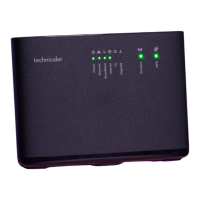
Guide to understanding the status lights for Power, Broadband, Internet, WPS, Wi-Fi.
Overview of managing your account, bills, and services online.
Provides contact numbers, hours, and email for technical support.
 General
| Brand | UTILITY WAREHOUSE |
|---|---|
| Model | Super router |
| Category | Network Router |
| Language | English |

 To Next Page