We have used icons to highlight the most important notes and information.
Here you find important safety information that should be followed.
Here you find additional notes or supplementary information.
1.2 Other Manuals
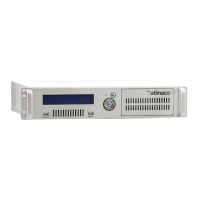
The CryptoServer is supplied as a PCI-Express (PCIe) plug-in card in the following series:
■ CryptoServer CSe-Series
■ CryptoServer Se-Series
The CryptoServer LAN (appliance) is supplied in the following series:
■ CryptoServer LAN CSe-Series
■ CryptoServer LAN Se-Series
We provide the following manuals on the product CD for the CryptoServer PCIe CSe- and Se-
Series plug-in cards and for the CryptoServer LAN (appliance) CSe- and Se-Series:
Quick Start Guides
You will find these manuals in the main folder of the SecurityServer product CD. They are
available only in English, do not cover all possible scenarios, and are intended as a
supplement to the product documentation provided on the SecurityServer product CD.
■ CryptoServer LAN - Quick Start Guide
If you are looking for step-by-step instructions on how to bring the CryptoServer LAN into
service, how to prepare a computer (Windows 7) for the CryptoServer administration and
how to start administrating your CryptoServer with the Java-based GUI CryptoServer
Administration Tool (CAT), read this document.
■ CryptoServer PCIe - Quick Start Guide
If you are looking for step-by-step instructions on how to bring the CryptoServer PCIe plug-
in card into service, how to install the CryptoServer driver on a computer with minimal
RHEL 7.0 installation and how to start administrating your CryptoServer with the
CryptoServer Command-line Administration Tool (csadm), read this document.


 To Next Page