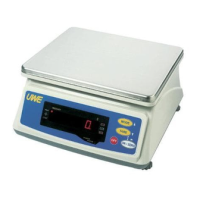
Need help?
Do you have a question about the UWE DW-30KE and is the answer not in the manual?
Lists items included with the scale, such as manual, platter, cover, screws, caps, and power adaptor.
Details how to attach the plastic platter to the holder using a screw and rubber cap.
Instructs to place the stainless steel platter onto the plastic platter.
Guides on powering on the scale, including checking input voltage against local voltage.
Explains the function of the ON/ZERO key for turning on/off and navigating setup.
Describes the TARE key for zeroing weight and decreasing values in setup.
Details the MODE key for shifting units and increasing values in setup.
Explains the OFF key for turning the scale off.
Describes the indicator for battery recharging status (red/green).
Indicates the scale is at a zero weight status.
Shows when the tare function is active and net weight is displayed.
Warns when the battery is low and needs recharging to prevent damage.
Appears when the scale is in standby mode (power saving).
Shows when weight detected exceeds the high limit in weight check.
Appears when weight is within the high and low limit range.
Shows when weight detected is below the low weight limit.
Indicates the scale is using avoirdupois weight units (lb).
Instructions for placing the scale on a level surface for accurate weighing, including adjusting feet.
Introduces the internal settings menu for scale configuration, including display, power, and data settings.
Ensures the scale is properly set up and ready for weighing, including checking platter and zero status.
Guidelines for gently placing objects on the platter and reading the displayed weight.
How to switch between metric and avoirdupois weight units, and how the setting is retained.
Enables or disables the feature that turns off the display when stable, saving power.
How to use the ON/ZERO key to set the displayed value to zero, especially when unloaded.
Manual procedure to tare off the weight of a container to obtain net weight.
Explains how to cancel the tare effect, either automatically or by pressing TARE.
Details the function that provides audio/visual signals for weight check results against limits.
Instructions for recharging the built-in battery, including initial charge duration.
Addresses issues where the scale does not power on, checking charge and adaptor connections.
Troubleshoots automatic power-off, checking Auto Power Off function and low battery indicator.
Diagnoses why the scale may not be reaching its rated capacity, checking tare status and loads.
Provides instructions on cleaning the scale using a damp cloth and mild detergent, avoiding harsh chemicals.
Recommends periodic verification of scale accuracy and recalibration if necessary.
Suggests using a dust cover during operation for better protection.
Advises placing the scale horizontally during transportation or long-term storage.
Recommends removing the platter from the scale before transportation or long-term storage.
Instructs to store the scale in a dry and clean place.
 General
| Capacity | 30 kg |
|---|---|
| Readability | 0.001 kg |
| Display | LCD |
| Weighing Units | kg |
| Power Supply | AC adapter |


 To Next Page