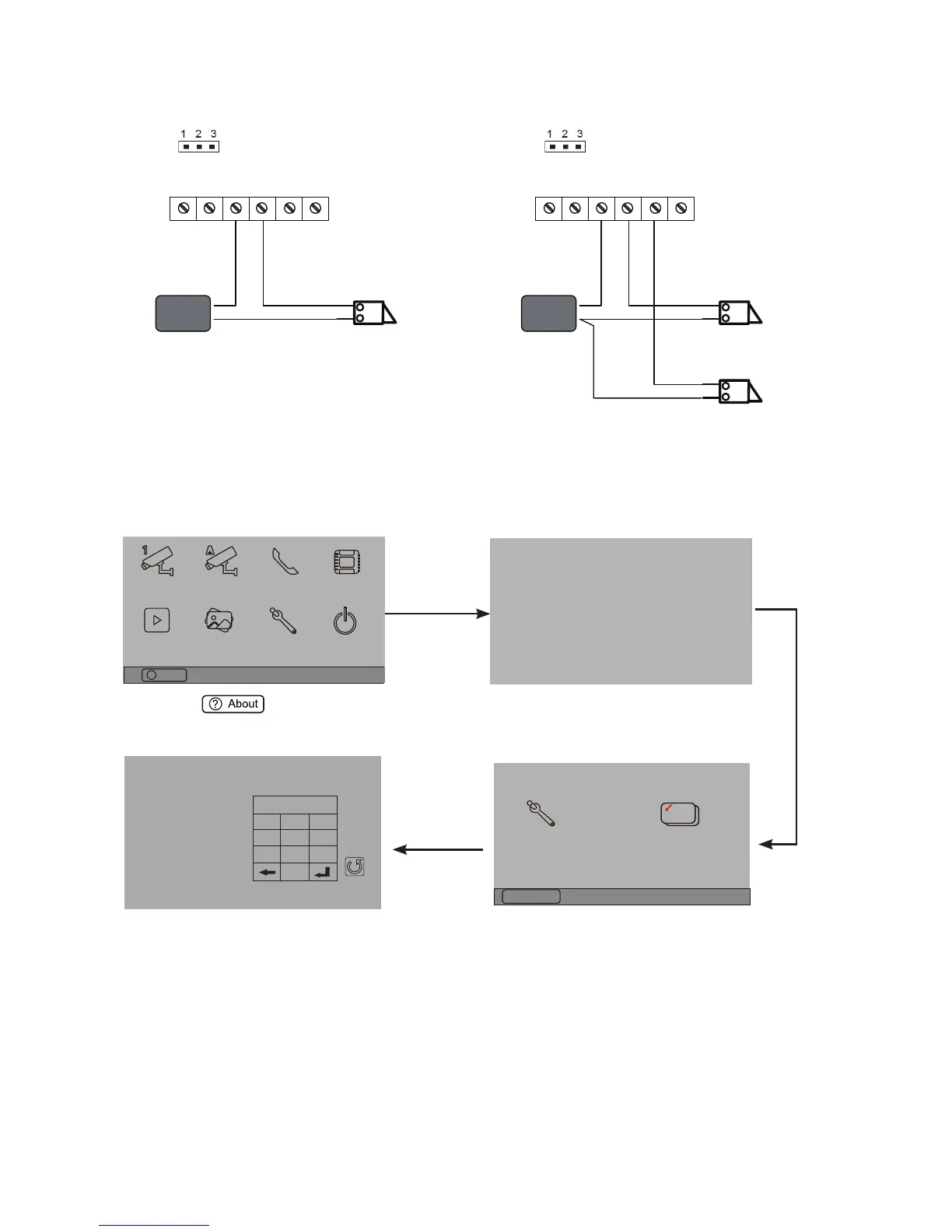
1.Touch item on main
menu page.
2.Touch the screen anywhere
and hold for 2s.
3.Touch Installer setup item
4.A digital keypad and setting
instructions will be showed.
Manual
Monitor
Monitor
Memory
Playback
Album
User Setup
09/30/2010 Thu.16:41
Close
Intercom
Multimedia
About
?
H/W : --- a1.3
S/W: V17.11.418.00
Local addr: ---
Unlock timing: ---
Video standard: -
UI-CODE: ---
MCM-VER.: ---
Updated: ---
Code Number:[----]
[0010]#:Remove all remote control
[0011]#:Add remote control
[8000]#:Set as master unit 0
[8001]#:Set as slaver unit 1
[8002]#:Set as slaver unit 2
[8003]#:Set as slaver unit 3
[8004]#:Set as guard unit
[8005]#:Set as not guard unit
[8006]#:Panel on as slaver unit called
[8007]#:Panel off as slaver unit called
[8008]#:Date format:MM/DD/YYYY
[8009]#:Date format:DD/MM/YYYY
[8010]#:Set lock mode to 0
[8011]#:Set lock mode to 1
[8021]~[8029]
#Set the lock time of 1~9s
Multi language settings:
---
1
4
7
8
0
9
6
5
2
3
Cancel
Installation settings:



 To Next Page