EasyManua.ls Logo

V-TEK Versacount II+ - Machine Overview

V-TEK Versacount II+
76 pages
Print Icon
To Next Page IconTo Next Page
To Previous Page IconTo Previous Page
Loading...
2 Versacount II+ User’s Guide
Machine Overview 61673621.fm
Machine Overview
Interface Panel
C
E
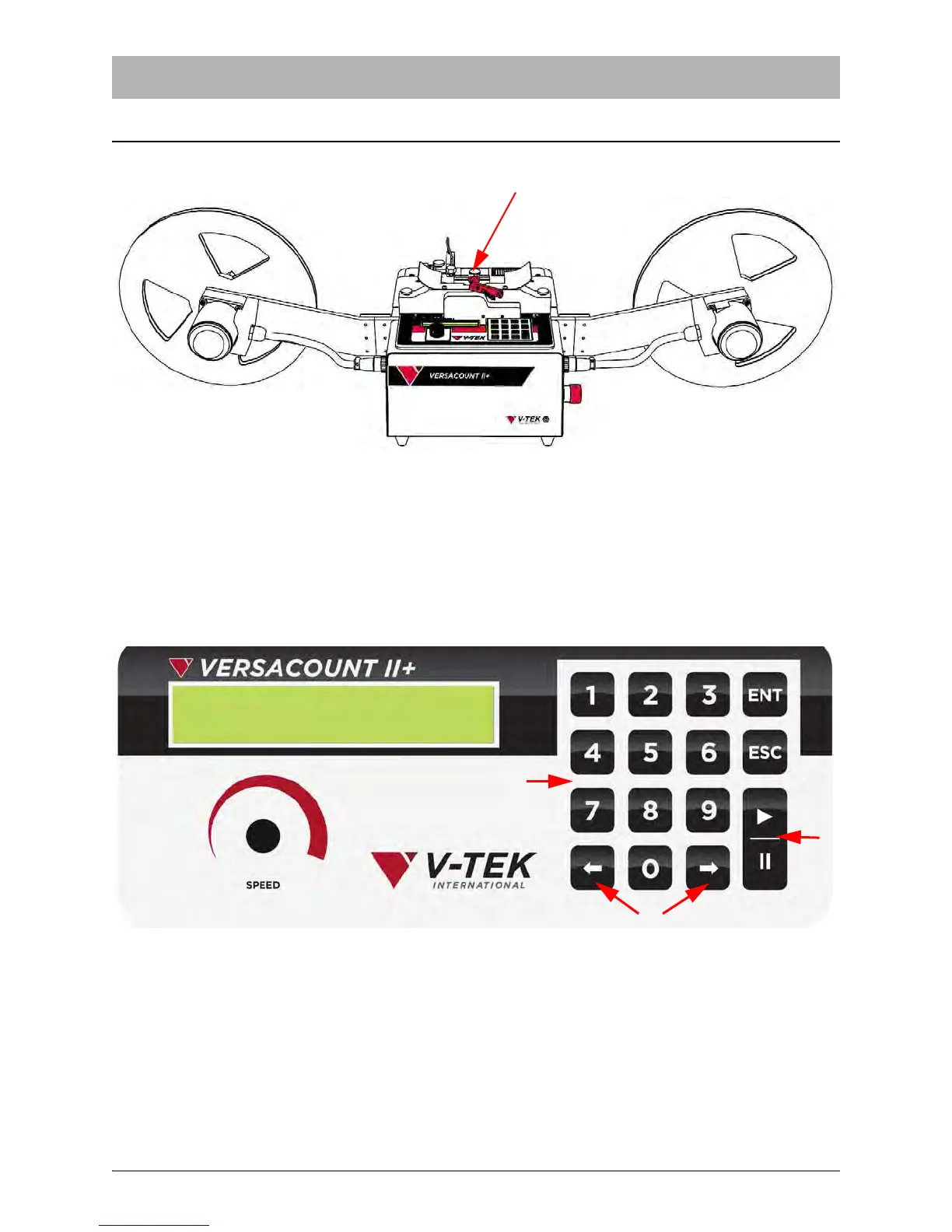
A: Take-up Reel
B: Empty Pocket Detector (optional)
C: Tape Adjuster Guide
D: Reel Arm
E: Taped Carrier Reel
F: Interface Panel
G: ESD Jack
H: Emergency Stop Button
I: Motor Cable
J: Take-up Motor
Figure 1-1
A
J
J
F
G
H
I
I
D
D
B
A. Keypad: Used to enter data
B. Arrow Keys: Used to specify the direction of
tape movement and also used to navigate
menus in the interface program.
C. Enter Key: Locks in entered data or clears
the counters when in run mode.
D. Escape Key: Moves among menu screens in
the interface.
E. Stop/Go Key: Stops and starts the motor.
F. Speed Knob: Controls the velocity the coun-
ter will advance the carrier tape.
G. Display
Figure 1-2
A
B
C
D
E
F
G