USBVideoGrabberAVC05EN
ArcSoftwareShowBiz–WindowsOS®
TheArcSoftShowBiziscomposedof“Capture”,“Edit”,“Product”Panels.
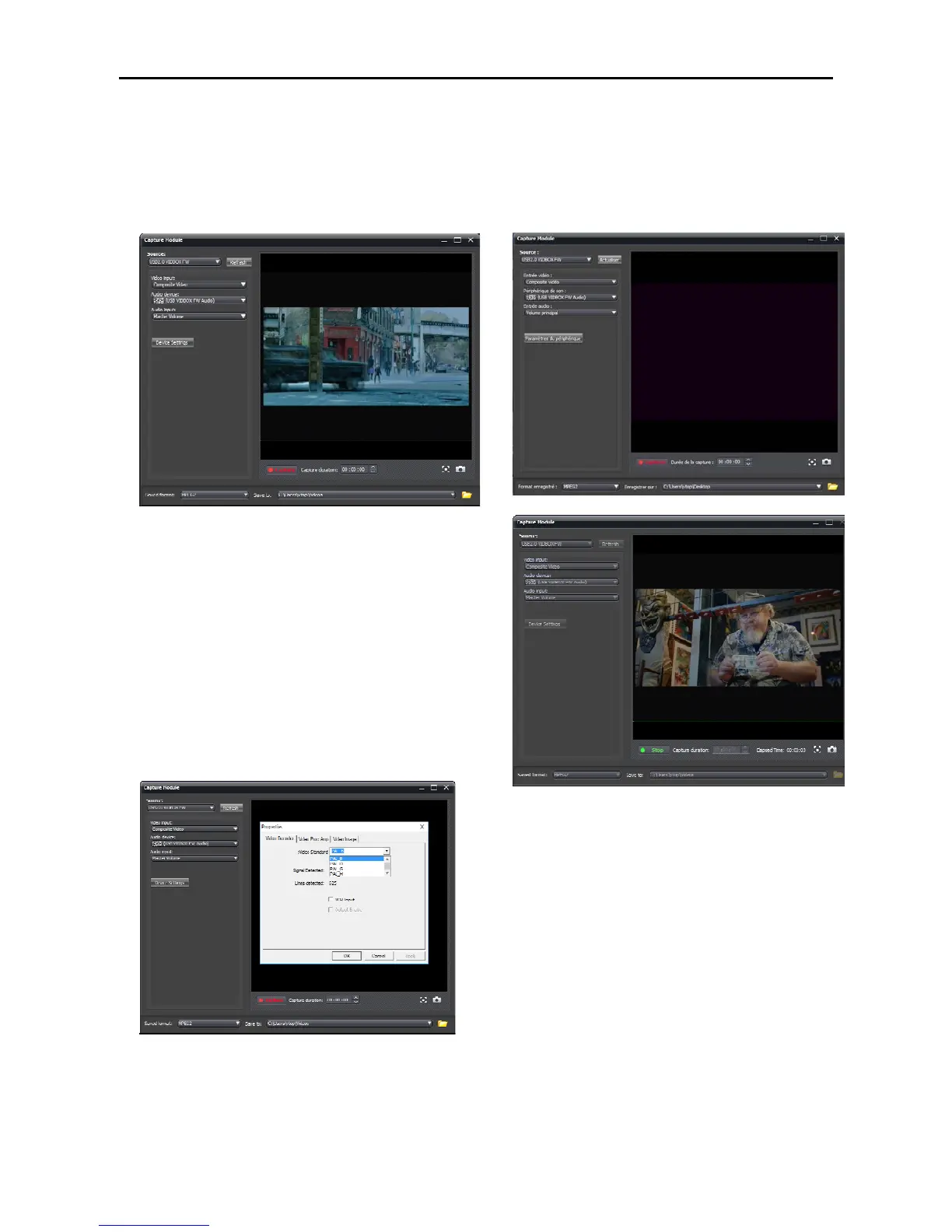
1. Execute ArcSoftware and go to “Capture” Panel,
settheSouceto“USB2.0VIDBOXFW”.
2.IfyoursourcedeviceisconnectedbyRCAcable
(Red,Yellow,White).PleasesetVideoInputas
“CompositeVideo”,otherwisepleasechoose
“S‐Video.”
3.SettheAudioinputon"USBVIDBOXFWAudio".
4.Setthepicturesize(aspectratio)on"4:3"or
"16:9".
5.Pleaseuse
"DeviceSettings"tochangetheVideo
Standardtotherightoneifyouhavenovideoor
audio.
6.Clickthe“Capture”tostartrecording,orclick
“Stop”toendtherecording.


 To Next Page