ENGLISH
- 61 -
23 - OPERATION DEFECTS
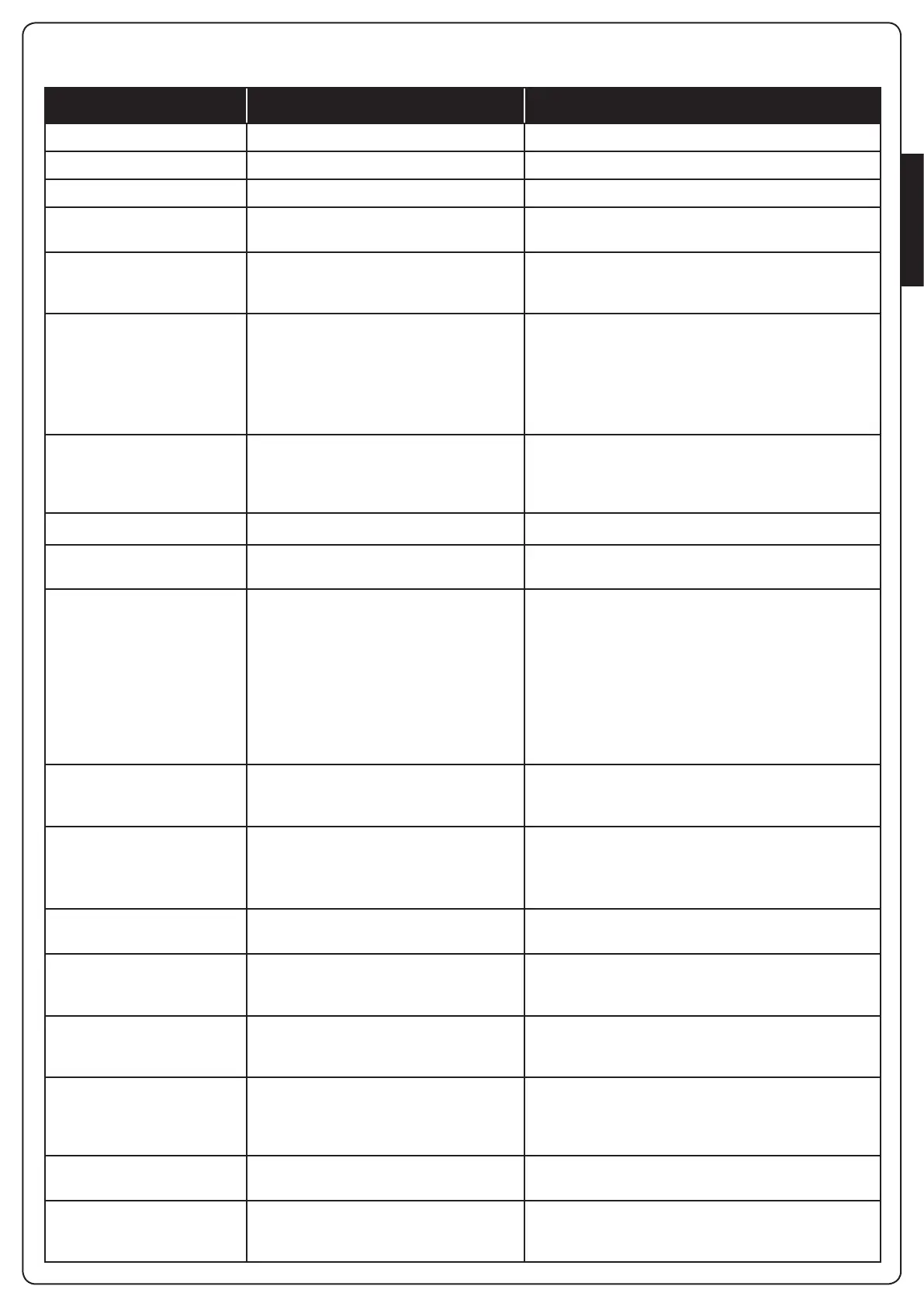
Thisparagraphshowssomepossibleoperationdefects,alongwiththeircauseandapplicableremedy.
DISPLAYING DESCRIPTION SOLUTION
POWERLOGICledoff Faultypowersupplyoflogics CheckfuseF1
POWERMOTORledoff Faultypowersupplyoftheinverter CheckfuseF2
ERRORledon Faultyinverter Sendtheunittotheservicedepartment
ATTENTIONledashing Charginginverter Thegatedoesnotmove:WhentheLEDturnsoffthe
inverterisreadyandtheoperationcanstart
ATTENTIONledon Emergencystopenabled TurnofftheSTOPbuttonbetweenterminalsT1andT2.
Ifyouhavenotinstalledaswitchthetwoterminalsmust
bebridged
OVERLOADledon 24Vpowersupplytoaccessoriesoverload 1. RemovetheterminalblockH1-H8:theOVERLOAD
LEDturnsoff
2. Solvetheproblemcausingoverloading(terminalsE1-
E3)
3. Re-installtheterminalboardandmakesuretheLED
doesnotturnonagain
Extendedpre-ashingtimeof
theBLINKER
Whenastartcommandisgiventheblinker
immediatelyturnsup,butthegatedoesnot
openimmediately:thecountofcyclesset
forServicehasexpired
EnterthemenuofthecountersandresettheService
parameter
Thedisplayshows
ERR1
Softwareerror Sendtheunittotheservicedepartment
Thedisplayshows
ERR2
Faultyinverter Checkthatthemotorisconnectedproperly.Iftheerror
persistssendtheunittotheServicedepartment
Thedisplayshows
ERR3
Thefunctionalitytestofthephotocells
failed
1. Makesuretherearenoobstructionsbetweenthe
photocells
2. Checkthatthephotocellsenabledbymenuare
actuallyinstalledandworking
3. Iftype2photocellsareused,makesurethatthemenu
item
FOT2
issetto
CFCH
4. Checkouttheprecedingconditions,iftheerror
persists,increasethetimeofthetest(parameter
FT.TE
)
Thedisplayshows
ERR4
Limitswitcherror Checkthatthelimitswitchesareproperlyconnectedand
thatthelimitswitchesareactivatedatthemovementof
thegate
Thedisplayshows
ERR5
Thefunctiontestofsafetyribbonsfailed 1. Makesurethatthesafetyribbonsenabledbymenu
areactuallyinstalledandworking
2. Ensurethatthecontrolunitofthesafetyribbonsis
properlyconnectedandworking
Thedisplayshows
ERR6
Faultycommunicationwiththeinverter IftheerrorpersistssendtheunittotheService
department
Thedisplayshows
ERR9
Accesstotheprogrammingmenulocked
byCL1+
InserttheCL1+modulewithwhichtheprogramming
waslockedintotheADIconnector:theunitwill
automaticallyentertheprogrammingmenu
PRG
Thedisplayshows
ERR10
Thefunctiontestofthesafetydevices
connectedtotheinterfaceADIfailed
VerifythattheADImoduleisconnected.
CheckthatthesafetydevicesconnectedtotheADI
interfaceareproperlyconnectedandworking
Thedisplayshows
ERR12
Inverteroverheating Thewarningsignappearswhenthemotorisstopped
duetoanoverheatingoftheinverterthatdrivesthe
motorandisrepeatedateachstartcommanduntilthe
inverternallycoolsdown
Thedisplayshows
INIT
Charginginverter Beforestartingthemotor,waituntilthewarningsign
goesoff
Thedisplayshows
HALT
Emergencystopenabled TurnofftheSTOPbuttonbetweenterminalsT1andT2.
Ifyouhavenotinstalledaswitchthetwoterminalsmust
bebridged


 To Next Page