-13-
7. Press the on/off button to turn the vacuum cleaner on.
8. Once you have completed vacuuming, press the on/off button, return the
handle to the upright position and unplug the power cord plug from the outlet.
Pile Height Selection and Settings
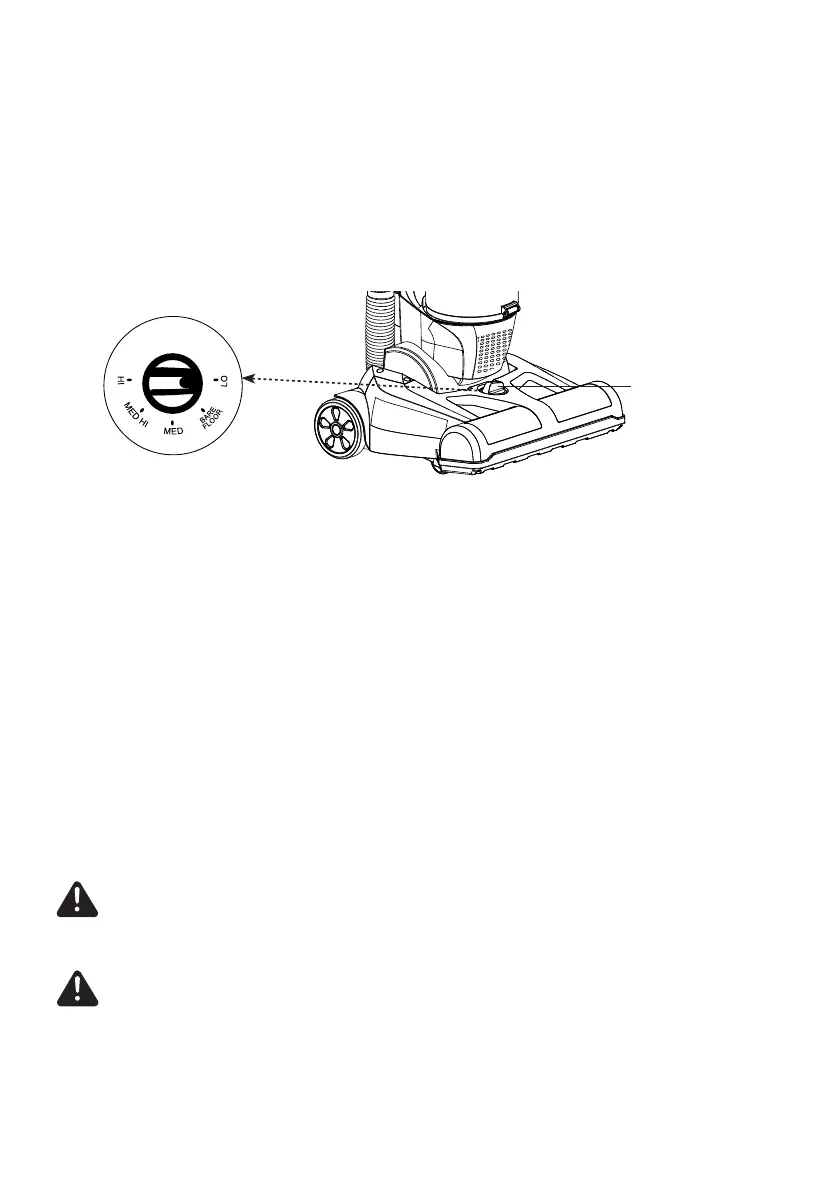
Select a pile height setting by turning the height adjust selector located on the
oor nozzle.
Suggested Pile Height Settings
There are ve (5) pile height settings on the vacuum cleaner. For best deep down
cleaning of low pile carpet, use the LO setting. However, you may need to raise
the height to make some jobs easier, such as scatter rugs and some deep pile
carpets.
Suggested settings are:
LO – Low pile carpet
BARE FLOOR – Bare oor
MED – Medium pile carpet
MED HI – Medium to deep pile
HI – Shag, deep pile, or scatter rugs
CAUTION
Incorrect setting may damage oor.
Height Adjust Selector
CAUTION
Do not allow the vacuum cleaner to remain in one spot for any length of time
when the brush roll is turning. Damage to carpet may occur.








 To Next Page