3
ARY, Inc. | 5200 W 110th Street Suite 200, Overland Park, KS 66211 | VacMasterFresh.com | 800-821-7849
VP95 Chamber Vacuum Sealer | User Guide
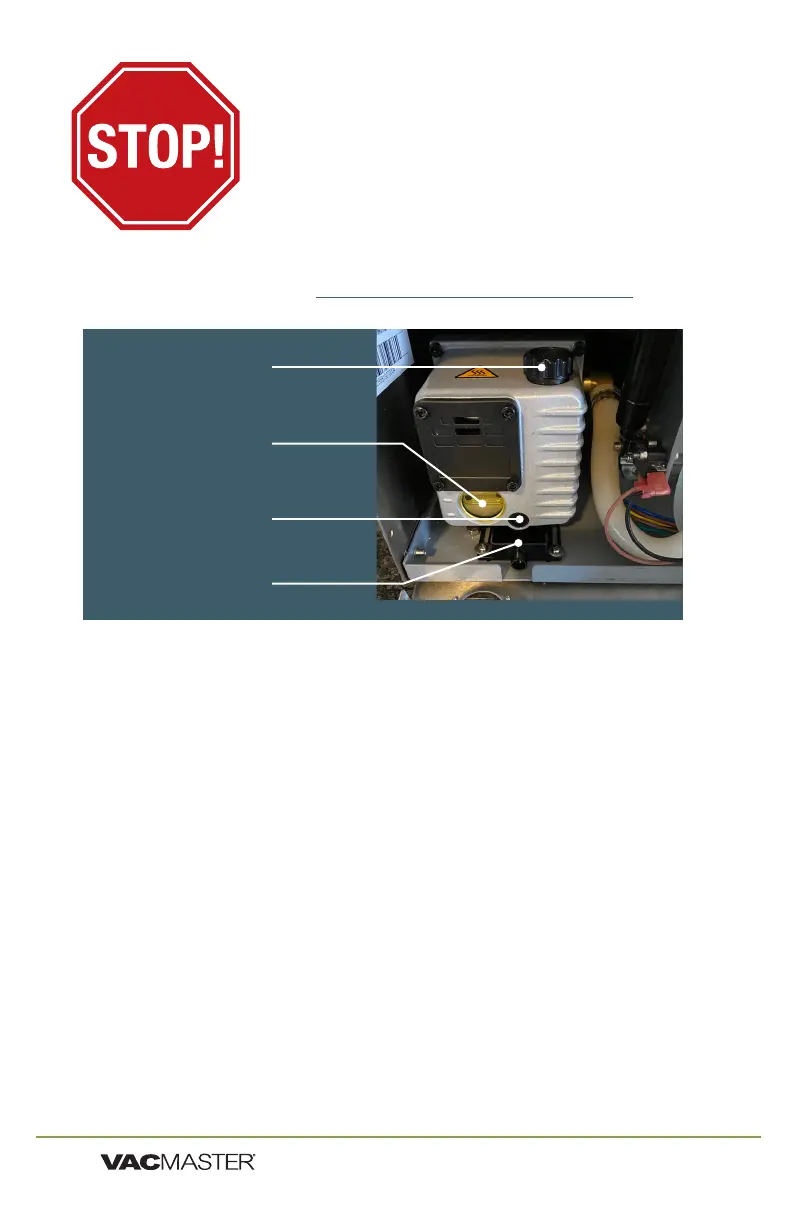
Adding Oil to Vacuum Pump
Turn off and unplug machine to prevent electrocution.
1. Using VacMaster
®
approved oil.
2. Open the back cover by removing Phillips head screws located on
the side of machine at the back - two on each side of case.
3. Locate the OIL FILL CAP.
4. Unscrew oil fill cap by hand.
5. Watching OIL SITE GLASS, pour oil into the oil fill hole.
6. Fill oil level between 1/2 to 3/4 of site glass.
7. Do not overfill. Overfilling can cause damage to the vacuum pump.
8. Replace and tighten OIL FILL CAP.
9. Replace the back cover.
10. It is recommended to run an Oil Clean Cycle prior to first use. (see p9)
YOU MUST ADD OIL
BEFORE USE!
FAILURE TO DO SO WILL DAMAGE THE PUMP!
VacMaster
®
VP95 uses an oil vacuum pump.
For shipping purposes there is no oil in the pump.
OIL MUST BE ADDED BEFORE USE!
Oil Fill Cap
Oil Site Glass
Oil Drain Plug
Oil Drain Tray


 To Next Page