7
ARY, Inc. | 5200 W 110th Street Suite 200, Overland Park, KS 66211 | VacMasterFresh.com | 800-821-7849
VP95 Chamber Vacuum Sealer | User Guide
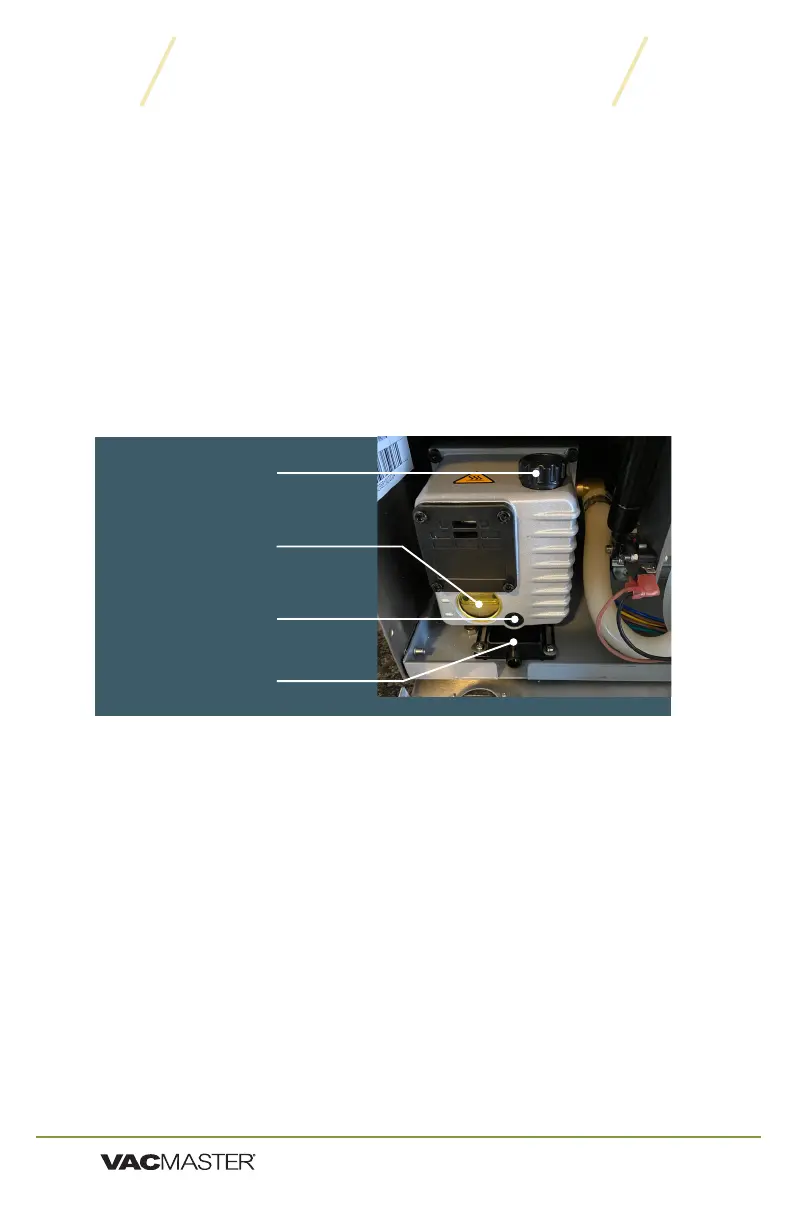
To Change the Vacuum Pump Oil:
1. Run vacuum process a couple of times to "warm up" the oil.
2. Turn off machine and unplug to prevent electrocution.
3. Locate the OIL DRAIN PLUG & FILL CAP on the unit.
4. Locate OIL DRAIN PLUG on front of vacuum pump.
5. Pull the oil drain tray forward.
6. For access and ease of draining the oil, position machine so the
drain bolt is "clear" and the dirty oil can be captured.
7. Oil will flow immediately when bolt is removed. Place catch cup
underneath before removing drain bolt.
8. Capture oil from pump. When oil is completely drained, replace and
tighten OIL DRAIN PLUG. (Dispose of used oil properly)
9. Follow the "Adding Oil to Vacuum Pump" instructions on Page 3 of
manual. DO NOT USE MACHINE UNTIL OIL HAS BEEN ADDED.
VP95 Machine Maintenance
Vacuum Pump Maintenance
This machine requires periodic oil changes. Required oil change schedule:
▫ First oil change: after 25 hours of usage.
▫ Future oil changes: change oil after every 60 hours of machine usage.
Check the oil level and color frequently using the OIL SITE GLASS.
▫ Oil must remain between
1
/
2
and
3
/
4
in the OIL SITE GLASS.
▫ With use, the pump oil will become cloudy or dark. Once oil
becomes discolored, replace with new VacMaster
®
vacuum oil. It is
recommended to run an Oil Clean Cycle prior to changing oil to avoid
contamination to new oil (see page 9 for more details).
Oil Fill Cap
Oil Site Glass
Oil Drain Plug
Oil Drain Tray


 To Next Page