EasyManua.ls Logo

Valeo SC600 Marcopolo - 1.5 Mode Overview; SC600 System Operation; 2.1 Activation and Deactivation; 2.2 Auto Mode

Valeo SC600 Marcopolo
12 pages
Print Icon
To Next Page IconTo Next Page
To Previous Page IconTo Previous Page
Loading...
BUS BODY ELECTRONICS
5
1.5 Mode overview
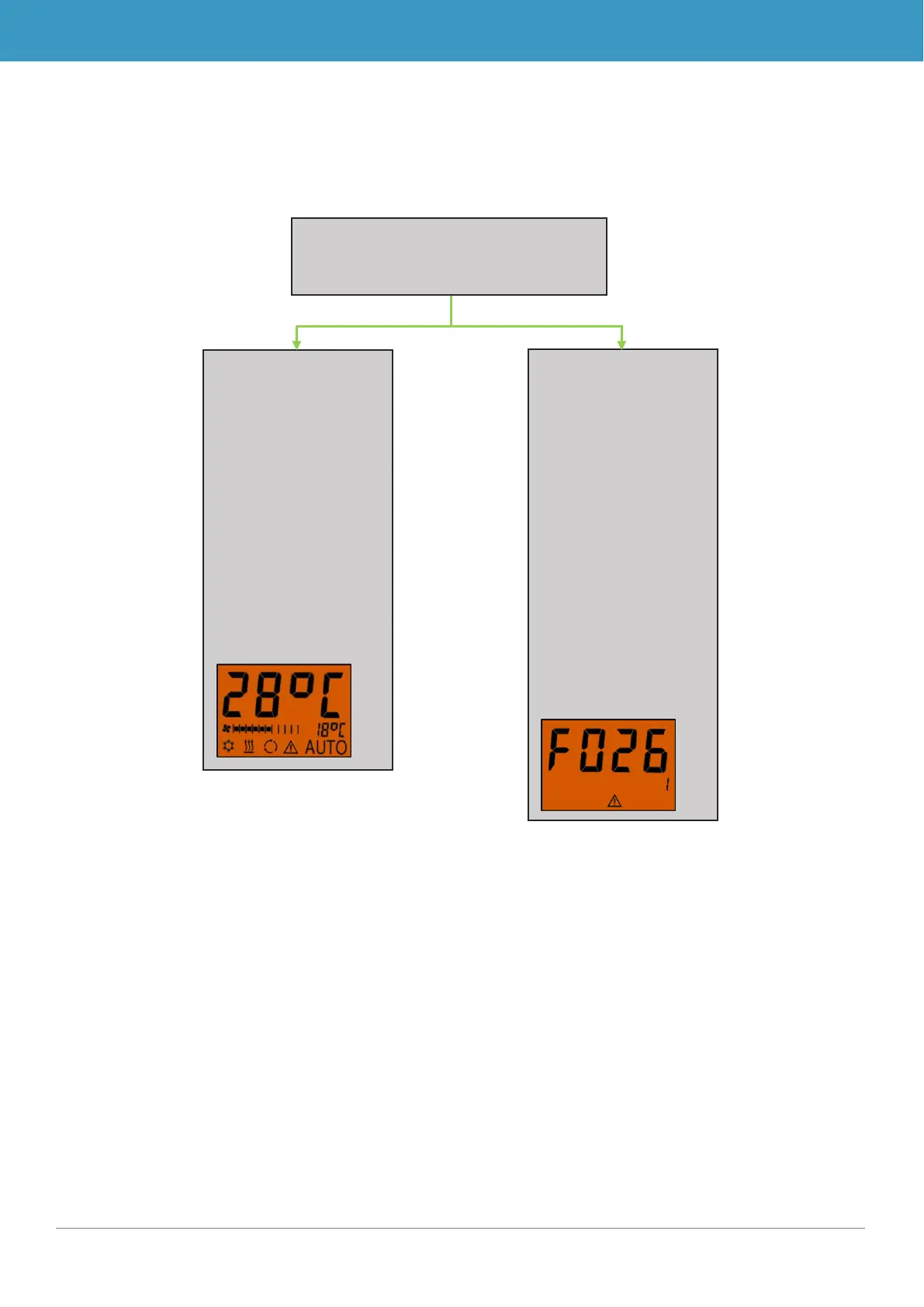
The SC600 system includes 2 different modes Operating mode and Error mode.
Figure 3 - SC600 mode overview
SC600
Operating mode:
Includes all of the
functions and infor-
mation summarized
under point 2 as
well as Error mode.
The normal operat-
ing display includes
all of the elements
provided here in the
example:
Error detection
mode:
Mode to display all
errors that occurred
and their probability
of occurrence.
For more infor-
mation, see points
2.6.1 and 2.6.2.
The error display in-
cludes all of the ele-
ments provided
here in the example:

Related product manuals