2 Use
2.1 Activation/deactivation
2.1.1 Activation
Press
button
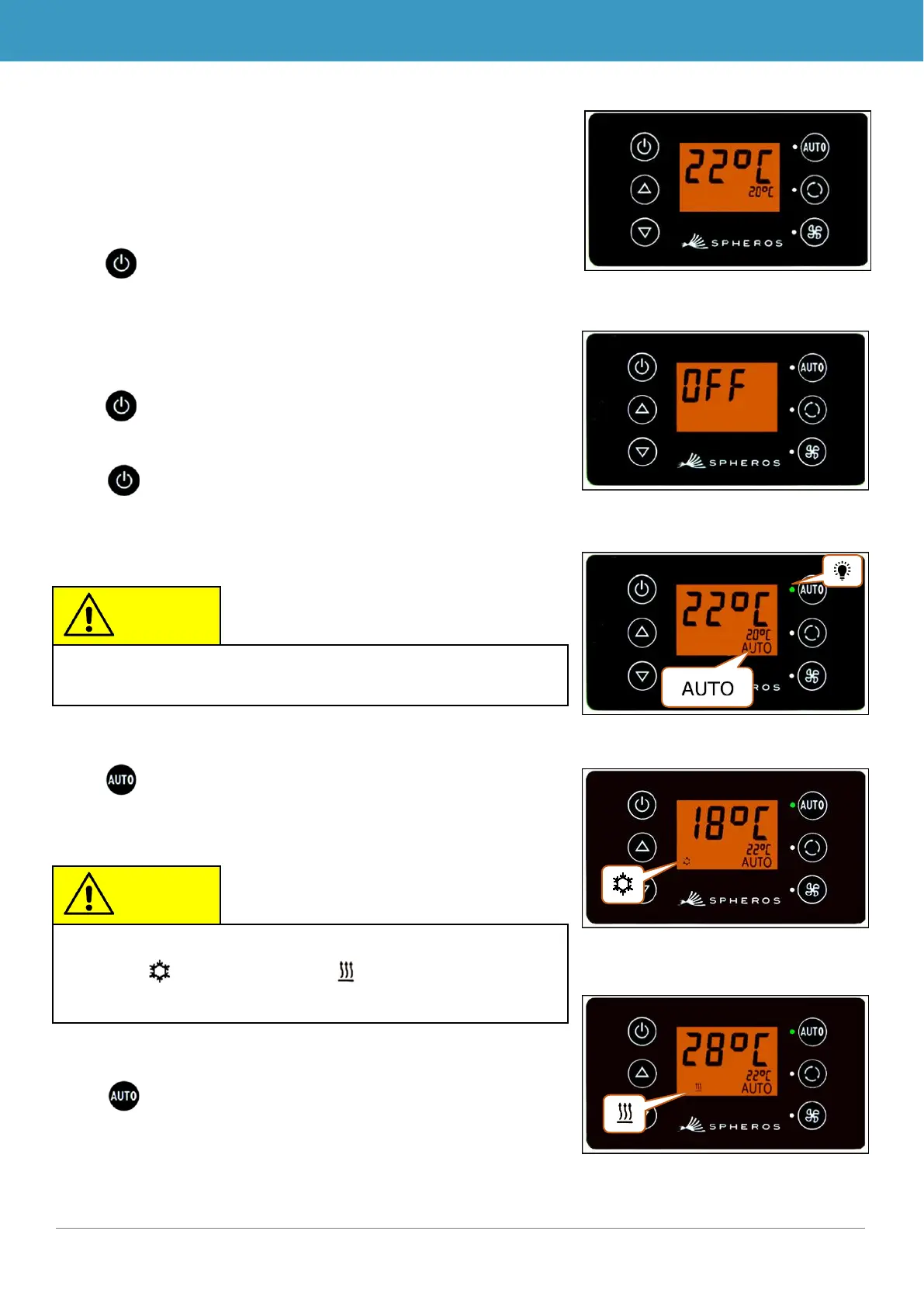
➔ Sets the last configured temperature; Auto mode off
(Figure 4).
2.1.2 Deactivation
Press button
➔ Display deactivated.
Press button for 2 seconds until OFF appears
➔ System deactivated.
2.2 Auto mode
2.2.1 Activation
Press button if Auto mode is off
➔ Mode is on - corresponding status light and function
symbol light up on the display (Figure 6).
2.2.2 Deactivation
Press button if Auto mode is on
➔ Mode is off - corresponding status light and function
symbol are off (Figure 8).
Auto mode can be turned on only if the motor has been
started.
If Auto mode is on, the system automatically turns on Cool-
ing Mode and Heating mode (if available) as needed
(Figures 7 and 8).
Figure 6 - SC600 Auto mode activated
Figure 7 - SC600 Auto mode activated,
Cooling mode
Figure 4 - SC600 start display
Figure 5 - SC600 deactivation
Figure 8 - SC600 Auto mode activated,
Heating mode



 To Next Page