BCs160VA
Nov. 15, 1997
SMART-PULP Smart Consistency Transmitter
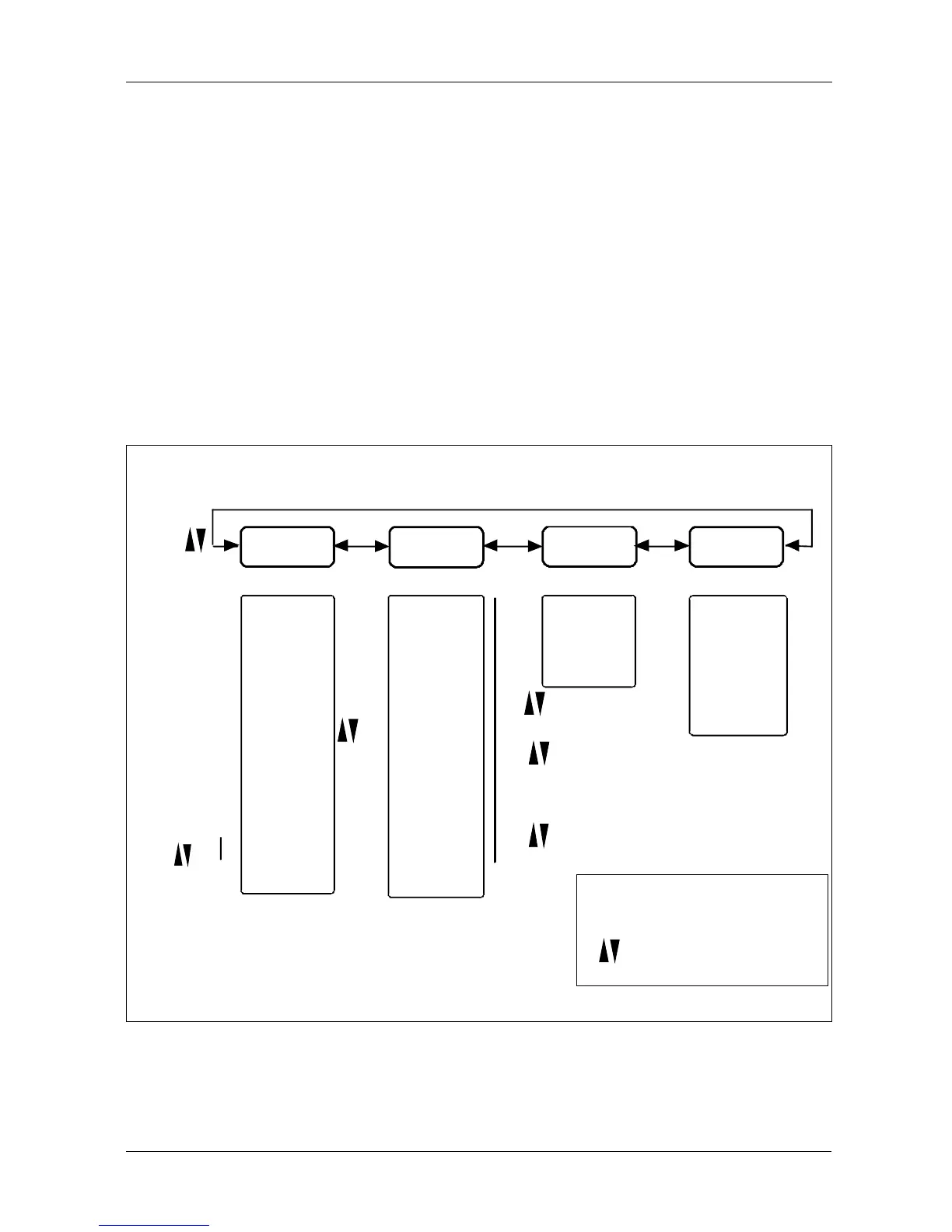
2 TRANSMITTER FUNCTIONS (MENUS)
Operations and calibration from SMART-PULP’s own operator keys
You can always get to the main menu by pressing ESC a sufficient number of times.
You can select the following main functions with arrow keys from the main menu:
1. MEASURE 2. CONFIGURation 3. CALIBRATion 4. DIAGNOSTics (Chapter 4)
20
Figure 2 SMART-PULP’s main menus
Consistency %
Milliamps
% of span
Shear force
Sensor temp.
Process temp.
Housing temp.
[enter]
[enter]
SAVE OK?
[enter]
%CS
MA
%
G or N
S F or C
P F or C
H F or C
RECIPE n
ASH %
MEASURE
[enter]
CONFIGUR
[enter]
LOWER RA
UPPER RA
DAMPING
LANGUAGE
UNITS
MOUNTING
PASSWORD
HART-ADD
BLADE TY
ALRM TYP
TAG
TMTRTYPE
TMTRVERS
[enter] [enter]
CALIBRAT
NEW RECI
SAMPLING
LABORATO
SP. GRADE
DIAGNOST
MESSAGES
MA-LOCK
TRIM-F
TRIM-MA
DIG INPT
COMMUNIC
[esc]
[enter]
[enter]
SAVE OK?
[enter]
[esc]
( )
[esc]
[enter]
Return to previous opti-
on or menu level
Accept (OK)
Moving in menu or
changing a parameter
value.
Ash% can be changed only in NEW RECIPE menu. Active recipe (=recipe n) must be the correct
before calibration r in front of the number means that remote selection (ie. binary inputs) is used for
active recipe selection. (Recipe 0 is selected from the operator terminal.)


 To Next Page