tai COM2
or COM2
33700600, L=1,5 m or
33700610, L=8,0 m
9
10
A1A6
A1A5
Par t. no.=.....
Software Version=.....
Par a meter Version=.....
Tractor model=.....
Date/Name=.....
long dis-
tance.
T ransmission Control
U n i t A C --- 5 . 2
Part. no................
Software Version........
ParameterVersion ...
Tractor mode..........
Date/Name............
diskettes part. no. page 370/24G
diskettes part. no. page 370/24G
145
1. 9. 2002
370 24C
6250--8950
37. Autocontrol 5/5.2
1. 8. 2000
Modell Code Page
B.5 Deleting and loading of the para-
meter file
(If necessary a parameter file can be deleted
and co pied separately without deleting the program file).
11. Switch programming unit power off (or switch the trac-
tor power off) > switch power on > appears text (AC5:
RESET) or (AC5.2: Loader v0.4 4Mb)(=OK)
12. Write L OAD_PAR (“CapsLock”off,use“Shift”key)>
enter > OK (old parameters are cleared in memory)
13. Choose “ Transfer ”>“Send text file ”
14. Go to point “ Files of type ” > choose “ All files (*.*) ”
>gotopoint“Look in ” > choose directory “ 3 ½ --- l e v y k e
A: ” > choose directory “ P arameters ”.
15. Chooseaparameterfilebymeansoftable(page
370/24G). double click > appears text (AC5: RESET)or
(AC5.2: OK Loader v0.4 4Mb) (=OK)).
NOTE! If in connection with inputting parameter file t he
following information appears “ parameters are
cleared!!!! card will not work until set!!! ”, carry out again
points 12...15 (type LOAD_PAR>enter...).
NOTE! If loading of the parameter file has not succeeded,
turn the power off for 30 seconds and carry out points
12...15 onc e more.
B.6 Programming inspection
16. Write PROC_VER? > enter > a number with four marks
appears in PC’s display, this clarifies what files are si tuated in
the control unit program file and parameter file (see page
370/24G). Check that the number with four marks correspond
to the right contro l unit part no. and tractor type. If necessary
copy parameters once more (stages 11...16).
NOTE! The two last numbers of the check code 1 cannot be
99 (e.g. 5399). Then the control unit is missing parameter file.
17. Choose “ Call ”>“disconnect ”
18. Switch programming unit power off (or switch tractor
power off).
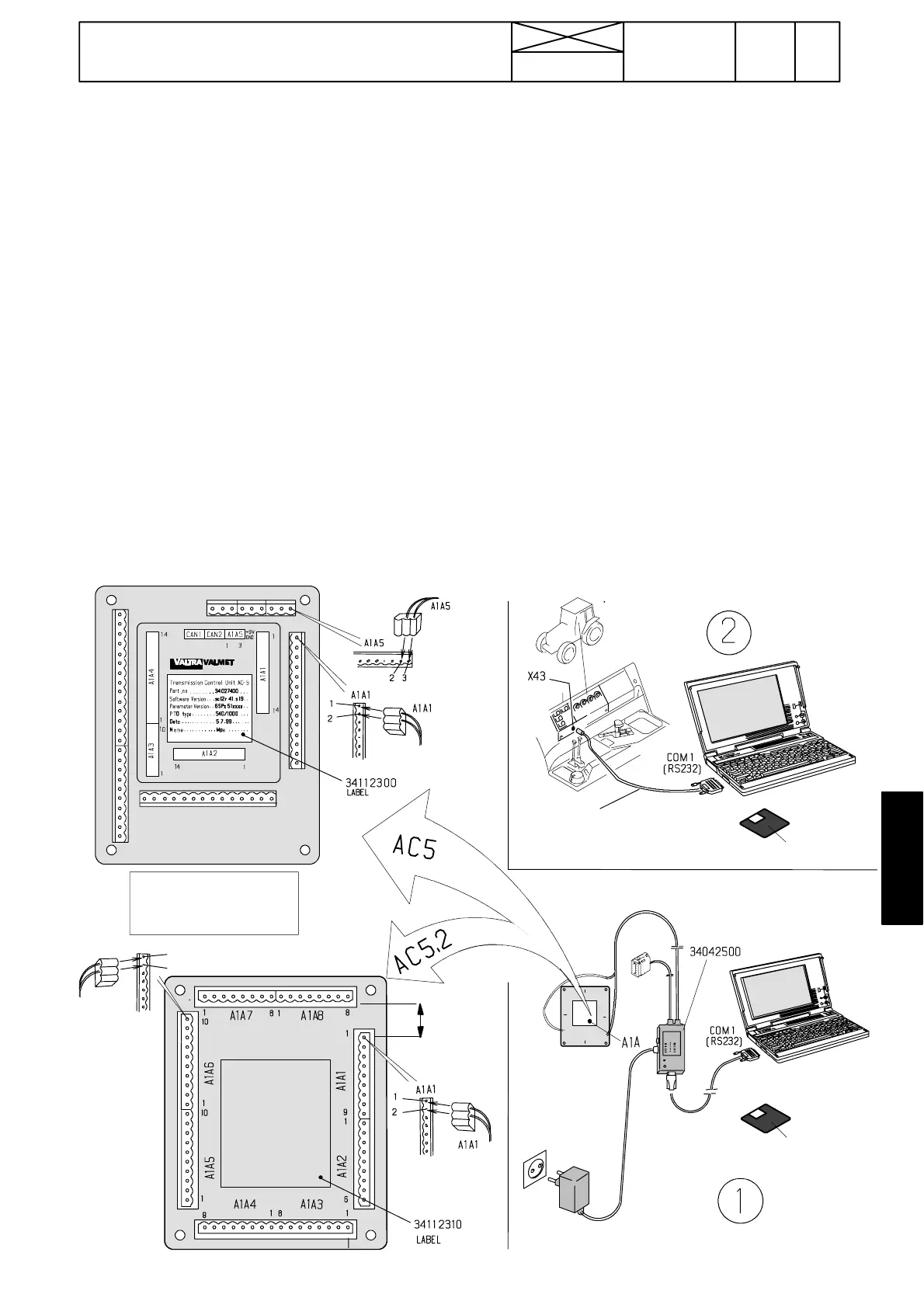
New control unit: Fill in an adhesive label (part no and file
names and tractor model, see table 1) > fasten it on the con-
trol unit in the right positio n (see picture 1).
19. Disconnect the programming cable from the control unit
(or from tractor).
NOTE! Exit from the “ Hyper Terminal ” program, if the control
units you are not going to be programmed.
B.7 Settings and test---drive
20. Carry out settings and test ---run the tractor according
to instr. at page 370/24A.



 To Next Page