Need help?
Do you have a question about the Vanco Evolution EVEXHDB1 and is the answer not in the manual?
Details HDBaseT features, transmission range, bandwidth, HDCP, CEC, design, and specifications.
Lists all items included in the EVEXHDB1 package, such as the extender set, IR components, power supply, and manual.
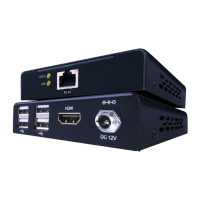
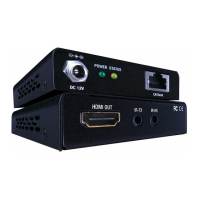
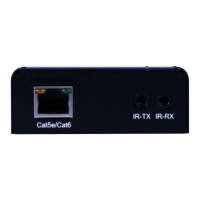
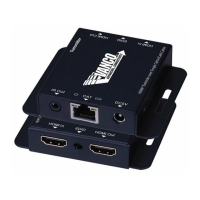
Explains the function of each port on the transmitting and receiving units, including HDMI, IR, and HDBaseT connections.
Details the function and status of the yellow and green indicator lights on the HDBaseT Extender.
Guides on connecting IR transmitters and receivers to control source or display devices.
The Vanco EVEXHDB1 HDBaseT™ Extender is a device designed for the distribution of uncompressed high-definition audio and video signals over long distances. This extender set, comprising a transmitter and a receiver, utilizes HDBaseT™ Technology to transmit signals up to 230 feet (70 meters) for 1080p resolutions and up to 131 feet (40 meters) for 4K@60Hz (4:2:0 color subsampling) over a single Cat5e/Cat6 cable. This technology is optimized for whole-home or commercial distribution, ensuring that signals maintain their quality without degradation over distances significantly greater than standard HDMI cables.
A key feature of the EVEXHDB1 is its Power over Cable (PoC) Technology. This allows power to be transmitted over the Cat5e/6 cable, meaning that either the transmitter or the receiver can be powered without the need for a separate power supply at the other end. This simplifies installation and reduces cable clutter, offering greater flexibility in placement.
The extender supports bi-directional IR control, enabling users to control the source device from the display location or the display device from the source location. The IR system consists of an IR Receiver (IR RX) and an IR Blaster (IR TX). The IR RX is where the remote control is pointed to send an IR signal, and it is typically placed at the display for controlling the source, or at the source for controlling the display. The IR TX sends the IR signal to the device being controlled, whether it's the source or the display, and is placed accordingly, either pointed at the device or on its front panel. It's important to note that the bi-directional IR system allows control in one direction at a time, not simultaneously. For optimal performance, users are advised to use the IR cables provided with the product due to potential differences in 3rd party IR cable pinouts.
The EVEXHDB1 is designed for ease of use and installation. To set up, an HDMI source (e.g., a Blu-ray DVD player) is connected to the HDMI In port of the transmitter. The HDBaseT OUT port of the transmitter is then connected to the HDBaseT IN port of the receiver using a Cat5e/Cat6 cable. Finally, an HDMI display (e.g., an HDTV) is connected to the HDMI Out port of the receiver with an HDMI cable. For power, a DC 12V power adapter is connected to the power port of either the HDBaseT Transmitter or Receiver, as PoC ensures both units are energized.
The device includes indicators for real-time operation information. A yellow indicator shows input signal connection, illuminating when connected. A green indicator indicates the linking status between the transmitter and receiver. If the green indicator is illuminated, the units are connected. If it blinks, it signifies that the HDCP is not compliant. If it is off, the units are disconnected.
For maintenance and optimal performance, several precautions are recommended. The system should be installed in a clean environment with appropriate temperature and humidity. All power switches, plugs, sockets, and power cords should be properly insulated and safely connected. It is crucial to connect all devices before powering them on. The Cat5e/Cat6 cable terminations for HDBaseT devices should adhere to a straight-thru TIA/EIA T568B standard. Vanco HDMI and Cat5e/6 cables are strongly recommended to ensure the best results. The transmission length is influenced by the type of Cat5e/6 cables, HDMI sources, and HDMI displays. Solid UTP cables generally offer longer transmission ranges than stranded patch cords, and shielded STP cables are preferred over unshielded UTP cables for improved EMI reduction, especially in long cable runs. For the best results, Cat6 cables are recommended. If the HDMI display has multiple HDMI inputs, using the first HDMI input (HDMI input #1) often yields better transmission performance.
Troubleshooting tips are provided to address common issues. If resolutions differ between the source and display, the extenders will attempt to adjust the signal to match the lowest resolution, potentially resulting in a lower-resolution picture on other HDTVs. If there is no audio or video, users should check the TV's setup menu. If the HDMI control circuit fails to establish a handshake, resetting the receiver by disconnecting and reconnecting the power supply, or performing a "hot-plug" sequence (connecting devices in a specific order while powered on), may resolve the issue. Interference from proprietary control channels (CEC) used by some manufacturers can also cause problems, in which case contacting the manufacturer or updating software may be necessary. For IR control issues, ensuring the IR RX pigtail is correctly plugged into the receiver and pointed at the display, and the IR TX pigtail is attached to the sender and pointed at the source, is essential.
The EVEXHDB1 is designed for durability and safety. It has been tested for conformance to safety regulations and requirements. Users are advised to follow all instructions and warnings, avoid servicing the unit themselves (unless explicitly explained in the manual), ensure proper ventilation, keep it away from water, place it on a stable surface, use only the provided power adapter and cables, and avoid liquid or aerosol cleaners. Always unplug the device before cleaning.
 General
| Category | Extender |
|---|---|
| Model | EVEXHDB1 |
| Input | HDMI |
| Output | HDMI |
| HDCP | 2.2 |
| Bandwidth | 18Gbps |
| PoC | Yes |
| IR Passback | Yes |
| Video Resolution | Up to 4K@60Hz 4:4:4 |
| Audio Formats | Dolby TrueHD, DTS-HD Master Audio |
| Operating Temperature | 32°F to 104°F (0°C to 40°C) |
| Weight | 0.4 lbs |
| Power Supply | 24V DC |

 To Next Page