2
1
Menu overview
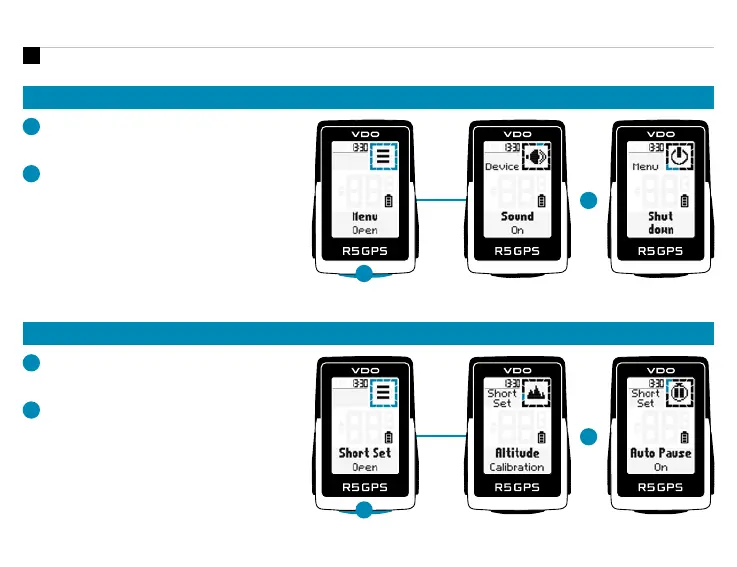
SHORT CUT MENU
1
Hold START button, when training
is active or in auto pause.
2
You can edit the most important
settings during training.
MAIN MENU
1
Hold START button, when training
is NOT started.
2
You have access to the main menu with
all the functions of the R5 GPS.
DE
HAUPTMENÜ
1. Die START-Taste gedrückt halten, während NOCH KEIN Training
gestartet wurde. 2. Sie haben Zugriff auf das Hauptmenü mit allen
Funktionen des R5 GPS.
KURZMENÜ
1. Die START-Taste gedrückt halten, während ein Training läuft oder
während einer automatischen Pause. 2. Die wichtigsten Einstellungen
lassen sich auch während des Trainings ändern.
FR
MENU PRINCIPAL
1. Maintenez la touche START enfoncée lorsqu‘AUCUN entraînement
n‘a ENCORE été démarré. 2. Vous accédez au menu principal avec toutes
les fonctions du R5 GPS.
MENU ABRÉGÉ
1. Maintenez la touche START enfoncée lorsqu‘un entraînement est en
cours ou pendant une pause automatique. 2. Les principaux réglages
peuvent être modifiés pendant l‘entraînement.
EN
2
1












 To Next Page