DGBD GB
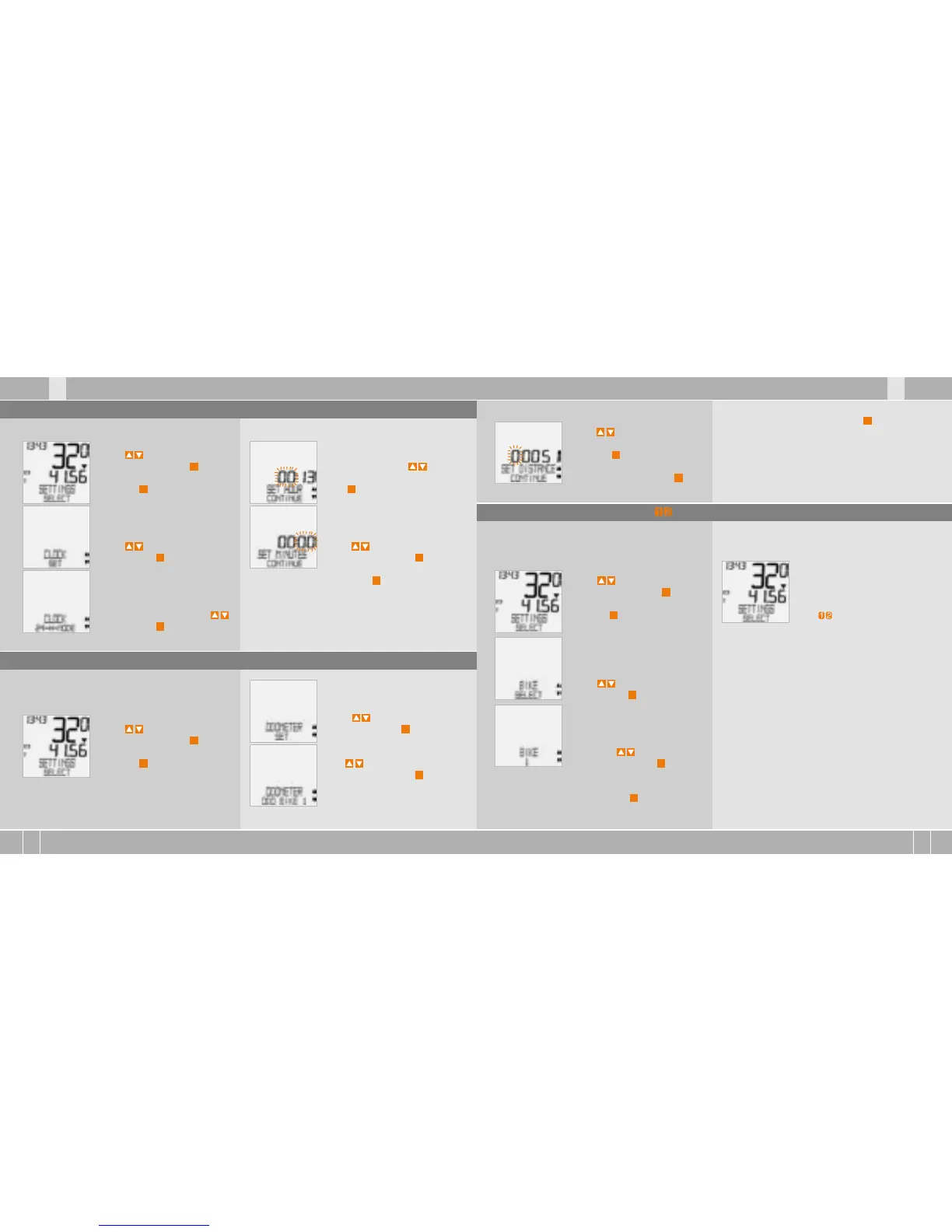
How to set the clock:
Using go to SETTINGS/
SELECT. Confirm with
M
.
You are now in setting mode
(pressing
C
for 3 seconds gets
you back to function mode)
Using go to CLOCK/SET.
Confirm with
M
.
CLOCK/24-H-MODE (you can
switch to 12-H mode using .
Confirm with
M
.
CLOCK...SET HOUR/CONTINUE
Set the hours using .
Confirm the hour setting
with
M
.
CLOCK...SET MINUTES/
CONTINUE. Set the minutes
using . Confirm the
minutes setting with
M
.
CLOCK/SET OK? Confirm with
M
.
The display confirms: CLOCK/SET DONE.
Automatic return to SETTINGS/SELECT.
5.3 Setting the clock
You can program the values on the distance coun-
ter at any time (e.g. at the end of a season).
Using go to SETTINGS/
SELECT. Confirm with
M
.
You are now in setting mode
(pressing
C
for 3 seconds gets
you back to function mode).
5.4 Setting the total kilometres
Using go to ODOMETER/
SET. Confirm with
M
.
ODOMETER/ODO BIKE 1
(use to go to setting for
BIKE 2). Confirm with
M
.
ODO BIKE 1 ...SET DISTANCE/
CONTINUE.
You can set the flashing digits
using .
To access the next digit, con-
firm with
M
. Repeat the steps
until the last digit on the right
is flashing. Confirm with
M
.
ODO BIKE 1/SET OK? Confirm with
M
.
The display confirms ODO BIKE 1/SET DONE.
Automatic return to SETTINGS/SELECT.
5.5 Switch from Bike 1 to Bike 2
Your VDO computer can be used on two bikes.
If you switch from bike 1 to bike 2, you must set the
computer to the bike being used before the ride.
Using go to SETTINGS/
SELECT. Confirm with
M
.
You are now in setting mode
(pressing
C
for 3 seconds gets
you back to function mode).
Using go to BIKE/SELECT
Confirm with
M
.
BIKE 1 (use to switch to
bike 2). Confirm with
M
.
BIKE 1 /SELECT OK? Confirm with
M
.
The display confirms BIKE/SELECT DONE
Automatic return to SETTINGS/SELECT
The selected bike 1 or 2) is
shown on the display bottom
left. ( )
ATTENTION, important note: When switching from
bike 1 to 2 or vice versa, the data for day‘s trip-
distance, ride time, average speed and max. speed
for the last trip are set to zero.



 To Next Page
 Loading...