12
13
Operation
Operation
DC PULSE SERIES EQUIPMENT
DC PULSE SERIES EQUIPMENT
8. Programming Parameter Indicators
6. Time Indicator (s)
7. Frequency Indicator (Hz)
These indicator lights will illuminate when programming.
Time indicator , when setting programm in gas pre-flow, up slope, down slope and gas
post-flow, this indicator will be on.
Frequency indicator, when the setting programm in pulse frequency ,this indicator will
be on.
2. Current Indicator
When setting programm in the peak current, base current, ending current and rem , this
current indicator will be on.
3. Percentage Indicator(%)
Percentage indicator, when setting programm in pulse duty cycle , this indicator will be
on .
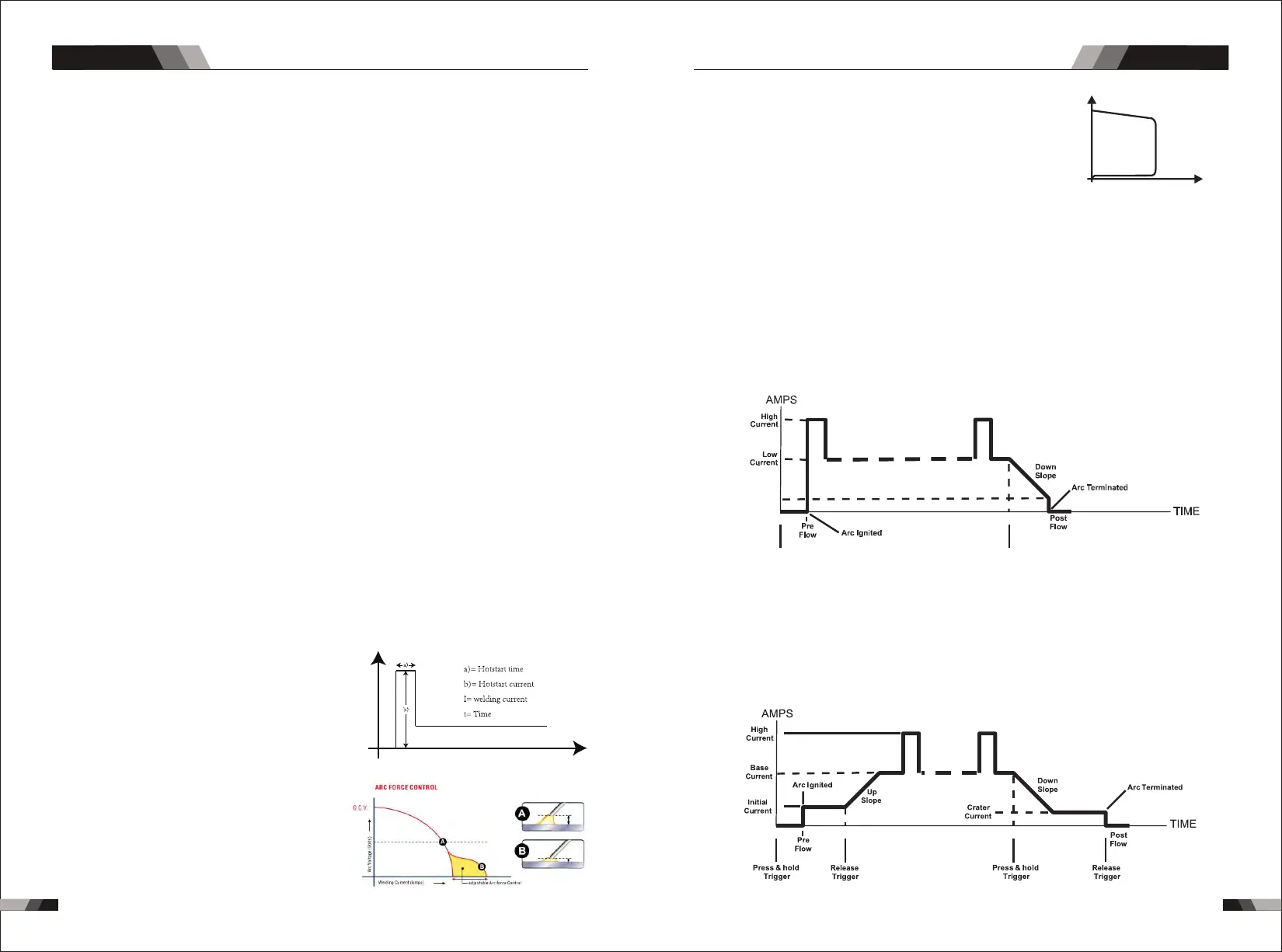
9. Hot Start
Arcforce Correction
Hot Start Function reliably ignites the electrode
and melts perfectly to ensure the best quality
even at the start of the seam. this solution makes
lack of fusion and cold welds a thing of the past
and significantly reduces weld reinforcement.
Adjust the hot start current here and the time here.
During the welding process, arcforce prevents
t h e e l e ct r od e st i ck i n g i n t h e w e l d p o o l w i t h
increases in current. this makes it easier to weld
large-drop melting electrode types at low current
strengths with a short arc in particular.
I
t
5. Thermal Overload Indicator Light
This welding power source is protected by a self resetting thermostat. The indicator will
illuminate if the duty cycle of the power source has been exceeded. Should the thermal
overload indicator illuminate the output of the power source will be disabled. Once the
power source cools down this light will go OFF and the over temperature condition will
automatically reset. Note that the mains power switch should remain in the on position
such that the fan continues to operate thus allowing the unit to cool sufficiently. Do not
switch the unit off should a thermal overload condition be present.
4. Power ON Indicator
The POWER ON indicator illuminates when the ON/OFF switch is in the ON position and
the correct mains voltage is present.
1. Digital Ammeter / Parameter meter
The digital Ammeter is used to display the actual output current of the power source. It is
also used to display Parameters in Programming Mode.
Depending on the Programming Parameter selected, the status indictor adjacent to the
Ammeter will illuminate to show the units of the programming parameter.
When welding, the Ammeter will display actual welding current.
Anti-stick prevents the electrode from annealing.
If the electrode sticks in spite of the arcrorce device, the
machine a u t o m atically s w i t c h e s o v e r t o the m i n i m u m
curren t w ith in abo ut 1 seco nd to pre ven t t he ele ctr ode
f r o m o ve r h e ati n g . In o rde r t o e as i l y s ep a r a te t he
e l e c tro d e a nd e le c t r ode h o l der t o p r ot e c t t he w el d e r.
Antistick
Antistick
U
I
10. JOB
11. SAVE
You can press JOB to select the memory records that you have saved before from 1-9.
Store welding function and parameters,can store 1-9 groups.
Minimum
Current
Press & hold
Trigger
Release
Trigger
Note: that when operating in GTAW (HF and LIFT TIG modes), the power source will
remain activated until the selected down slope time has elapsed
4T Latch mode this mode of welding is mainly used for long welding runs to reduce
operator fatigue. In this mode the operator can press and release the torch trigger and
the output will remain active. To deactivate the power source, the trigger switch must
again be pressed and released, thus eliminating the need for the operator to hold the
torch trigger.
12. Trigger Mode Control Button (HF TIG and LIFT TIG Mode only)
The trigger mode control is used to switch the functionality of the torch trigger between
2T and 4T.
output to be active.
Press and hold the torch trigger to activate the power source (weld). Release the torch
trigger switch to cease welding.
2T Normal Mode In this mode, the torch trigger must remain pressed for thewelding



 To Next Page