EasyManua.ls Logo

Vector VEC1090 A - User Manual

Vector VEC1090 A
12 pages
Print Icon
To Next Page IconTo Next Page
Loading...
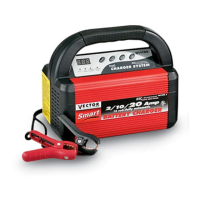
SMART AUTOMATIC
BATTERY CHARGER
OWNER’S MANUAL & WARRANTY INFORMATION
12 VOLT 2/10/20 AMPERE CHARGE RATES WITH
ALTERNATOR VOLTAGE CHECK AND BATTERY RECONDITION FUNCTIONS
• IMPORTANT SAFETY INSTRUCTIONS •
WARNING – RISK OF EXPLOSIVE GASES
1. WORKING IN VICINITY OF A LEAD-ACID BATTERY IS DANGEROUS. BATTERIES
GENERATE EXPLOSIVE GASES DURING NORMAL BATTERY OPERATION. FOR THIS
REASON, IT IS OF UTMOST IMPORTANCE THAT EACH TIME BEFORE USING YOUR
CHARGER, YOU READ THIS MANUAL AND FOLLOW THE INSTRUCTIONS EXACTLY.
2. To reduce risk of battery explosion, follow these instructions and those published by the battery
manufacturer and manufacturer of any equipment you intend to use in vicinity of battery. Review
cautionary markings on these products and on engine.
GENERAL BATTERY SAFETY
1. Use this charger for charging a 12 V LEAD-ACID battery only. It is not intended to supply power to a low voltage
electrical system other than in automotive applications. DO not use this battery charger for anything other than 12
volt rechargeable types of batteries. Charging batteries with other voltage ratings or “non-rechargeable” may burst
and cause injury to persons and damage to property.
2. Use of an attachment not recommended or sold by the battery charger manufacturer may result in a risk of fire, electric
shock, or injury to persons.
3. To reduce risk of damage to electric plug and cord, pull by plug rather than cord when disconnecting charger.
4. An extension cord should not be used unless absolutely necessary. Use of an improper extension cord could result in
a risk of fire and electric shock.
If extension cord must be used, make sure:
a. Pins on plug of extension cord are the same number, size, and shape as those of plug on charger.
b. Extension cord is properly wired and in good electrical condition; and
c. Wire size is AWG#12 (12 gauge) to 100 feet and AWG#10 for distances over 100 feet.
5. Do not operate charger with damaged cord or plug - replace the cord or plug immediately.
6. Do not operate charger if it has received a sharp blow, been dropped, or otherwise damaged in anyway; take it to
a qualified service technician.
7. Do not disassemble charger; contact a qualified service technician when service or repair is required. Incorrect
reassembly may result in risk of electric shock or fire.
8. To reduce risk of electric shock, unplug charger from outlet before attempting any maintenance or cleaning. Turning
off charger controls will not reduce this risk.
9. Do not operate charger in rain or snow or use when wet .
10 . Never charge a frozen battery.
SAVE THESE INSTRUCTIONS:
This manual contains important safety and operating instructions for battery charger Model VEC1090 A
4140 SW 28TH WAY, FT. LAUDERDALE, FL 33312 • TEL: 954-584-4446 • FAX: 954-584-5556 • TOLL-FREE 866-584-5504
VEC1090 A
California Proposition 65:
WARNING:
THIS PRODUCT CONTAINS CHEMICALS KNOWN TO THE STATE OF CALIFORNIA TO CAUSE CANCER OR REPRODUCTIVE TOXICITY
.
This device complies with Part 15 of the FCC Rules.

Questions and Answers

  • I
    Ivan MorrisJul 31, 2025
    What to do if Vector Battery Charger is not accepting a charge?
    • R
      Robert PerezJul 31, 2025
      If your Vector Battery Charger isn't charging the battery, ensure it's plugged into a working 110/120VAC outlet and the Power LED is on. Also, check the battery connections to ensure a solid connection at the battery terminal and/or vehicle chassis. Verify the battery isn't sulfated and that you've selected the correct charge rate. Finally, allow sufficient charging time according to the table in Appendix A (page 11).
  • C
    christian43Aug 6, 2025
    How to troubleshoot FAULT LED lit on Vector Battery Charger?
    • H
      Heather KerrAug 6, 2025
      If the FAULT LED is lit on your Vector Battery Charger, check the battery connections to ensure a good connection at the battery terminal or vehicle chassis. Try decreasing the charge rate by pressing the 2/10/20A button. If that doesn't work, try charging at a faster rate by pressing the 2/10/20A button. Also, the lit FAULT LED may indicate a shorted battery cell, an open battery cell, or a sulfated battery, which would require battery replacement or service. Ensure the fan is not blocked, as internal overheating can also trigger the FAULT LED. As an additional check, try charging another battery; if the FAULT LED doesn't light, the issue lies with the initial battery. Disconnect AC then reverse clamp locations on battery and frame.
  • D
    David MurilloAug 11, 2025
    What to do if Vector Battery Charger indicates internal short cell battery?
    • S
      Shannon CookeAug 11, 2025
      Take your battery to a certified automotive service center for evaluation.
  • P
    phammelissaAug 17, 2025
    What to do if Vector Battery Charger indicates a sulfated battery?
    • M
      Maria RobertsonAug 18, 2025
      Follow the instructions in Battery Recondition.
  • N
    Nathan MartinezAug 25, 2025
    Why Vector VEC1090 A Battery Charger charges slowly very cold battery?
    • J
      Juan FarmerAug 25, 2025
      The rate of charge will increase as the battery warms.

Summary

Safety Instructions and Warnings

Explosive Gas Hazards

Crucial warnings about explosive gases from lead-acid batteries.

General Battery Safety

Guidelines for safe handling and charging of lead-acid batteries.

Personal and Electrical Safety

Personal Precautions

Personal safety measures when working near batteries and charging.

Preparation and Placement

DC Connection and Operation

DC Connection Precautions

Safety steps for connecting the charger's DC output clamps to the battery.

Controls and Indicators

Status Codes and Functions

Fault and Operation Codes

Lists and explanations for fault codes (F01-F05) and operation codes (000, FUL).

Charge Rate Selection and Connection

Battery Recondition Mode

Alternator Voltage Check

Troubleshooting

Troubleshooting Fault Codes

Solutions for common issues indicated by fault LEDs and codes.

Warranty Information

Vector VEC1090 A Specifications

General IconGeneral
Output Voltage12V DC
Output Current10A
Battery Voltage12V
DisplayLED Indicators
Battery TypeAGM, GEL
Protection FeaturesOvercharge, Reverse polarity
Compatibility12V Lead Acid Batteries
Charging Current2A/10A

Related product manuals