OTDR Series e-Manual, D07-00-076P-RevC00 Page 70 of 107
7.1.3 Auto mode
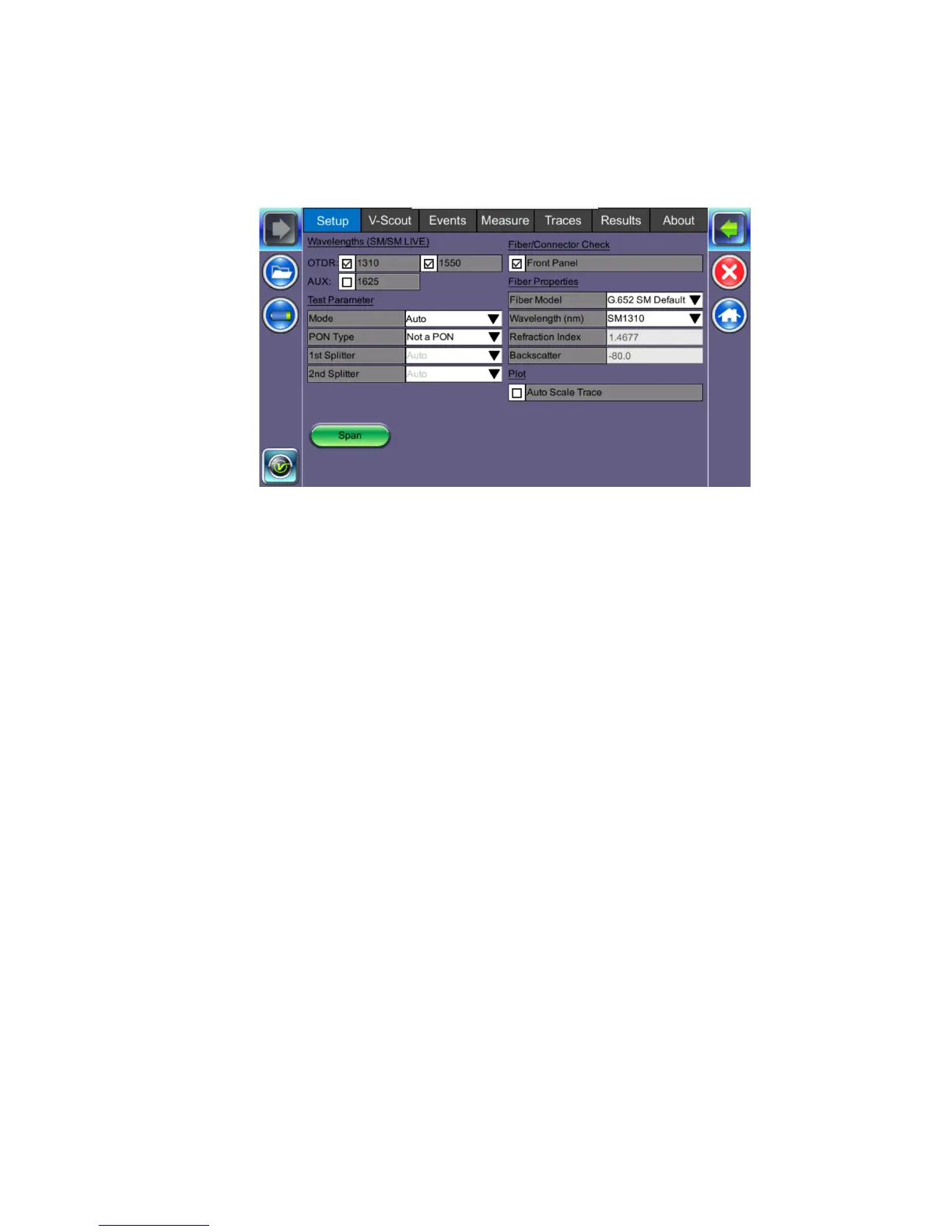
To set OTDR test parameters automatically, select Auto Mode under Test Parameters. In this
mode, the OTDR performs a short measurement and analysis of the fiber and automatically
determines optimal test settings. This process typically takes less than 5 seconds.
Auto mode is intended for inexperienced operators and only uses single pulse/wavelength.
However, the user must still specify if they are testing point-point or a point-to-multi-point
network which are typical of PON and RFoG networks. In Auto mode, the user can only set the
test wavelength/s. Distance Range, Pulse Width, Resolution and Measurement time are set
automatically by the unit.
• Test Wavelength/s
• (singlemode, multimode, singlemode live or filtered (1625 nm or 1650 nm))
• PON Type
• Not a PON (point-to-point)
• Manual PON - 1st Splitter and 2nd Splitter (1x2, 1x4, 1x8, 1x16, 2x2, 2x4, 2x8, or
2x32)
For information on defining splitter loss values, see
Splitters.
• Auto PON - Used only if user does not know their PON configuration
• Fiber properties - Refractive Index and Backscatter coefficient as provided by cable
manufacturer
• Real Time button - Used when checking initial connection, VFL testing or splice
alignment (On the FX150, press the right side rocker button to expand the menu on the
right side.)



 To Next Page