General Operation
Power on/off Press the ' ' button to turn the unit on. Press and hold ' ' -
to turn unit off.
Changing Modes Press 'SRC' button to switch between Radio, AUX IN, Bluetooth
Music, Media (USB).
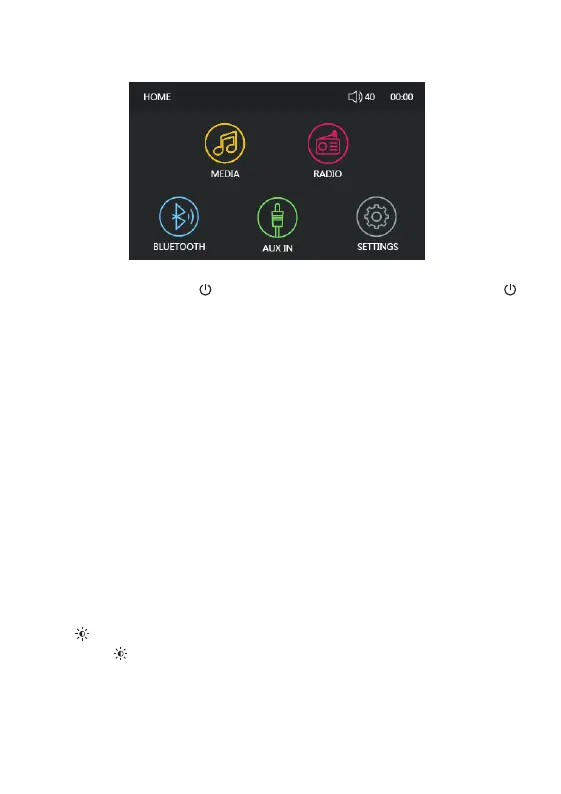
MENU- Press MENU button and use the Volume Knob to select between MEDIA,
RADIO, BLUETOOTH, AUX IN, SETTINGS. Short Press the Volume Knob to
confirm the selection.
Settings Select 'SETTINGS' from MENU to set System time, Time format -
(12/24 Hours), Language, Radio Region (Europe/American), Restore Factory
Setting, Software Version.
Volume Rotate the Volume Knob to adjust volume (AUX IN/MEDIA/RADIO -
/BT)
When the volume level interface is still on display, quick press the Volume Knob to
enter settings for BAS, MID, TREB, BAL, FAD, SUB, LOUD OFF, EQ in sequence,
then rotate the Volume Knob to set the required level. Use MENU/RETURN button
to quit setting, or wait for time out to return to the previous status.
MUTE/ Short press
Long press ' ' to switch off / on the button back light.
'MUTE' button to MUTE the stereo.


 To Next Page