28
HPS10 PersonalScope
TM
Meter Readout
READOUT SET-UP
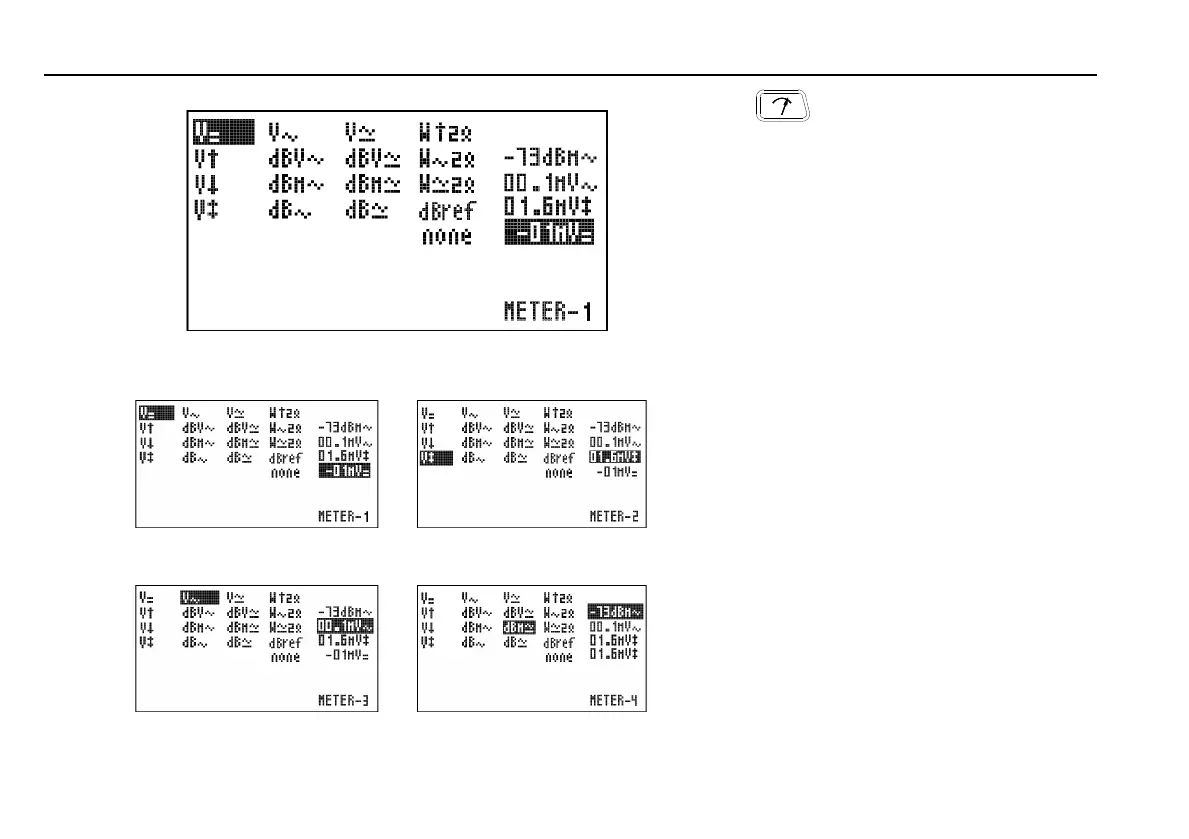
Press to call the meter 1 to 4 selection menu.
Make use of the cursorkeys to set a readout for
up to 4 meters
Setting up the measurement readouts:
1. Pressing the ‘meter’-key selects the first
readout location.
2. Press the cursorkeys to highlight the desired
readout function for meter1 readout. (Fig. 18)
3. Pressing the ‘meter’-key selects the second
readout location
4. Press the cursorkeys to highlight the desired
readout function for meter2 readout. (Fig. 19)
5. Pressing the ‘meter’-key selects the third
readout location
6. Press the cursorkeys to highlight the desired
readout function for meter3 readout. (Fig. 20)
7. Pressing the ‘meter’-key selects the fourth
readout location.
8. Press the cursorkeys to highlight the desired
readout function for meter4 readout. (Fig. 21)
9. Pressing the ‘meter’-key returns to scope
mode.
The Personal Scope offers many measuring
possibilities.
1. DC voltage measurement (V=).
This function enables the user to measure DC
voltages (only for DC input coupling)
F Useful tip for measuring DC voltages: The
readout can be set at zero (reference) for any
position on the screen by keeping the AC/DC
key pressed down. Always use the "run"
trigger mode for DC voltage measurement.
Fig 17
Fig 18 Fig 19
Fig 20 Fig 21
HPS10_man.pub
page 28
Wednesday, April 03, 2002 09:22
Composite













 To Next Page