16
5.3 SeTTiNGS modificATioN
5.3.1 procedure To modifY miN cfm SeTTiNG
• Go to MIN using (+/-) then press on the OK button for 4 seconds.
• Use (+/-) to increase/decrease CFM and OK to conrm.
5.3.2 procedure To modifY mAx cfm SeTTiNG
• Go to MAX using (+/-) then press on the OK button for 4 seconds.
• Use (+/-) to increase/decrease CFM and OK to conrm.
5.3.3 procedure To modifY opTioNS SeTTiNG
• Go to CFG OPT using (+/-) then press on the OK button for 4 seconds.
5.2 uNiT firST booT
prepArATioN
Follow these steps to ensure accurate measurements:
• Seal all the ductwork with tape. Close all windows and doors.
• Turn off all exhaust devices such as range hood, dryer and bathroom fans.
• If the installation is in any way connected to a ductwork of a central forced-air system, make sure that the central forced-air
system blower is ON. If not, leave central forced-air system blower OFF.
AuTo-bAlANciNG procedure
• Plug the unit and wait for the maximum CFM to display on the LCD screen. If unit is colder than ambient temperature, it is
normal to experience a 60 s longer boot-up since motors have to preheat.
• The maximum CFM will display on the LCD screen. Use (+/-) to adjust the CFM and OK to conrm.
• The minimum CFM will display on the LCD screen. Use (+/-) to adjust the CFM and OK to conrm.
• The house that ashes on the LCD screen indicates which side currently limits the airow (supply or exhaust). If the airow
reached is not sufcient, the installer can improve the installation to increase airow.
iNSTAllATioN coNfiGurATioN SelecTioN
• INS will display on the LCD screen. Choose among T-1, T-2, T-3, T-4 or T-5 following the installation conguration (Refer to
section 2.2 for more details).
• Auto-balancing is completed.
5.1 diSplAY oN lcd ScreeN
DISPLAY DEFINITION DISPLAY DEFINITION
STB Standby mode OVR 60 Override 60 min
MED MED speed OVR CNT Override by dry contact
INT Intermittent mode AHU Refer to section 6.3 for explanation
REC Recirculation mode
(Min, Med or Max speed)
HUM Humidistat or Dehumidistat override
AUT AUTO mode TUR Turbo mode
SMT SMART mode OTH Away mode or Scheduling mode
OVR 20 Override 20 min DEF Defrost mode
OVR 40 Override 40 min EXX or WXX
(XX referring to error or warning
number)
Refer to section 8 for each error/warning
explanation
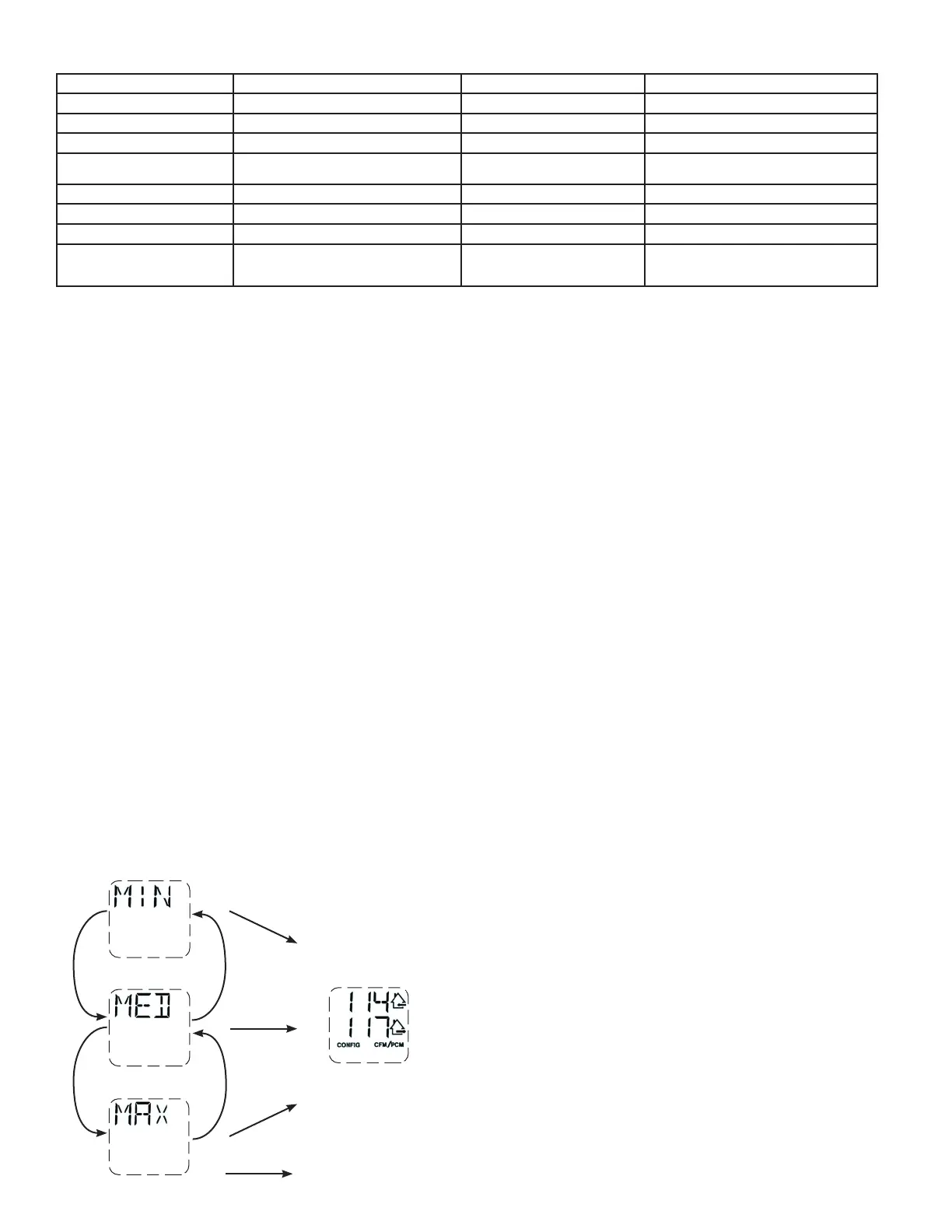
5.3.4 procedure To modifY iNdepeNdeNT AirflowS SeTTiNG
• Press simultaneously (+/-) buttons for 4 seconds.
+
+
-
-
OK
OK
OK
+
WHEN MAX DISPLAYS, PRESS
ON + BUTTON TO EXIT
INDEPENDENT AIRFLOWS
SETTING.
SUPPLY AIRFLOW VALUE WILL FLASH.
PRESS ON + BUTTON OR - BUTTON TO
INCREASE/DECREASE VALUE.
PRESS OK BUTTON.
EXHAUST AIRFLOW VALUE WILL FLASH.
PRESS ON + BUTTON OR - BUTTON TO
INCREASE/DECREASE VALUE.
PRESS OK BUTTON.


 To Next Page