3
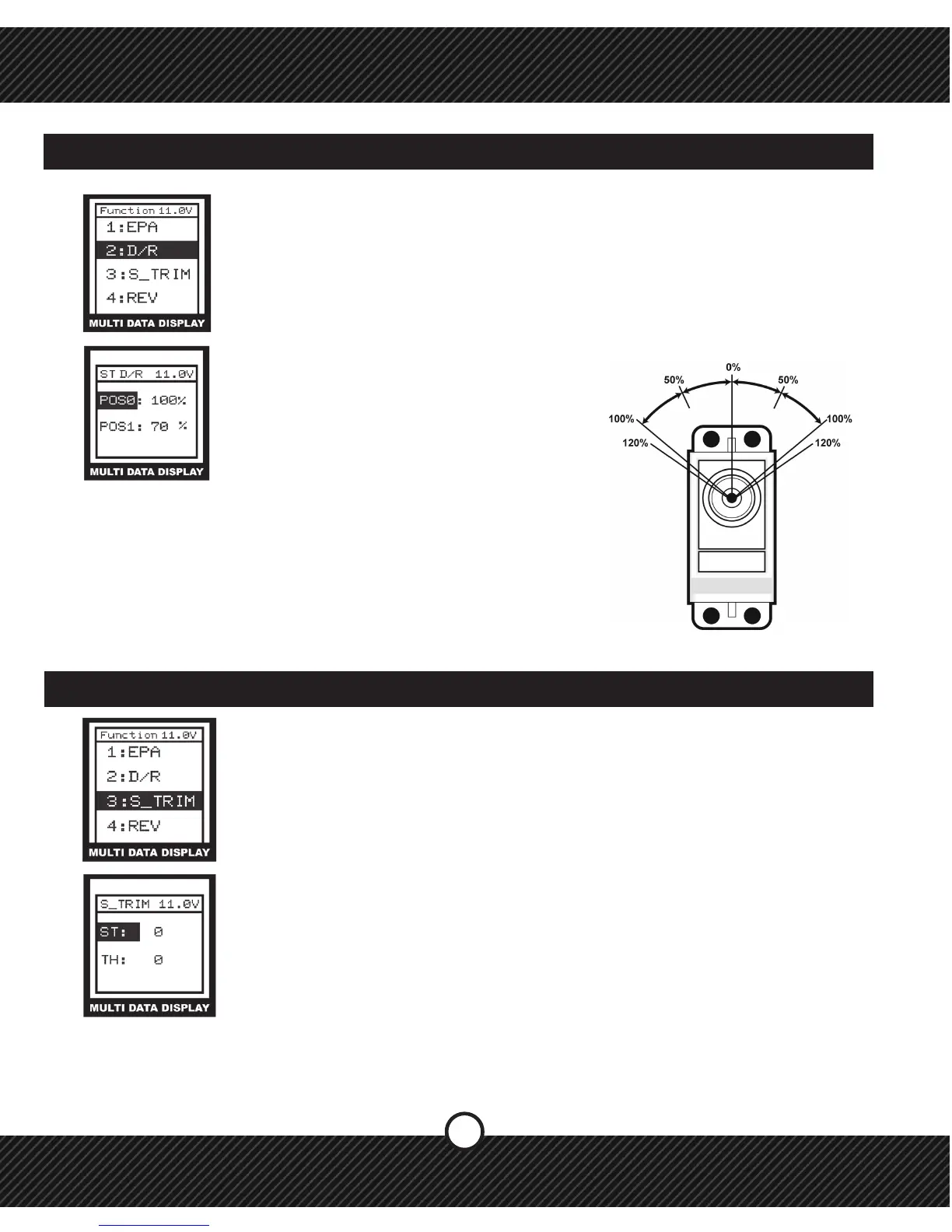
1) Press ENTER to see the FUNCTION MENU.
2) Use the +/- KEYS to highlight D/R and press
ENTER.
3) Press ENTER to select a setting.
4) Use the +/- KEYS to change the value.
5) Press EXIT to save and return to FUNCTION
MENU, press EXIT again to return to the
Main Screen.
2.2 FUNCTION / ST D/R (STEERING DUAL RATE)
ST D/R - Steering Dual Rate (ST D/R) - Creates two overall steering travel presets. Set
the primary value POS0 to an equal or lesser percentage of the steering EPA. Set the
secondary value POS1 to a lower percentage than the primary value POS0. Use the
ST D/R button on the grip of the transmitter to select between the two preset values.
Example, if the EPA steering value is 100% then set POS0 to 100% (or less) and set
POS1 to 70%. When the ST D/R button is pressed the steering travel value changes
between 100% and 70% This allows you to change the amount of steering while
driving.
SERVO
LEFT
BACK
RIGHT
FWD
TERMS: POS- POSITION
2.3 FUNCTION / S_TRIM (SUB TRIM)
The SUB TRIM feature allows for a function to be adjusted in 1% increments from the
center of travel point which is 0%. Use this to make small adjustments and to center a
servo during assembly. While driving, using the external TRIM BUTTONS for Steering
(ST) and Throttle (TH).
1) Press ENTER to see the FUNCTION MENU.
2) Use the +/- KEYS to highlight S_TRIM and press ENTER.
3) Press ENTER to select a setting.
4) Use the +/- KEYS to change the value.
5) Press EXIT to save and return to FUNCTION MENU, press EXIT again to return
to the Main Screen.
TERMS: ST-STEERING, TH-THROTTLE.


 To Next Page