11
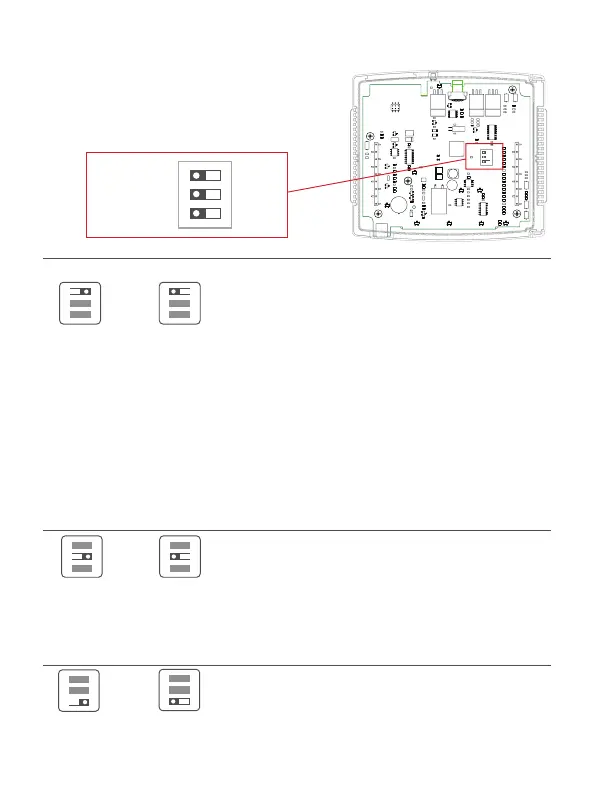
Step 8 - Check Dip Switch
1) Ensure which switch is correct for
your system. Dip switches are located
on the back of the thermostat
HP
OR
GAS/EL HP
ON
1 2 3
ON
1 2 3
OR
O B BO
ON
1 2 3
ON
1 2 3
GAS ELEC
OR
GAS ELEC
ON
1 2 3
ON
1 2 3
1
GAS
O
GAS/EL
ELEC
B
HP
ON
23
1
GAS
O
GAS/EL
ELEC
B
HP
ON
23
1. When GAS/EL or HP is set for GAS/EL:
This switch (GAS or ELEC) controls how the
thermostat will control the Fan (G) terminal in
heating mode. When GAS is chosen, the thermostat
will not energize the Fan (G) terminal in heating.
When ELEC is chosen the thermostat will energize
the fan in heating.
2. When GAS/EL or HP is set for HP:
This switch (GAS or ELEC) defines the Aux Heat type.
When GAS is chosen, the auxiliary heat will not be
allowed to run during heat pump operation. When
using a Dual Fuel system, set this switch for GAS
(T3900). When ELEC is chosen, up to two stages of
auxiliary strip heat will be allowed to run.
For Heat Pump Only
When the GAS/EL or HP dip switch is configured for
HP, this dip switch (O or B) must be set to control
the appropriate reversing valve. If O is chosen,
the W1/O/B terminal will energize in cooling. If
B is chosen, the W1/O/B terminal will energize in
heating.
This dip switch configures the thermostat to control
a conventional gas/electric system or a heat pump.
If your system is anything other than a heat pump,
leave this switch set for GAS/EL.


 To Next Page