7
Controls and Connections (Cont.)
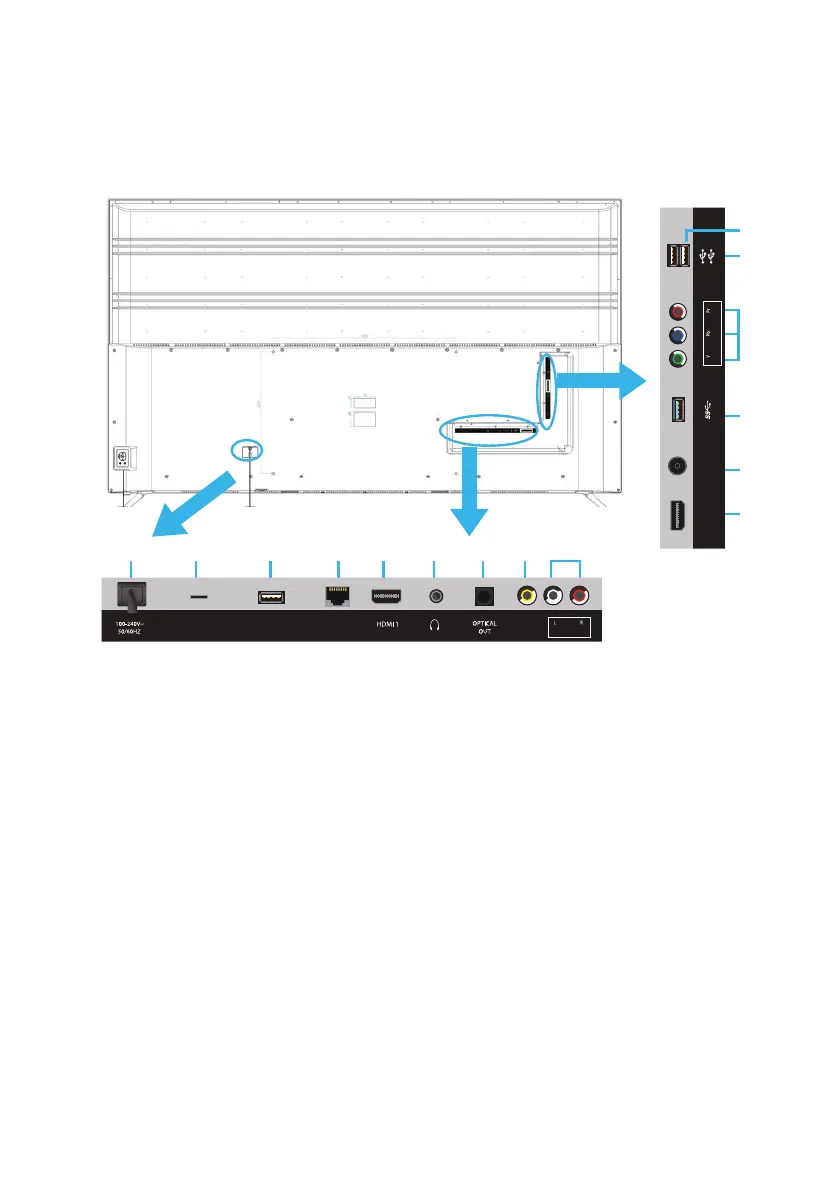
Main Unit Back View Controls and Sockets
1. POWER CORD: 1A: Model VPS75UHD, 1B : Model VPS55UHD
2. MICRO SD CARD INPUT (for Model VPS75UHD only):
3. USB: Connect a USB storage device to USB (TV) for PVR recording and
multimedia file playback.
4. LAN INPUT (Local-Area Network): For connecting to the internet.
5. HDMI 1 (ARC) / HDMI 2: Provides a digital video/audio connection
between the TV and any HDMI devices.
6. HEADPHONES OUTPUT: Connect your headphones via a 3.5mm
connector.
7. OPTICAL DIGITAL AUDIO OUTPUT: Connect to an external digital audio
device.
8. AV (COMPOSITE VIDEO) INPUT: Supports SD picture quality
connections.
9. L-R AUDIO INPUTS: Shared with AV and Y/Pb/Pr video inputs.
10. ANTENNA INPUT: For connection of the external antenna.
11. Y/Pb/Pr INPUT (COMPONENT): Supports both SD (Standard Definition)
and HD (High Definition) picture quality.
12. USB FOR AIRMOUSE DONGLE
2
1
3 4 5 6 7 8 9
(4K/ 30Hz) (4K/ 30Hz)
MICRO SD
USB
(TV)
LAN
VIDEO
(ARC)
(AUDIO IN)(COMPOSITE)
5
10
3
11
(4K/ 60Hz)
HDMI 2
ANT
(ANDROID)
(AIR MOUSE)
(COMPONENT)(TV)
3
12
1A
B



 To Next Page