vi
Remote Control (Cont.)
TIPS:
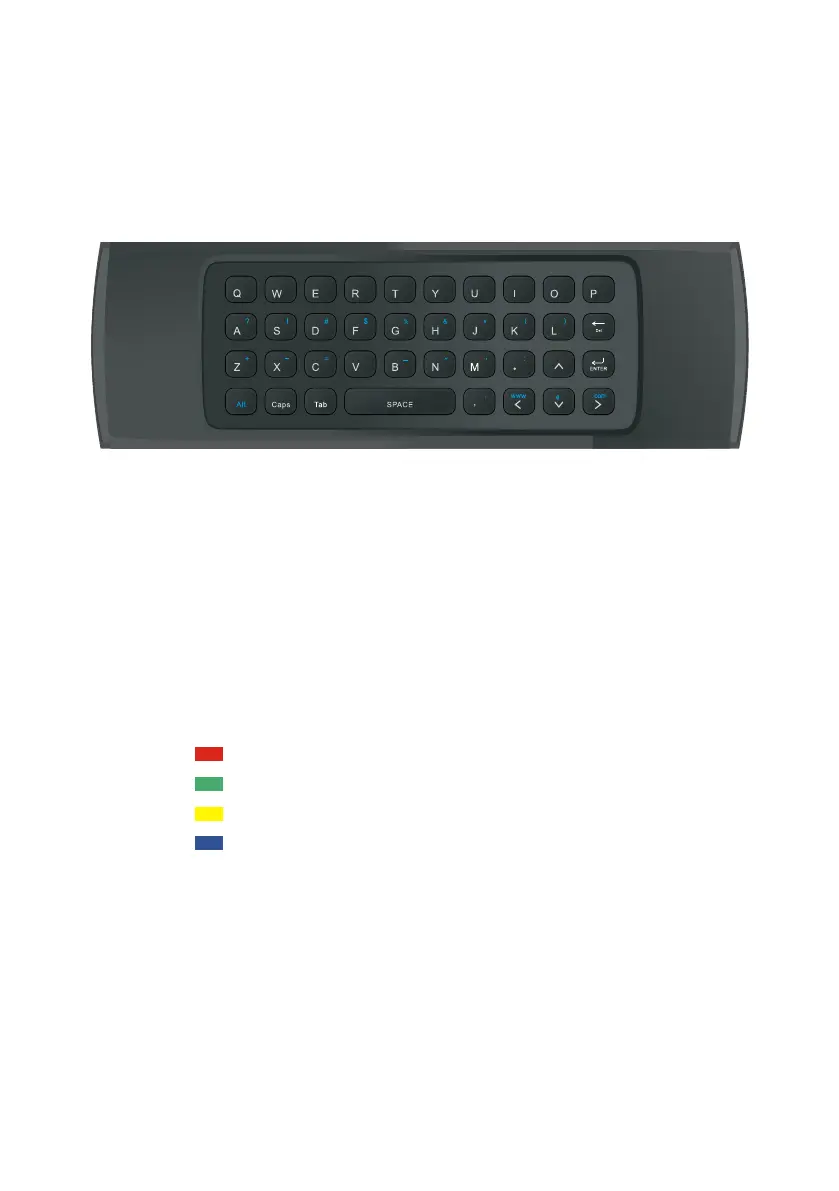
• To enter UPPERCASE letters, press the ‘Caps’ button first, followed by the
chosen letter button.
• To enter the numbers and characters shown on the keys in yellow, press the
‘Alt’ button first, followed by the chosen letter button.
• As an alternative to the remote control keyboard, you can use the on screen
keyboard.
• Press the up/down/left/right navigation key to select characters.
• Press the RED button for ENTER function.
• Press the GREEN button to move the cursor to the left.
• Press the YELLOW button to move the cursor to the right.
• Press the BLUE button for backspace function.
NOTE: If you experience difficulty with connection or range of the air mouse
or keyboard features of the remote, please connect the USB air mouse
dongle extension cable to the USB port labelled ‘Air Mouse’ at the rear of the
T V.
NOTE: USB air mouse dongle must be connected for keyboard to work.
There is a built-in keyboard on the back of the remote control for easy
operation (for Smart Hub).
3
4
5
6 7 8 9 0
1 2
/
07
1E
1A 1F 58
16 1B 54
12 17
50
1
3
5B
03
1C
02 5F 40
5E
18
55
56 57
14
0A
06
48
44
52
33
NA
43/53
4E
4F/09
5C
49/15
11
4A
60
10
4D
0C
4C
VO L
+
VO L
-
CH
+
CH
-
Customer Support
0800 883 301



 To Next Page