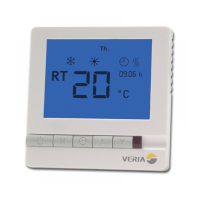
8
Basic functionality
SETTING THE CLOCK
With the thermostat turned on.
Press “ ” once, hour will be ash.
Use the Up/Down key to select the hours.
Press “ ” again, minute will be ash.
Use the Up/Down key to select the minutes.
Press “ ” button again, till the week day ashes.
Use the Up/Down key to select the day of the week.
After setting week day do not press any further buttons and the
thermostat will go back to normal operating mode mode.
SETTING THE FLOOR TEMPERATURE MAX. LIMIT
This function is used for wooden oors mainly and is only available
in program modes using the oor sensor (program mode 3 and 5)
The temperature setting should be maximum 35C, which is also the
default set point of the thermostat.
If you choose to control the oor temperature solely by the oor
sensor (program mode 2) the max. oor temperature is set for 35C
and can‘t be changed.
Change the oor temperature max. limit (program mode
3 and 5)
With the thermostat turned o.
Hold the “M” button for 10 seconds until the display shows “ ”.
Now let go of the button “M” and the display will show “SET”.
You are now prompted to enter the maximum oor temperature
(temperature range 20°C-45°C)
EN


 To Next Page