Configuration and operation
LD8 Operations Manual 13
4 Configuration and operation
There are two ways in which the LD8 can be configured, by using VERIPOS Quantum software, or by using the
LD8 WebUI. Quantum must be used if being used for system monitoring. If Quantum is not available, system
configuration must be performed through the WebUI, which features a terminal application that can be used for
sending commands.
This section introduces the WebUI and details how to perform LD8 system configuration using both terminal
commands and, where available, the WebUI. For configuration with Quantum please refer to the Quantum User
Manual.
4.1 WebUI status
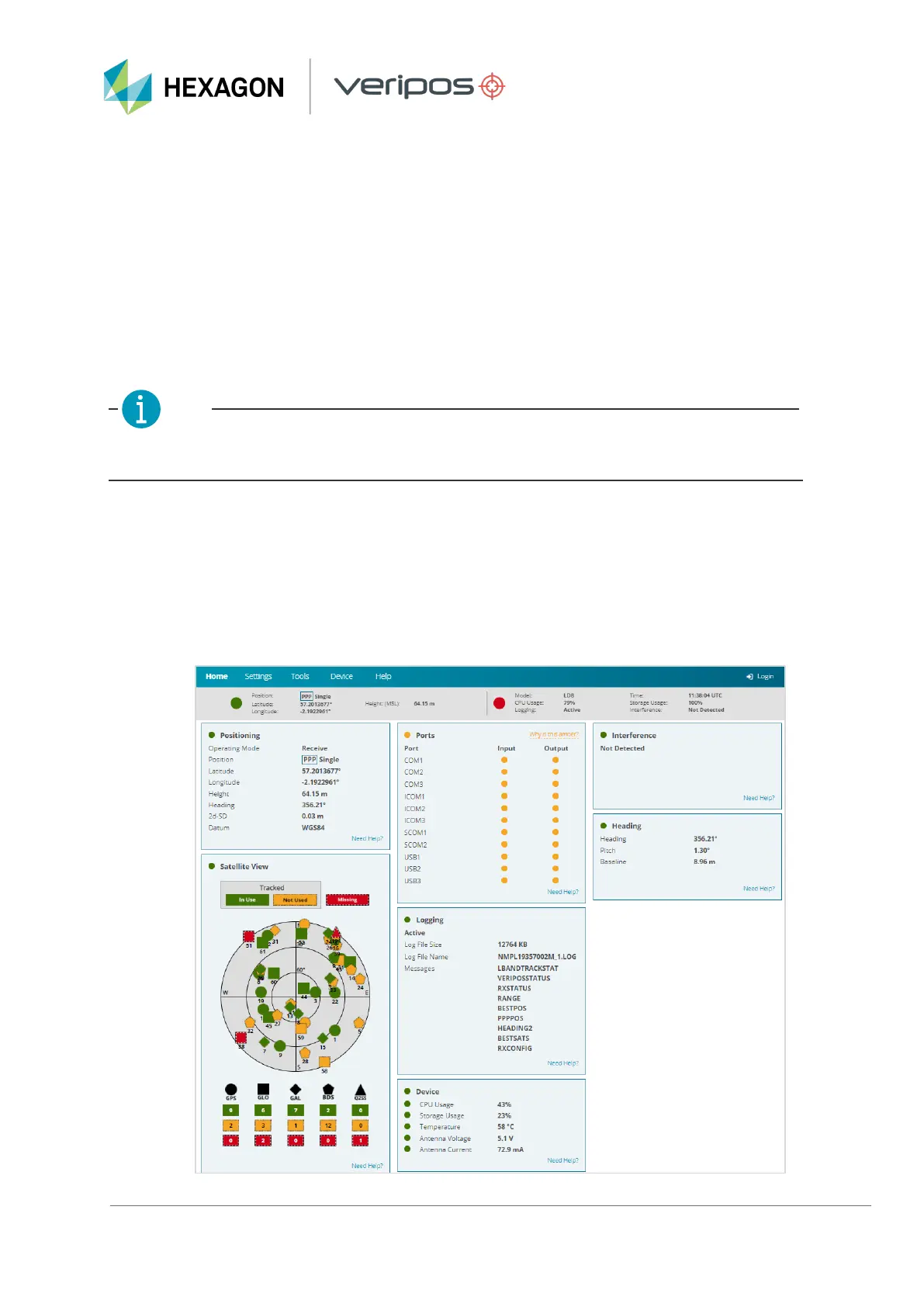
Once connected to the LD8 via Ethernet and the WebUI has been loaded, the user will be presented with the
LD8 WebUI Home > Status page. This page displays information relating to the status and behaviour of the
system. To gain access to any other pages or functionality it is necessary to use the Login option, found in the
top right-hand corner of the page. To login to the system locate the LD8 serial number, which typically starts with
'NMPL' and can be found on the underside of the unit. When prompted, use the LD8 serial number as the
password and click Log In. Changing the password is possible, as detailed in section LD8 password.



 To Next Page