Configuration and operation
LD8 Operations Manual 16
one beam should be available. A global map with a beam overlay can be found in the Appendix, however the
below table can be used as a general guide:
North America, Gulf of Mexico, South America
North America, Gulf of Mexico, South America, North Sea, West Africa
North Sea, Mediterranean Sea, Africa, Persian Gulf, Caspian Sea
Asia, Indian Ocean, East Africa, Persian Gulf, Caspian Sea, East Mediterranean
Asia, Australasia, Indian Ocean
The VERIPOS software Verichart can be used to assess L-band availability by creating coverage charts specific
to a work location.
Where possible, different VERIPOS receiver units on the same vessel should be set to different beams to
maximise redundancy.
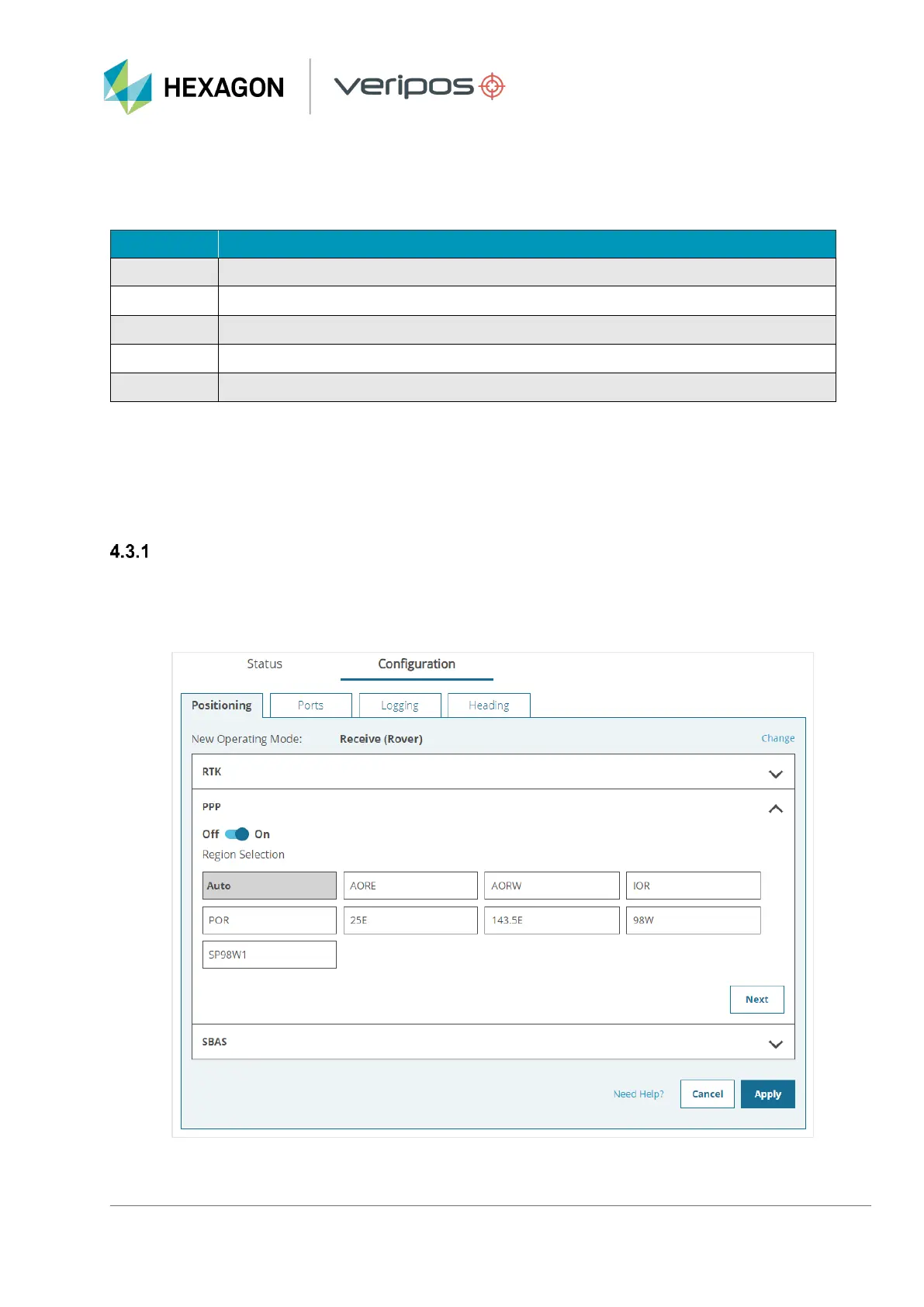
Selecting beam via WebUI
To select Auto beam (or a single beam if required) navigate to Configuration > Positioning and click Receive
(Rover), followed by Next. On the next page expand the PPP section and select either Auto or an available
beam, followed by Apply:



 To Next Page