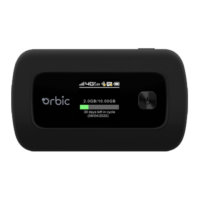
This document is a Quick Start Guide for the Orbic Speed 4G LTE mobile hotspot device, provided by Verizon. It offers essential information for setting up, operating, and maintaining the device, ensuring users can quickly get connected and troubleshoot common issues.
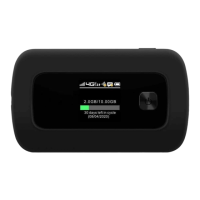
The Orbic Speed is a portable 4G LTE mobile hotspot designed to provide wireless internet access to multiple devices. Its primary function is to convert a 4G LTE cellular signal into a Wi-Fi network, allowing smartphones, tablets, laptops, and other Wi-Fi-enabled devices to connect to the internet. The device is compact and features a small display screen that shows important status information, making it easy to monitor its operation.
Usage Features:
The device's general appearance includes several key components and indicators:
- Menu button: Used for navigating through the device's on-screen menus.
- Signal status icon: Indicates the strength of the cellular signal.
- Network mode icon: Shows the current network mode (e.g., 4G LTE).
- Wi-Fi signal icon: Displays the status of the Wi-Fi network broadcast by the device.
- Unread message icon: Notifies the user of unread messages.
- Battery icon: Shows the current battery level.
- Power button: Used to turn the device on/off and select actions in menus.
- USB Type C port: For charging the device.
- Battery cover: Protects the battery compartment.
- Cutout to remove back cover: Facilitates access to the battery and SIM card slot.
The display layout and icons provide a clear overview of the device's status:
- Signal status icon: Indicates cellular signal strength.
- Network mode icon: Shows the active network technology.
- Send/receive data activity arrows: Illustrate ongoing data transfer.
- Wi-Fi signal and number of access users: Displays Wi-Fi status and how many devices are connected.
- Unread message maximum is 100: Indicates the presence of unread messages, with a maximum capacity of 100.
- Battery capacity icon: Changes to red if the battery capacity is below 20%, alerting the user to recharge.
- Data statistics, used/total: Shows the amount of data consumed versus the total available data in the current billing cycle.
Navigating through the Orbic Speed's interface is straightforward. Users can use the MENU and POWER buttons to select actions displayed at the bottom of the screen. The device features 8 main menu screens in addition to the home screen, providing access to various settings and information such as Device Info, 2.4GHz Wi-Fi Info, 5GHz Wi-Fi Info, Back Home, USB Options, Software Update, and Device Settings.
Setting up a Wi-Fi connection involves pressing and holding the power button for 3 seconds until the welcome logo appears and Wi-Fi is enabled. Terminal devices can then search for the Wi-Fi network (SSID: "Verizon-RC400L-CE") and connect using the password, which can be found on the 2.4GHz or 5GHz Wi-Fi Info screens next to the lock icon.
The Device Management Website (accessible via http://192.168.1.1 or http://my.jetpack) allows users to log in with the default username "admin" and the Wi-Fi password to modify settings, including the username and password. To change the username and password, users navigate to Settings, then Management page, select System Admin, enter current and new credentials, and click "Apply."
Troubleshooting common issues is also covered. If the SSID is visible but connection fails, users should verify the password and check for WPS security settings on their PC. For no service, users are advised to check local signal stability, hardware, and move the device to a location with better reception, such as near a window. They should also ensure the SIM card is active and properly inserted. If the username or password is forgotten, it can be found on the device's Wi-Fi info screen or reset to factory defaults by pressing the reset button for 5 seconds. Data connection failures typically indicate no network coverage, prompting users to move to a location with better reception. For overseas internet connection issues, users should check if mobile data roaming is enabled in the web UI settings.
Maintenance Features:
The guide emphasizes proper handling and care for the Orbic Speed and its battery.
- SIM Card and Battery: The device comes with a preinstalled 4G LTE SIM card that should not be removed while the device is powered on to prevent damage. The SIM card should be protected from bending, scratching, static electricity, water, or dirt.
- Inserting and Charging the Battery: The battery is inserted by aligning its contacts with the terminals in the compartment and pushing it down until it clicks. The battery cover is then placed over the compartment and pressed until it clicks into place. The device is charged using the provided charger and USB Type-C cable, plugged into an electrical outlet.
- Removing the 4G LTE SIM Card: To remove the SIM card, the device must first be powered off, the battery cover removed, and the battery taken out. The SIM card can then be gently removed from its slot.
- Restore Factory Settings: If Wi-Fi settings are uncertain, users can restore factory defaults either through the Device Management Website or by pressing and holding the "Reset" button in the battery compartment for 5 seconds. This action will delete all user-defined Wi-Fi settings and restore Admin and Wi-Fi settings to their factory defaults.
- Troubleshooting: If the device is unresponsive, a reboot can be performed by pressing the "Power" button for about 8 seconds. Restoring factory settings is another troubleshooting step.
- General Device Care: Users are advised not to use the device immediately after a sudden temperature change to avoid moisture buildup. The device should be handled carefully, avoiding drops, bends, or strikes. Only qualified technicians should perform repairs. The recommended operating temperature range is -20°C to 55°C, with a humidity range of 5% - 95%.
- Battery Handling: To prevent excessive heat, fire, or explosion, the battery should not be short-circuited, stored in hot areas, or disposed of in fire. Disassembling or modifying the battery is prohibited. For long-term storage, the battery should be removed and kept in a cool, dry place. Damaged or worn-out chargers/batteries should never be used. Worn-out batteries should be returned to the provider or placed in an approved recycling container, not regular trash. If the battery is broken, users should keep away from it and wash skin with abundant fresh water if contact occurs, seeking medical help if necessary.
- Safety Guidelines: The guide warns against electromagnetic interference with other electronic devices, especially medical devices like hearing aids and pacemakers (maintain >20 cm distance). Users should be aware of usage limitations in hazardous environments (e.g., oil warehouses, chemical factories) and turn off the device when required. Electronic transmitting devices are forbidden in aircrafts, gas stations, and hospitals. The inner antenna area should not be touched unnecessarily as it affects performance. The device should be kept out of reach of children. Metallic parts should not be touched during operation to avoid burns.
- Accessory Use: Only original or authorized accessories should be used to avoid affecting performance and violating regulations.
- Environmental Factors: The device should not be used near metallic structures or establishments that emit electromagnetic waves, as this can influence signal reception. It is not waterproof and should be kept dry and stored in a shady, cool place.
This comprehensive guide ensures that users have all the necessary information to effectively use and maintain their Orbic Speed 4G LTE mobile hotspot.

 Need help?
 General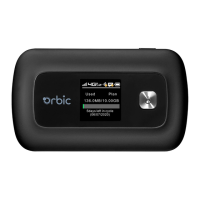

 To Next Page