EVX-534/-539 VHF Service Manual 16
Perform the following alignments as needed.
symbol deviation
This parameter is to align the deviation of the digital mode articially.
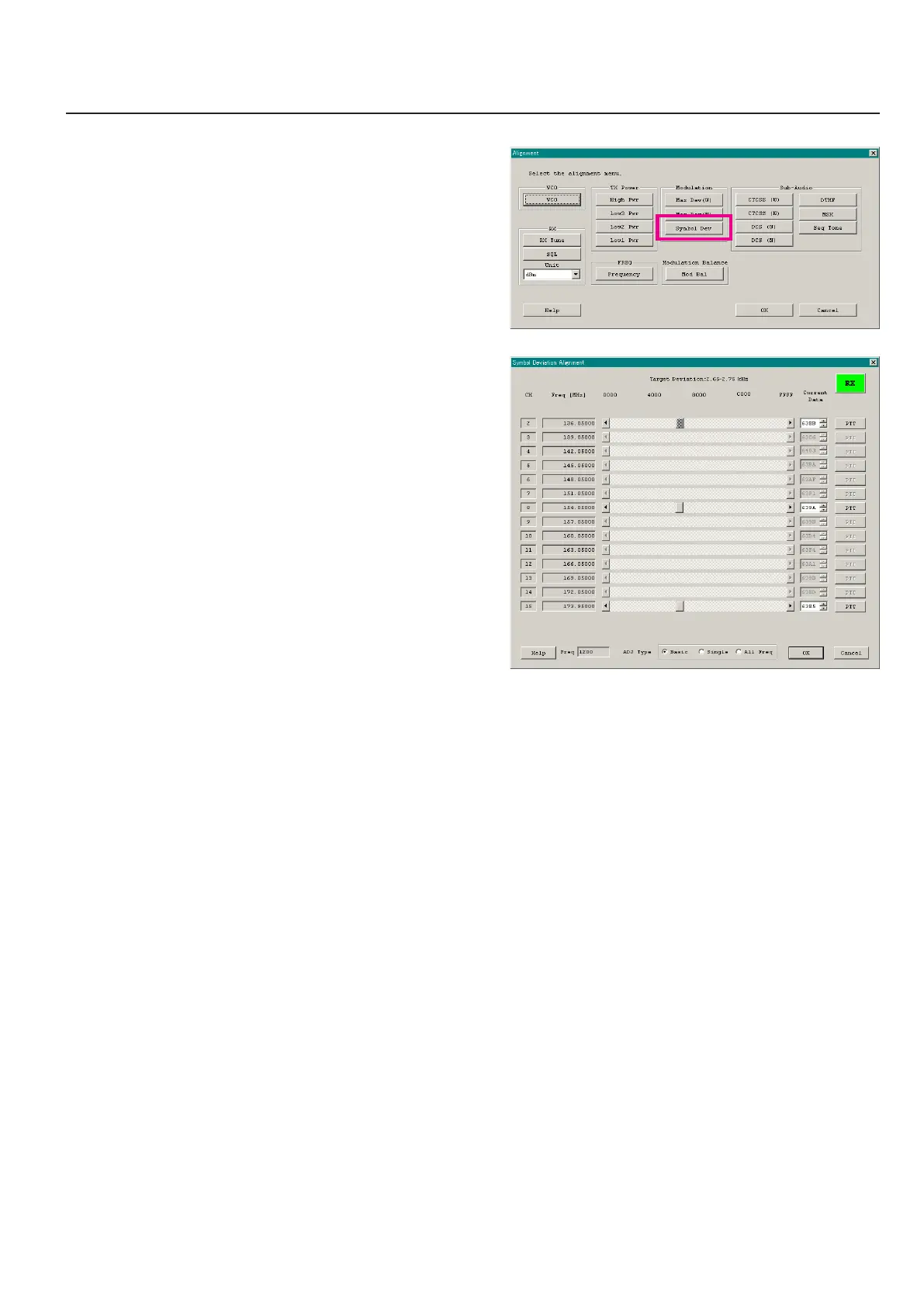
1. Press the “Symbol Dev” button to open the “Symbol Deviation
Alignment” window.
2. Click the “PTT” button on the desired channel. The radio starts
to transmit on the selected channel.
3. Set the value to get Target Deviation (which is indicated on the
screen) on the deviation meter according to the following ways:
l
Dragging the slide bar
l
Clicking the arrow buttons
l
Pressing the up-down key of the computer’s keyboard
l
Entering the value in the entry box from the computer’s
keyboard
4. After getting the desired deviation, click the “PTT” button or
press the “SPACE” bar to stop transmitting.
5. Click the “OK” button to finish the Symbol Deviation align-
ment and save the data.
You may select the alignment type from the “Radio” button (ADJ
Type) located at the bottom of the screen, as needed.
Basic: “Low-edge / band center / high-edge” and select the
channel for alignment (Default).
Single: Alignment value changes only on the selected chan-
nel.
All Freq: Alignment value changes on all channels.
ê
Alignment


 To Next Page