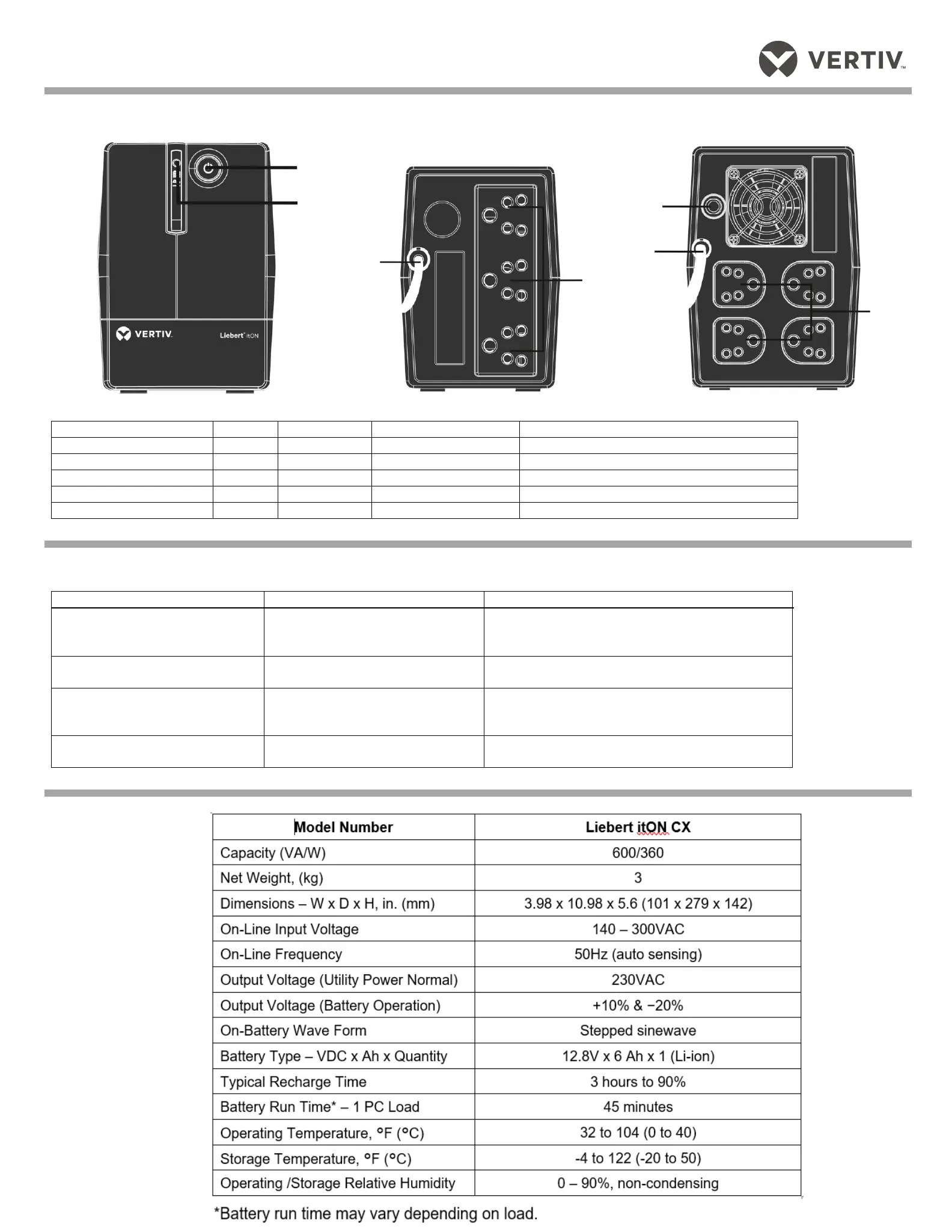
10BUPS CONTROLS AND CONNECTIONS
Figures 1 – Front Panel LEDs
Figure 2 – Rear Panel
CX 600VA
UPS Status, Alarm Conditions and Alerts
UPS shuts down immediately
9BTROUBLESHOOTING
If the UPS malfunctions during operation, check the following chart for proper adjustment. For further assistance, please contact your local representative.
Utility is normal, but LED is not
illuminated.
Battery capacity may be low.
The UPS battery reached end of life.
The UPS may not be turned on.
Recharge the UPS at least 6 hours.
Replace the battery with the same type of battery.
Press the On/Off button to turn on the UPS.
Alarm buzzer beeps continuously
although utility power is normal.
The UPS may be overloaded.
Disconnect some equipment from the UPS.
UPS does not provide expected
backup time.
The UPS may be overloaded
Battery voltage may be low.
The UPS battery reached end of life.
Disconnect some equipment from the UPS.
Recharge the UPS at least 6 hours.
Replace the battery with the same type of battery.
Utility is normal, but LED flashes.
The power cord may not be connected
properly.
Connect the power cord securely into a wall outlet.
Battery backup
outlets (3)
Battery backup
outlets (3)
Battery
backup
outlets (4)



 To Next Page