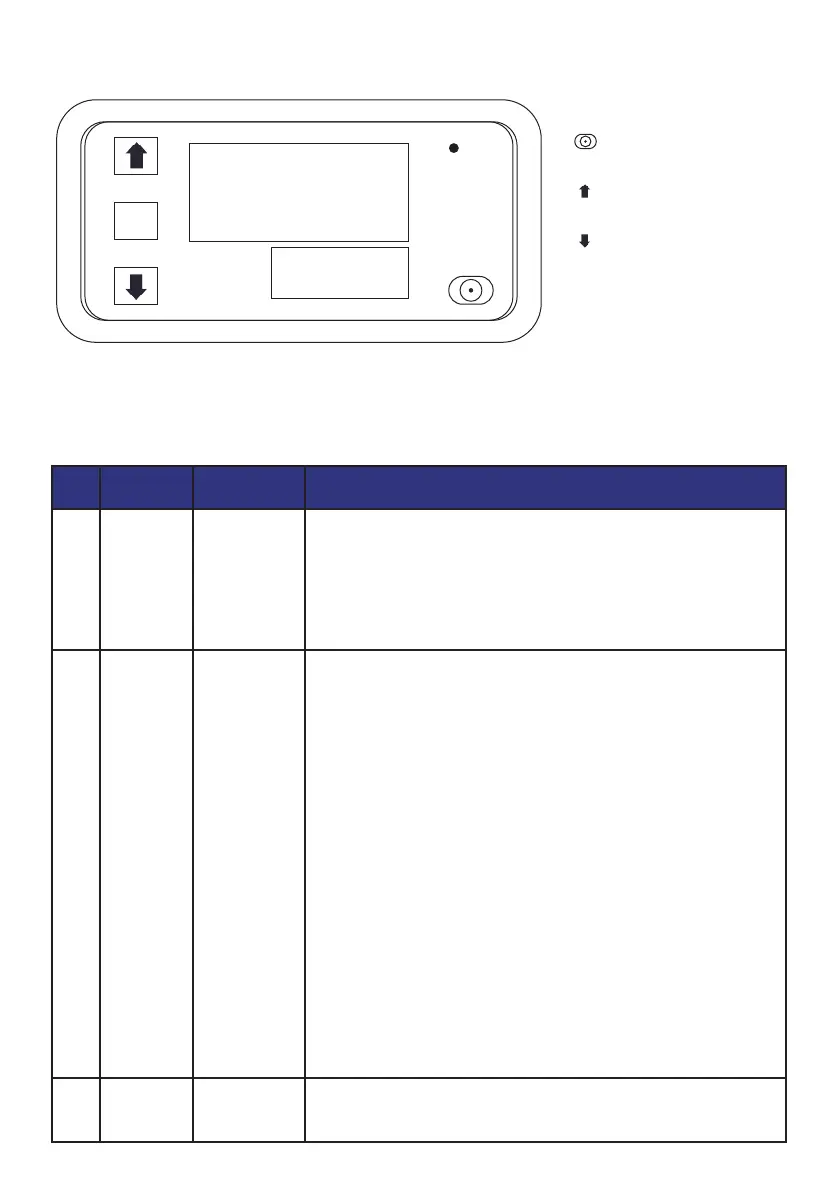
DISPLAY PANEL AND BUTTONS
INSTRUCTIONS FOR KEY OPERATION
Press the SET button 1 time to enter the time setting mode, and the red
digital tube flashes. Adjust the timing time T1 by pressing the key plus or
subtracting the key button, T1 is set and short press SET again, the green
digital tube flashes, the timing time is set by the key plus or minus T2, T2
time is set, short press the SET button again, the system will save the
memory when setting the question or Yuan Shoufu 0s, O5B for the tracing
brake to automatically remember and save the data.
Press and hold SET to enter the parameter setting mode. There are two
sets of parameters for users to select PO and P1. In the current mode,
short press SET to switch between P0 and P1. Under the PO parameters,
you can set the timing mode that suits you by pressing the button to add
or subtract. Under the P1 parameter, the working mode can be set by
pressing the button to add or subtract.
P0--0: T1 timing time mode is seconds
PO--1:T1 timing time mode is minutes
PO--2: T1 timer time mode is time
P1--0: relay pick-up after delay T1 time (T1 timing) P1-1: relay release
after delay T1 time (T1 timing) P1-2: relay pick-up after delay T1 time (T1
timing), relay release (T2 timing) after delay T2 time, end.
P1--3: Relay release (T1 timing) after delay T1 time, relay engagement
(T2 timing) after delay T2 time, and end.
P1-a4: Relay engagement (T1 timing) after delay T1 time, relay release
(T2 timing) after delay T2 time, and repeat cycle.
P1--5: Relay release after delay T1 time (T1 timing), relay engagement
after delay T2 time (T2 timing), repeat cycle.
For example, for example, a customer needs to turn on the computer for
10 seconds, turn off it for 20 seconds, and keep looping.
T1 setting time 10, T2 setting time 20PO-0 (T1 timing range is seconds)
P1-5 (the working mode of the timer is to work first and then stop and keep
looping)
Due to the wrong setting, the data is messed up, and when it cannot be
set, you can choose to restore the factory language and leave it on and
then power it on.
1
SORT KEYSTROKE FUNCTION
DESCRIPTION OF THE OPERATION
2
3
SET
▲+SET
SET
Time setting
mode
Parameterization
mode
Factory reset
8.8.8
8.8.8
SET
OUT
PV
SV
key:Move the key down
SETkey:Set the key
key:Reboot key
key:Adjust the up key
Before use, the user is first reminded to pay attention to a point, the data must be set and wait for 6s, and the module
will automatically save the data after 6s


 To Next Page