Refrigeration
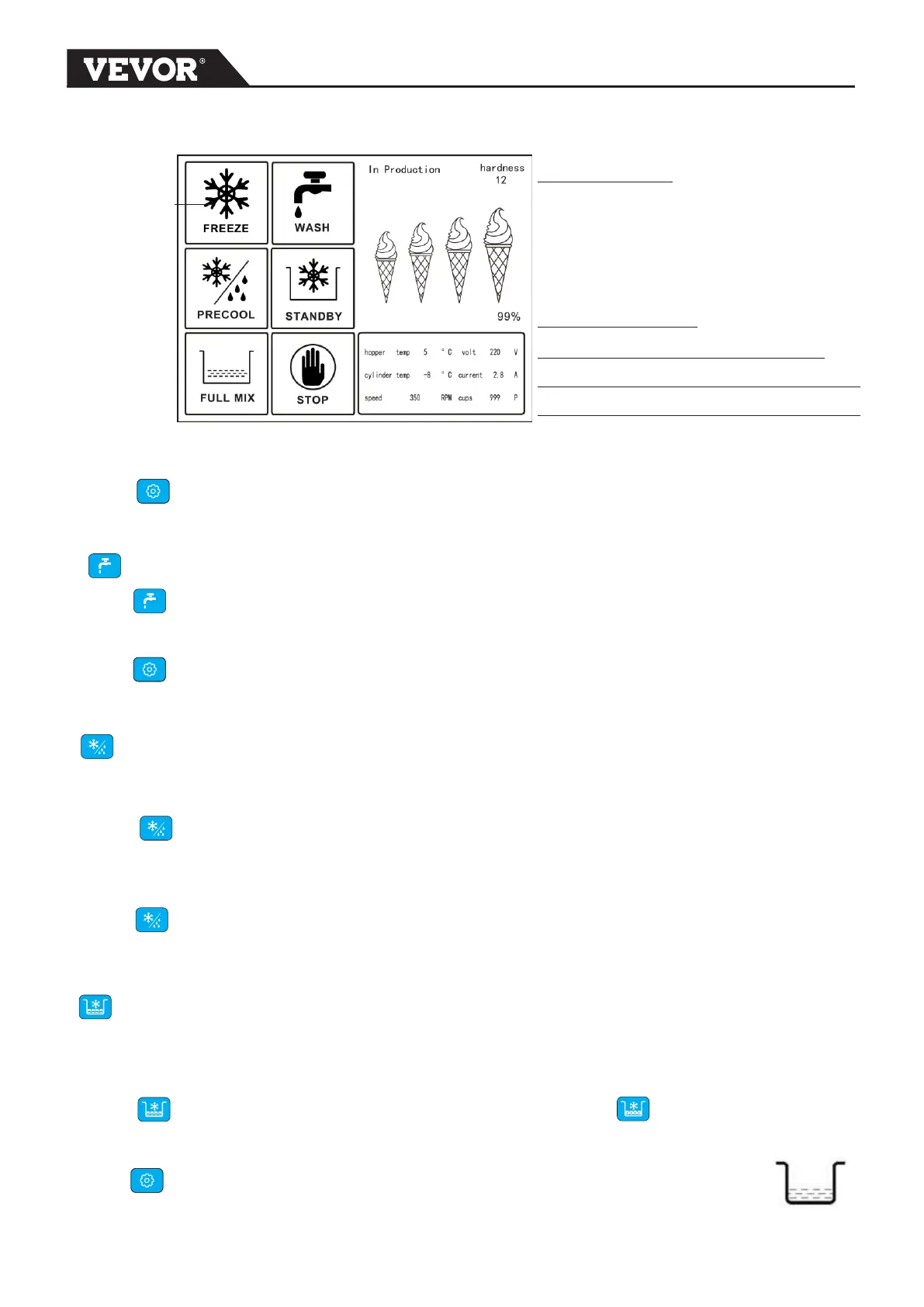
state
Hardness level
Cooling progress
Hopper temperature and voltage
Cylinder temperature and Motor current
Motor speed and counter
The refrigeration state will blink on the screen during REFRIEGRATION is ON.
Press Can exit from Refrigeration state.
WASH BUTTON
Press WASH button, the machine will be in washing state. Only the beater
motor operate.
Press Can exit from WASH state .
PRE-COOLING BUTTON
This maintains product temperatures below 40°F in the hopper,keep mix fresh in hopper.
Press button , LCD display show Pre-cooling is ON .
Press button again can stop pre-cooling ,and LCD display show pre-cooling OFF.
STANDBY
This maintains product temperatures below 40°F in both the hopper and cylinder for long
time .At night ,can open standby to keep mix fresh .
Press button , LCD display show STANDBY is ON and start cooling ,
when cooling finish display show KEEPING FRESH
Press button can stop STANDBY ,and LCD display show STANDBY OFF
5


 To Next Page