EasyManua.ls Logo

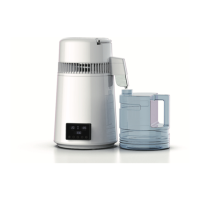
VEVOR YMK40107A - Operating Instructions; Function Description; Display Screen Functionality; Timing Function Operation

VEVOR YMK40107A
8 pages
Print Icon
To Next Page IconTo Next Page
To Previous Page IconTo Previous Page
Loading...
04
• Open the package, take out the machine (the whole machine extension

the tank. If it is a glass bottle, assemble the handle of the cup and make

Add the water with the maximum scale water level into the tank of the

• Place the machine head on the main machine (check whether the










• When the main engine is heated for about 30 minutes, the distilled
water begins to drip out of the outlet slowly until the water in the inner
tank is completely dried and protected by automatic tempera ture
control, and the ON/OFF switch should be closed.
Use Instructions
Function Description
3. Temperature control:


enters the thermal insulation state and the head is cooled normally.The
control time and temperature can work at the same time, the setting time
can determine the required time, and the temperature can also be set to


1. Three screen display:
Time display, current temperature display and set temperature display.
2. Timing function:
The maximum time setting is 99 hours and 59 minutes, and the minimum
time setting is 1 minute.Set any time within the range. After setting, stop
for 3 seconds then enter the working state. The clock enters the

and enters the standby state.When time setting is required, press the set

minute bit setting, press the set key again, the clock minute ten bit light


keys for setting, After setting, stop setting. After 3 seconds, the machine
works normally and the clock enters the countdown.

Related product manuals